
Participating Frequently
September 12, 2012
Answered

Dynamic Table not displaying data

  • September 12, 2012
  • 1 reply
  • 800 views

First off, i have searched high and low, and havent been able to find much help.

That said, i have been trying to create a simple search/results page in dream weaver, i am using ASP and sql express.  Ive been following the adobe tutorial, and everything works as it says it should, except that when you actually do a search, and hit submit, the results page only shows the dynamic table headings, but no data.

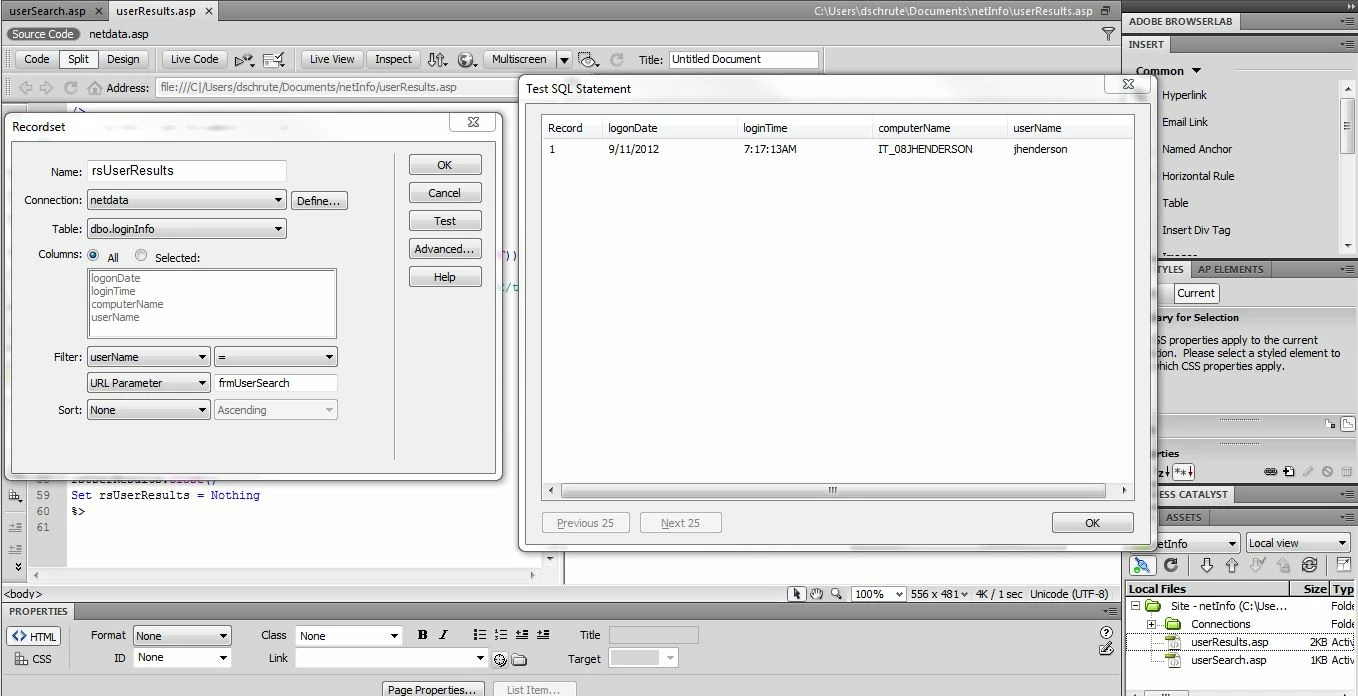
On the results page, when i create the record set, if i test it, the data shows up correctly.  However on the page itself, nothing shows up.

Here are some example screen shots:
This topic has been closed for replies.
Correct answer bregent

You are populating your variable with this querystring value:

Request.QueryString("frmUserSearch").  That's the name of the form, not the form field with the user name.

Your form field is "name="userName"

Change all references in your script from "frmUserSearch" to "userName"

1 reply

Participating Frequently
September 12, 2012

The answer is in the code. Screenshots don't help much.

Aranoxf5Author
Participating Frequently
September 12, 2012

Results page:

<%@LANGUAGE="VBSCRIPT" CODEPAGE="65001"%>

<!--#include file="Connections/netdata.asp" -->

<%

Dim rsUserResults__MMColParam

rsUserResults__MMColParam = "1"

If (Request.QueryString("frmUserSearch") <> "") Then

  rsUserResults__MMColParam = Request.QueryString("frmUserSearch")

End If

%>

<%

Dim rsUserResults

Dim rsUserResults_cmd

Dim rsUserResults_numRows

Set rsUserResults_cmd = Server.CreateObject ("ADODB.Command")

rsUserResults_cmd.ActiveConnection = MM_netdata_STRING

rsUserResults_cmd.CommandText = "SELECT logonDate FROM dbo.loginInfo WHERE userName = ?"

rsUserResults_cmd.Prepared = true

rsUserResults_cmd.Parameters.Append rsUserResults_cmd.CreateParameter("param1", 200, 1, 50, rsUserResults__MMColParam) ' adVarChar

Set rsUserResults = rsUserResults_cmd.Execute

rsUserResults_numRows = 0

%>

<%

Dim Repeat1__numRows

Dim Repeat1__index

Repeat1__numRows = 10

Repeat1__index = 0

rsUserResults_numRows = rsUserResults_numRows + Repeat1__numRows

%>

<!DOCTYPE html PUBLIC "-//W3C//DTD XHTML 1.0 Transitional//EN" "http://www.w3.org/TR/xhtml1/DTD/xhtml1-transitional.dtd">

<html xmlns="http://www.w3.org/1999/xhtml">

<head>

<meta http-equiv="Content-Type" content="text/html; charset=utf-8" />

<title>Untitled Document</title>

</head>

<body>

<table border="1">

  <tr>

    <td>logonDate</td>

    <td>loginTime</td>

    <td>computerName</td>

    <td>userName</td>

  </tr>

  <% While ((Repeat1__numRows <> 0) AND (NOT rsUserResults.EOF)) %>

    <tr>

      <td><%=(rsUserResults.Fields.Item("logonDate").Value)%></td>

      <td><%=(rsUserResults.Fields.Item("loginTime").Value)%></td>

      <td><%=(rsUserResults.Fields.Item("computerName").Value)%></td>

      <td><%=(rsUserResults.Fields.Item("userName").Value)%></td>

    </tr>

    <%

  Repeat1__index=Repeat1__index+1

  Repeat1__numRows=Repeat1__numRows-1

  rsUserResults.MoveNext()

Wend

%>

</table>

</body>

</html>

<%

rsUserResults.Close()

Set rsUserResults = Nothing

%>

---------------------------------------------------------------------------------

Search page:

<%@LANGUAGE="VBSCRIPT" CODEPAGE="65001"%>

<!DOCTYPE html PUBLIC "-//W3C//DTD XHTML 1.0 Transitional//EN" "http://www.w3.org/TR/xhtml1/DTD/xhtml1-transitional.dtd">

<html xmlns="http://www.w3.org/1999/xhtml">

<head>

<meta http-equiv="Content-Type" content="text/html; charset=utf-8" />

<title>Untitled Document</title>

</head>

<body>

<form id="frmUserSearch" name="frmUserSearch" method="get" action="userResults.asp">

  <p>Enter User Name

    <input type="text" name="userName" id="userName" tabindex="1" />

  </p>

  <p>

    <input type="submit" name="userNameSubmit" id="userNameSubmit" value="Submit" />

  </p>

</form>

</body>

</html>

bregentCorrect answer
Participating Frequently
September 12, 2012

You are populating your variable with this querystring value:

Request.QueryString("frmUserSearch").  That's the name of the form, not the form field with the user name.

Your form field is "name="userName"

Change all references in your script from "frmUserSearch" to "userName"
