
Known Participant
April 25, 2017
Answered

Element display missing in DW 2017?

  • April 25, 2017
  • 5 replies
  • 1925 views

Hi folks,

I'm dipping back into DW after a long absence. Currently watching a Bootstrap tutorial on Lynda.com that was recorded on DW 2015. The presenter uses the element display a lot, and I'm not seeing one or finding any way to kick one on – or any reference to toggling element display on/off in the docs.

Was the feature tossed, or am I missing the obvious?
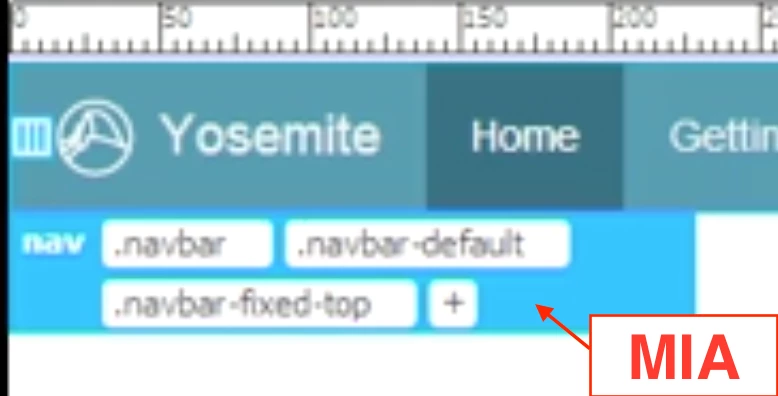
DW 2017.0.2 / iMac 27" retina late 2015 / macOS Sierra.
This topic has been closed for replies.
Correct answer Preran

Hi Preran,

Since I was troubleshooting, I stripped the page to the absolute minimum when testing. Between each test, I made a new HTML5 document, put in one <p> Hello world </p> between the body tags, and tested for the element display both before and after saving the file. On my iMac, no display in DW 2017. On my laptop, the display showed.

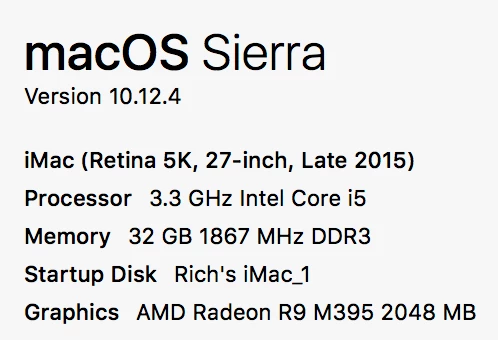
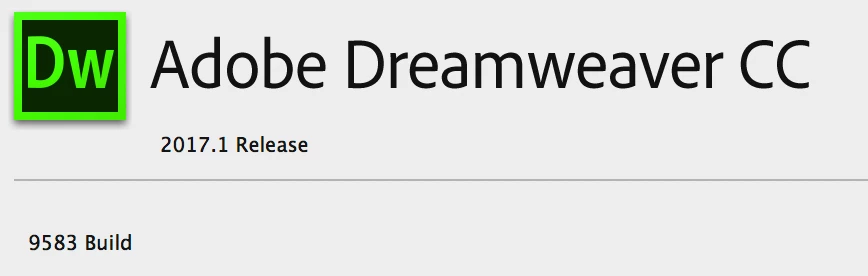
Here are the OS and DW data:


Hi Richard,

From what I hear, your issue was resolved by renaming your drive. It had a special character that had to be removed.

Feel free to unmark my answer as correct if that isn't true.

Thanks,

Preran

5 replies

gvmmAuthor
Known Participant
April 27, 2017

This problem persists, despite uninstalling all Adobe apps, running Adobe Creative Cloud Cleaner tool, and then re-installing DW. (With computer restarts at each stage.)

I've got a bug report in.

pziecina
Legend
April 28, 2017

I don't know if it is possible to attach a standard hd monitor, or adjust the graphics settings, but i found a lot of unexplained behaviours when using a hi-dpi display.

I know they are working on making Dw hi-dpi aware, but until then !!!

gvmmAuthor
Known Participant
April 28, 2017

Thanks for the tip. That would explain why my old laptop is happy with DW 2017 but my late 2015 iMac is not.

Odd, though. If this is the cause, wouldn't there be a torrent of complaint?

If this really is the case, I'll work with DW 2015 until it's fixed.

Can someone from Adobe please comment?

gvmmAuthor
Known Participant
April 27, 2017

The plot thickens.

I cleared program cache, restarted. No change.

I tossed ~/Library/Application Support/Adobe/Dreamweaver CC 2017 several times. Even tossed the Backups folders for good measure. Restarted each time. No effect.

I went into DW prefs and uncouple syncing, just in case the app reads in anything from the cloud on startup. No deal.

I downloaded a copy of DW 2017 to my laptop. It works fine.

Perhaps we are dealing with a corrupt app in my iMac here? Re-install?

While I have you on the line, does anyone want to comment on DW 2017's general flight-readiness? I updated to DW 2017 when I was about to resume my use of the app. I'm beginning to wonder if that was such a good idea.

TIA

RH

gvmmAuthor
Known Participant
April 27, 2017

Addendum:

Just downloaded the latest update of DW 2017, tossed ~/Library/Application Support/Adobe/Dreamweaver CC 2017, and restarted the app.

No element display.

Not a great way to spend my time trying to get back into DreamWeaver. Any ideas at all greatly appreciated.

Jon Fritz
Community Expert
Community Expert
April 27, 2017

Personally, I'd choose the "Nuke it from orbit" option...

Use the Creative Cloud Cleaner Tool to solve installation problems

Make back-ups of anything you think you need, like the Snippets or Library folders in your personal configuration folder (if you have custom snippets or .lbi's created).

The Cleaner Tool will completely remove all traces of DW from your system. Sometimes old/corrupt files can be left behind during a normal uninstall/reinstall that will affect the new installation, the CC Cleaner will nuke those files.

gvmmAuthor
Known Participant
April 26, 2017

Thanks for the responses!

I tested Live View on/off, and I have toggled the View > Live View Options > Show/Hide Live View Displays on and off. No joy.

Here's a screen shot. One of the elements on screen is selected, and the appropriate responses occur in the DOM and in the element hierarchy readout beneath the page display (don't know what that's called). But I don't get the blue  frame or menus near the selected element.

Demonic possession, perhaps?

RH

Jon Fritz
Community Expert
Community Expert
April 26, 2017

It might be worth clearing the program cache and/or restoring preferences.

Those things tend to go corrupt in DW and cause all kinds of weird things to happen. Turn on your OS's Hidden Files and give the program cache file the boot...

Clear Program Cache - https://forums.adobe.com/thread/494811

Restart your system and try again. If it's still not coming up, clearing the preferences may help...

Restore Preferences CC Versions - https://helpx.adobe.com/dreamweaver/kb/restore-preferences-dreamweaver.html

Jon Fritz
Community Expert
Community Expert
April 26, 2017

If you are in Live View already, and you're still not seeing the blue tabs popping up, go to View > Live View Options and make sure Hide Live View Displays is NOT checked.

BenPleysier
Community Expert
Community Expert
April 26, 2017

You need to be in Live view

Wappler is the DMXzone-made Dreamweaver replacement and includes the best of their powerful extensions, as well as much more!