Participating Frequently
June 27, 2017
Answered

Find and Replace Advanced - Replace only Matched Text

  • June 27, 2017
  • 2 replies
  • 1625 views

Hi folks,

I cannot figure out a way to use advanced search to do what I used to do with it; namely make code changes across my site quickly and easily. If anyone can help me figure out how to replace only the matched text within a tag found through advanced search, I will be truly grateful.

I am attempting to change all hyphens found in a span we use for item #s to the code for a non-breaking hyphen. Finding them is no problem, this search pulls them up. However replacing them is what's stumping me. I don't seem to have the ability to only replace the hyphen - my only relevant option seems to be to replace all the contents of the tag.  What I want to do is leave everything except the hyphen as is. The rest of the text is different in each case, so I can't replace all contents.

Any ideas?

    This topic has been closed for replies.
    Correct answer Niharika Jha

    Hi,

    Yes, that's true - but can you replace only part of a string in a

    specific tag and leave the rest? I don't see how....


    Hi,

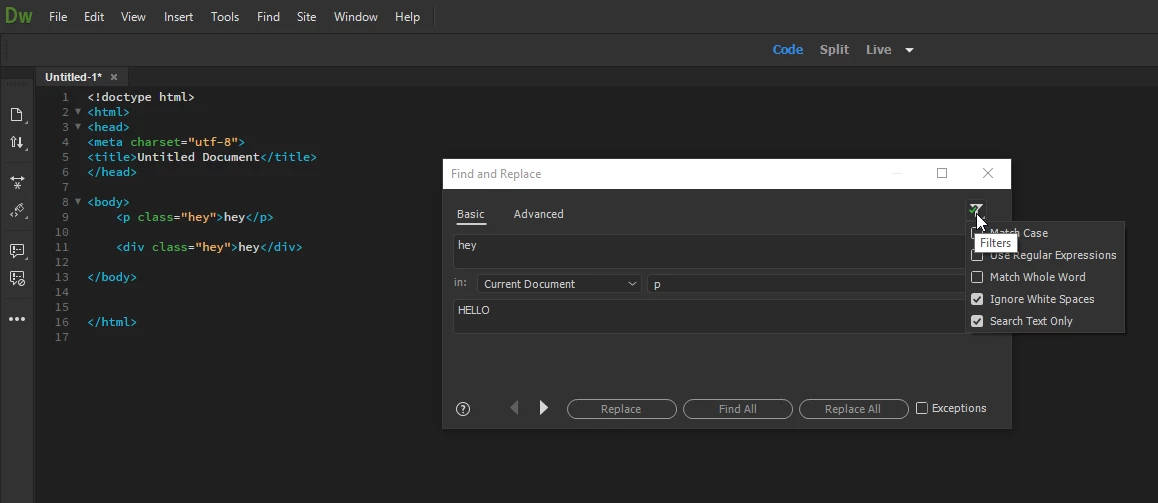
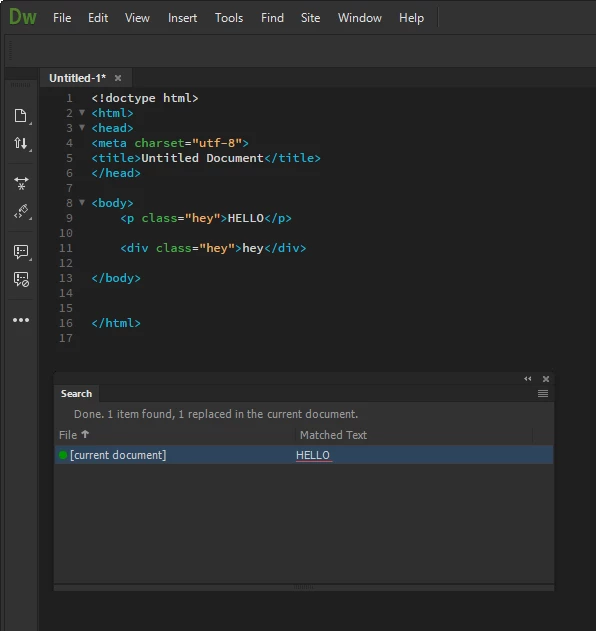
    We can of-course replace a particular string in the inner html of the tag without touching its outer html. I can better explain you with the example below:

    1. I am trying to replace "hey" with "HELLO" in the Design view text of <p> tag only.

    2. I am making use of the filter "Search Text only" which makes a Design view Search and as you can see below, it hasn't touched any other instance other than the one in inner html of <p> tag.

    Hope this helps. I am still expecting that you will share the query which used to run in CC 2015 and is not working in CC 2017.

    Regards,

    Niharika Gupta

    Adobe Dreamweaver

    2 replies

    Niharika Jha
    Adobe Employee
    Adobe Employee
    July 4, 2017

    Hi,

    The tag search in Find and Replace dialog now as per Dw 17.5 works exactly the same as it used to in Dw CC 2015, I assure you there is no change at all. So can you share the search and replace query that you used in CC 2015 which worked and is not working in CC 2017.5?

    Although, we now have one more option to search in [any tag], please use the settings as per the snapshot below and see if this works?

    Regards,

    Niharika Gupta

    Adobe Dreamweaver

    Participating Frequently
    July 5, 2017

    Hello Niharika,

    In your example, wouldn't that replace all hyphens in ANY span with the code?  We only wish to replace hyphens within spans that have the class "ItemNumber".

    Niharika Jha
    Adobe Employee
    Adobe Employee
    July 6, 2017

    Hi,

    Yeah, this will replace any hyphen that is there in the "Design view" text in any span tag. For your specific case, I am not able to formulate the exact query from the Find and replace options that are available.

    Although, you mentioned that you were able to fulfill it through CC 2015, so I was wanting to understand the query that you used there.

    Regards,

    Niharika Gupta

    Adobe Dreamweaver

    Niharika Jha
    Adobe Employee
    Adobe Employee
    June 28, 2017

    Hi,

    As per your snapshot, you are not trying to find text containing hyphen, you are finding all tags containing the hyphens. For or better understanding, can you please copy a code snippet from you file showcasing the initial state and the result that you want? That will make us help you better.

    Regards,

    Niharika Gupta

    Adobe dreamweaver

    Participating Frequently
    July 3, 2017

    Hi Niharika,


    Thanks for the reply!

    Correct, we are looking for hyphens in any tag with class "itemNumber". The regular hyphen character can cause problems on some devices, so we want to replace with the non-breaking hyphen like so:

    (Original)

    <span class="itemNumber">SKU-SAMPLE</span>

    (Desired)

    <span class="itemNumber">SKU&#8209;SAMPLE</span>

    Fortunately, a fellow employee still has Dreamweaver 2015 on her machine, so I was able to borrow her computer to run the find and replace.  Still, I would like to be able to do it without leaving my office!

    Thanks for any help,