
Participant
August 1, 2018
Answered

Fit Website to Dreamweaver View Area

  • August 1, 2018
  • 1 reply
  • 1152 views

Hi, i am working on a 1080p monitor, however I am developing a website for a 4K monitor.

The problem I am having is that the website is so large, in Dreamweaver I can only see 10% of the page at a time in design view.
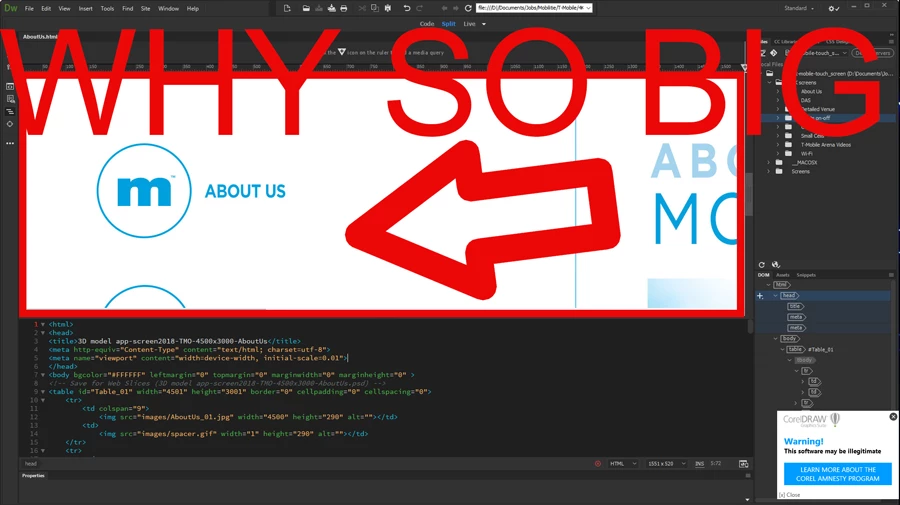
How can I fit the website to the viewing area on Dreamweaver so i can see what im doing?  Viewing only 10% of the website makes design view pretty much worthless.

I want to zoom out or fit to page as they call it in PS so i can see the whole page and program it fast. I have 50 pages to edit and this view just doesn't work!

Thanks.
    This topic has been closed for replies.
    Correct answer Nancy OShea

    Collapse panels & zoom out with Ctrl+ - (minus) a few times.

    1 reply

    pziecina
    Legend
    August 1, 2018

    First question - Is the site to be viewed on other none 4k monitors/devices?

    Second question - Why are you even trying to use Dw's design or live view, (simply will not work, and trying to build for 4k monitors that way is a quick way to insanity)?

    Third question - Do you have any 4k devices to test on, (tablet ot tv)?

    Do not even try using Dw's or your browsers zoom to test the page.

    The main problem you will find is images, and the use of srcset is a must. Browsers will often 'enlarge' text proportionally as required automatically, so unless you know what 4k monitors you are coding for you could run into all kinds of problems. What you should do if the site is to be viewed on other none 4k monitors or 4k devices is code the site as normal then use media-queries (detecting viewport size and resolution) to 'enlarge' the required elements so that they are proportionally correct for the larger 4k monitors or devices.

    Participant
    August 1, 2018
    First question - Is the site to be viewed on other none 4k monitors/devices?


    -No it is to be used for a Kiosk Touch Screen in the Shopping Mall that is 4K.

    Second question - Why are you even trying to use Dw's design or live view, (simply will not work, and trying to build for 4k monitors that way is a quick way to insanity)?

    -The client sent me html pages sliced in PS and I need to add many rollover effects and hyperlinks that were not added in PS.

    Third question - Do you have any 4k devices to test on, (tablet ot tv)?

    -Yes I have the clients 4K monitor here but I can not install design software on it as it belongs to the client , it is only to be used for testing uploading the kiosk site.

    I normally use DW to do this for all my Kiosk Clients, however this is the first time with 4K. Now im not sure how to go about it. DW made it so easy to code slices for my clients. Also the client does not want me to design the gui in 1080p and upscale it. That would defeat the purposed use of a $8,000 4K monitor my client purchased.

    Participant
    August 2, 2018

    To set up the iPad for quick reference whilst working, use the IP address as Jon suggested. It does mean that one must scroll both vertically and horizontally whilst checking, but for quick checking if you do not have the space to set up both monitors it is a good way to work.

    What you will find to be the biggest problem between normal monitors vs 4k, is that what you can easilly see on say a hd monitor, such as images not 'fitting' correctly or the resolution being off, is that on 4k monitors it is often only a 'feeling' that something is wrong, (eg - images that are not the correct size for whatever reason, have a 'feel' of a slight shadow around them) but due to the resolution it is not immediately apparent. Also as you are probably already aware, text must be bigger than normal, but on 4k monitors the device driver may automatically 'enlarge' the text to be the equivalent size of when viewed on a standard hd set up, (this will be immediately apparent, but check on the surface pro early, to save you changing the text size).

    If the text is part of an image, check that it is not blurred very early, as any text in an image tends to look bad if the image resolution is even slightly off.


    Thank you pziecina.

    use the IP address as Jon suggested.

    The 4K Touchscreen AIO Computer does have Windows Apache Server Installed for serving content over its own IP.  This is very helpful for testing on the 4K. We just cant install the whole Adobe Suite on it unfortunately because ultimately it is the clients pc and will be delivered to them.

    Also as you are probably already aware, text must be bigger than normal, but on 4k monitors the device driver may automatically 'enlarge' the text to be the equivalent size of when viewed on a standard hd set up.

    Yes the pc was enlarging content 200% / up scaling HD content to 4K however we had to disable this (turn it back down to 100%) because the client wants true 4K and not simulated or up scaled HD content.  This also ads to design issues because many software's are not designed to work on 4K including Windows 10 ! So everything looks awkward in 4K but the GUI images are astounding and breath taking so in the end it all works its self out.

    Thank you so much all for your input, I appreciate it and I hope this thread can possibly help someone looking to work in 4K in the future.

    Good Luck to you all.

    -Zeke