
Flex and vh understood by CS4?
Good afternoon!
Maybe this is one of those (non-existent) dumb questions... (I haven't done anything with web pages for ... 5-6 years.)
The following code is from: https://www.quackit.com/css/flexbox/tutorial/create_a_website_layout_with_flexbox.cfm
<!doctype html>
<title>Example</title>
<style>
* {
box-sizing: border-box;
}
body {
margin: 0;
}
#main {
display: flex;
min-height: calc(100vh - 40vh);
}
#main > article {
flex: 1;
}
#main > nav,
#main > aside {
flex: 0 0 20vw;
background: beige;
}
#main > nav {
order: -1;
}
header, footer, article, nav, aside {
padding: 1em;
}
header, footer {
background: yellowgreen;
height: 20vh;
}
</style>
<body>
<header>Header</header>
<div id="main">
<article>Article</article>
<nav>Nav</nav>
<aside>Aside</aside>
</div>
<footer>Footer</footer>
</body>
This is my result:
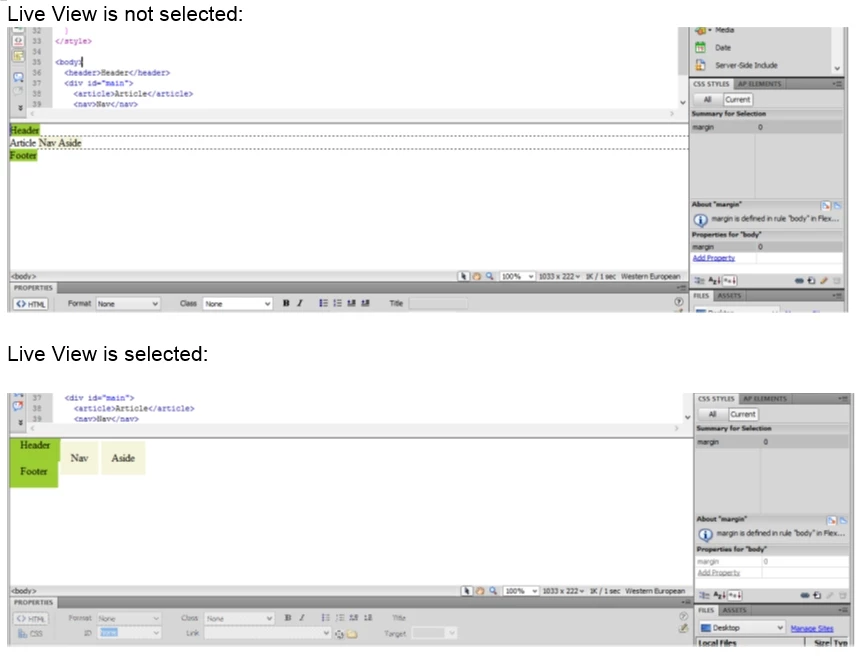
My results look nothing like the "holy grail" example on the above link.
If "Flex" and "vh" (or box-sizing) are acceptable to CS4 Dreamweaver, then there must be something I need to change in my configuration.
HELP!!
Any suggestions are appreciated. Thank you!!
 AdChoices