I think the display problems are to investigate inside the file:
singlePageTemplate.css
The original single-page-template works just fine. It does not fill the entire viewport on desktop but it works as expected & is responsive on small devices. 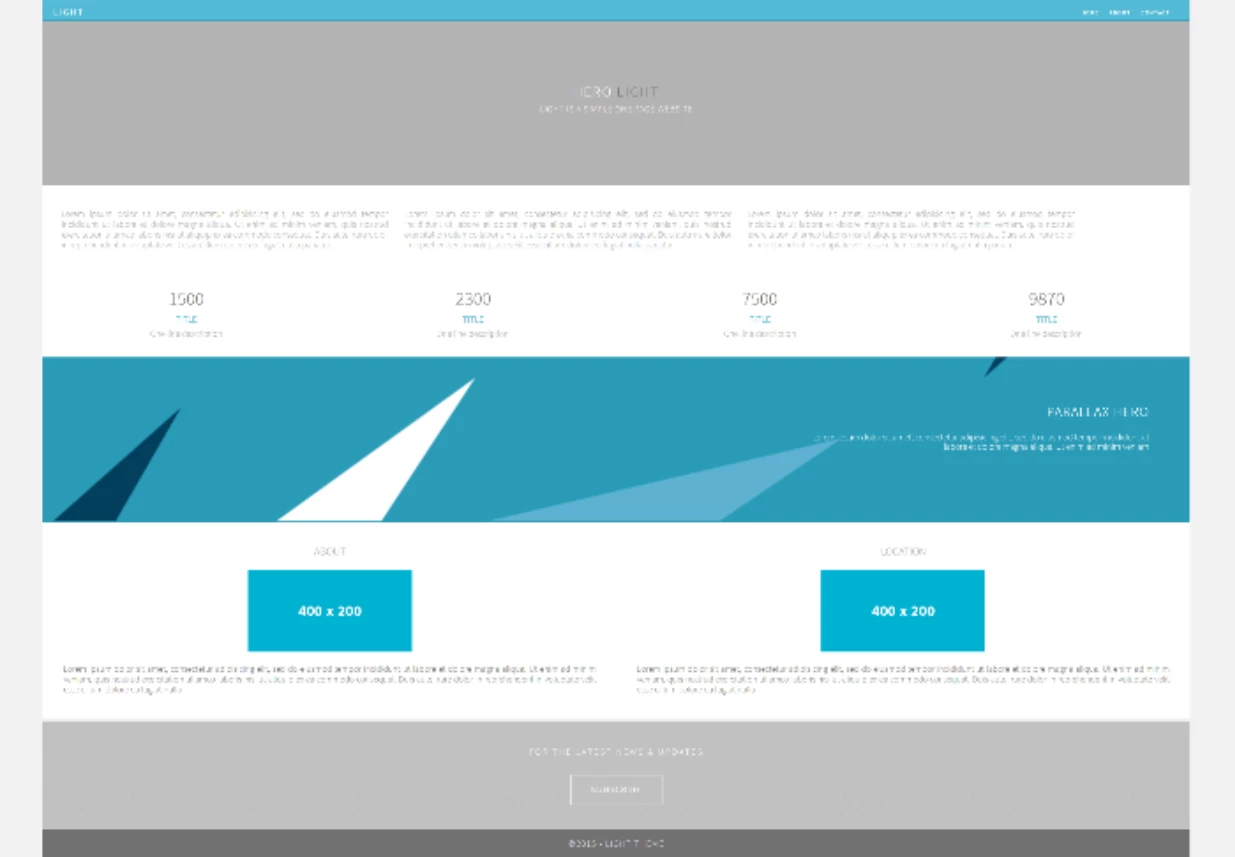
Compare the original code below with yours & note the differences.
<!doctype html>
<html lang="en-US">
<head>
<meta charset="utf-8">
<meta http-equiv="X-UA-Compatible" content="IE=edge">
<meta name="viewport" content="width=device-width, initial-scale=1">
<title>Light Theme</title>
<link href="css/singlePageTemplate.css" rel="stylesheet" type="text/css">
<!--The following script tag downloads a font from the Adobe Edge Web Fonts server for use within the web page. We recommend that you do not modify it.-->
<script>var __adobewebfontsappname__="dreamweaver"</script>
<script src="http://use.edgefonts.net/source-sans-pro:n2:default.js" type="text/javascript"></script>
<!-- HTML5 shim and Respond.js for IE8 support of HTML5 elements and media queries -->
<!-- WARNING: Respond.js doesn't work if you view the page via file:// -->
<!--[if lt IE 9]>
<script src="https://oss.maxcdn.com/html5shiv/3.7.2/html5shiv.min.js"></script>
<script src="https://oss.maxcdn.com/respond/1.4.2/respond.min.js"></script>
<![endif]-->
</head>
<body>
<!-- Main Container -->
<div class="container">
<!-- Navigation -->
<header> <a href="">
<h4 class="logo">LIGHT</h4>
</a>
<nav>
<ul>
<li><a href="#hero">HOME</a></li>
<li><a href="#about">ABOUT</a></li>
<li> <a href="#contact">CONTACT</a></li>
</ul>
</nav>
</header>
<!-- Hero Section -->
<section class="hero" id="hero">
<h2 class="hero_header">HERO <span class="light">LIGHT</span></h2>
<p class="tagline">Light is a simple one page website</p>
</section>
<!-- About Section -->
<section class="about" id="about">
<h2 class="hidden">About</h2>
<p class="text_column">Lorem ipsum dolor sit amet, consectetur adipisicing elit, sed do eiusmod tempor incididunt ut labore et dolore magna aliqua. Ut enim ad minim veniam, quis nostrud exercitation ullamco laboris nisi ut aliquip ex ea commodo consequat. Duis aute irure dolor in reprehenderit in voluptate velit esse cillum dolore eu fugiat nulla pariatur. </p>
<p class="text_column">Lorem ipsum dolor sit amet, consectetur adipisicing elit, sed do eiusmod tempor incididunt ut labore et dolore magna aliqua. Ut enim ad minim veniam, quis nostrud exercitation ullamco laboris nisi ut aliquip ex ea commodo consequat. Duis aute irure dolor in reprehenderit in voluptate velit esse cillum dolore eu fugiat nulla pariatur. </p>
<p class="text_column">Lorem ipsum dolor sit amet, consectetur adipisicing elit, sed do eiusmod tempor incididunt ut labore et dolore magna aliqua. Ut enim ad minim veniam, quis nostrud exercitation ullamco laboris nisi ut aliquip ex ea commodo consequat. Duis aute irure dolor in reprehenderit in voluptate velit esse cillum dolore eu fugiat nulla pariatur. </p>
</section>
<!-- Stats Gallery Section -->
<div class="gallery">
<div class="thumbnail">
<h1 class="stats">1500</h1>
<h4>TITLE</h4>
<p>One line description</p>
</div>
<div class="thumbnail">
<h1 class="stats">2300</h1>
<h4>TITLE</h4>
<p>One line description</p>
</div>
<div class="thumbnail">
<h1 class="stats">7500</h1>
<h4>TITLE</h4>
<p>One line description</p>
</div>
<div class="thumbnail">
<h1 class="stats">9870</h1>
<h4>TITLE</h4>
<p>One line description</p>
</div>
</div>
<!-- Parallax Section -->
<section class="banner">
<h2 class="parallax">PARALLAX HERO</h2>
<p class="parallax_description">Lorem ipsum dolor sit amet, consectetur adipisicing elit, sed do eiusmod tempor incididunt ut labore et dolore magna aliqua. Ut enim ad minim veniam</p>
</section>
<!-- More Info Section -->
<footer>
<article class="footer_column">
<h3>ABOUT</h3>
<img src="images/placeholder.jpg" alt="" width="400" height="200" class="cards"/>
<p>Lorem ipsum dolor sit amet, consectetur adipisicing elit, sed do eiusmod tempor incididunt ut labore et dolore magna aliqua. Ut enim ad minim veniam, quis nostrud exercitation ullamco laboris nisi ut aliquip ex ea commodo consequat. Duis aute irure dolor in reprehenderit in voluptate velit esse cillum dolore eu fugiat nulla </p>
</article>
<article class="footer_column">
<h3>LOCATION</h3>
<img src="images/placeholder.jpg" alt="" width="400" height="200" class="cards"/>
<p>Lorem ipsum dolor sit amet, consectetur adipisicing elit, sed do eiusmod tempor incididunt ut labore et dolore magna aliqua. Ut enim ad minim veniam, quis nostrud exercitation ullamco laboris nisi ut aliquip ex ea commodo consequat. Duis aute irure dolor in reprehenderit in voluptate velit esse cillum dolore eu fugiat nulla </p>
</article>
</footer>
<!-- Footer Section -->
<section class="footer_banner" id="contact">
<h2 class="hidden">Footer Banner Section </h2>
<p class="hero_header">FOR THE LATEST NEWS & UPDATES</p>
<div class="button">subscribe</div>
</section>
<!-- Copyrights Section -->
<div class="copyright">©2015 - <strong>Light Theme</strong></div>
</div>
<!-- Main Container Ends -->
</body>
</html>

 AdChoices