


Answered
How can I position iframes evenly on a bootstrap grid-layout?
Can someone tell me how I can position iframes containing links to YT-videos so that they are divived evenly over a page horizontally instead of justified to the left, so that an empty space is left on the right?
Here's the html-code of the page:
<!DOCTYPE html>
<html lang="nl"><!-- InstanceBegin template="/Templates/HB-rood-logo_video.dwt" codeOutsideHTMLIsLocked="false" -->
  <head>
    <meta charset="UTF-8">
	<meta http-equiv="X-UA-Compatible" content="IE=edge">
	<meta name="viewport" content="width=device-width, initial-scale=1">
	<!-- InstanceBeginEditable name="doctitle" -->
	<title>Test-video 2</title>
	<!-- InstanceEndEditable -->
	<!-- Bootstrap -->
	<link href="../css/bootstrap-4.4.1.css" rel="stylesheet">
	<link href="../css/stijlblad_HB_2r.css" rel="stylesheet" type="text/css">
	<!-- InstanceBeginEditable name="head" -->
	<!-- InstanceEndEditable -->
  </head>
  <body>
    <div class="container-fluid m-auto">
	<div class="row">
				<div class="col-lg-12 header fixed-top">
<nav class="navbar fixed-top navbar-expand-lg navbar-light"> <a href="../html/Index.html" target="_self" class="navbar-brand"><img src="../afbeeldingen/Dickenslogo-HB.png" alt="logo" width="400" class="img-fluid float-left"></a>
  				<button class="navbar-toggler" type="button" data-toggle="collapse" data-target="#navbarSupportedContent3" aria-controls="navbarSupportedContent3" aria-expanded="false" aria-label="Toggle navigation"> <span class="navbar-toggler-icon"></span></button>
       			 <div class="collapse navbar-collapse" id="navbarSupportedContent3">
          			<ul class="navbar-nav ml-auto">
			  		<li class="nav-item dropdown">
			  				<a class="nav-link dropdown-toggle" href="#" id="navbarDropdown1" role="button" data-toggle="dropdown" aria-haspopup="true" aria-expanded="false"> Home</a>
          		<div class="dropdown-menu" aria-labelledby="navbarDropdown1"> <a href="../html/Index.html" target="_self" class="dropdown-item">About us</a> <a href="../html/meetings.html" target="_self" class="dropdown-item">Meetings</a></div></li>
           <li class="nav-item"> <a  href="../html/book_of_study.html" target="_self" class="nav-link">Book of Study</a> </li>
          <li class="nav-item dropdown"> <a class="nav-link dropdown-toggle" href="#" id="navbarDropdown2" role="button" data-toggle="dropdown" aria-haspopup="true" aria-expanded="false"> Dutch Dickensian</a>
          <div class="dropdown-menu" aria-labelledby="navbarDropdown2"> <a href="../html/Dutch_Dickensian_index_1.html" target="_self" class="dropdown-item">Index</a> <a href="../html/Dutch_Dickensian_online.html" target="_self" class="dropdown-item">Online</a></div>
        </li>
          <li class="nav-item dropdown"> <a class="nav-link dropdown-toggle" href="#" id="navbarDropdown3" role="button" data-toggle="dropdown" aria-haspopup="true" aria-expanded="false"> News </a>
          <div class="dropdown-menu" aria-labelledby="navbarDropdown3"> <a href="../html/laatste_nieuws.html" target="_self" class="dropdown-item">Latest</a> <a href="../html/nieuwsarchief.html" target="_self" class="dropdown-item">Archive</a></div>
        </li>
          <li class="nav-item dropdown"> <a class="nav-link dropdown-toggle" href="#" id="navbarDropdown4" role="button" data-toggle="dropdown" aria-haspopup="true" aria-expanded="false">Images</a>
          <div class="dropdown-menu" aria-labelledby="navbarDropdown4"> <a href="../html/fotos.html" target="_self" class="dropdown-item">Photos</a> <a href="../html/videos.html" target="_self" class="dropdown-item">Videos</a></div>
        </li>
          <li class="nav-item dropdown"> <a class="nav-link dropdown-toggle" href="#" id="navbarDropdown5" role="button" data-toggle="dropdown" aria-haspopup="true" aria-expanded="false"> Links</a>
          <div class="dropdown-menu" aria-labelledby="navbarDropdown5"> <a href="../html/branches.html" target="_self" class="dropdown-item">Branches</a> <a href="../html/sites_of_special_interest.html" target="_self" class="dropdown-item">Sites of Special Interest</a></div>
        </li>
									 <li class="nav-item dropdown"> <a class="nav-link dropdown-toggle" href="#" id="navbarDropdown6" role="button" data-toggle="dropdown" aria-haspopup="true" aria-expanded="false"> Dutch Connections</a>
          <div class="dropdown-menu" aria-labelledby="navbarDropdown6"> <a href="../html/Dutch_Connections.html" target="_self" class="dropdown-item">English page</a> <a href="../html/Nederlandse_Connecties.html" target="_self" class="dropdown-item">Nederlandse pagina</a></div>
        </li></ul><form class="d-flex">
        <input class="form-control me-2" type="text" placeholder="Search site">
        <button class="btn btn-searcher" type="button">🔍</button>
      </form>
      </div></nav>
			<form class="form-inline my-2 my-xs-0 small-screen"></form>
	</div>
			</div>
	<div class="row top">
    		<div class="col-lg-12"><!-- InstanceBeginEditable name="paginatitel" --><h1>Video's</h1>
<h2>Haarlem Branch</h2>
    		<!-- InstanceEndEditable --></div>
   		</div>
	<!-- InstanceBeginEditable name="video" -->
			<div class="row main">
				<div class="row">
						<div class="col-md-6">
							<figure>
								<div class="embed-responsive embed-responsive-4by3">
									<iframe class="embed-responsive-item" src="https://www.youtube.com/embed/EBcL7xK7JUQ"></iframe>
								</div>
							<figcaption>
								<p>Dit is het bijschrift</p>
							</figcaption>
						</figure>
						</div>
					<div class="col-md-6">
							<figure>
								<div class="embed-responsive embed-responsive-4by3">
									<iframe class="embed-responsive-item" src="https://www.youtube.com/embed/tLB6ryTsQos" ></iframe>
								</div>
							<figcaption>
								<p>Dit is het bijschrift</p>
							</figcaption>
						</figure>
						</div>
				<div class="row">
						<div class="col-md-6">
<video controls ></video>
		<p class="text-center">Dit is het bijschrift</p><br>
						</div>
						</div>
						<div class="col-md-6">
<video controls></video>
		<p class="text-center">Dit is het bijschrift</p><br>
						</div>
			</div>
		</div>
	<!-- InstanceEndEditable -->
<div class=" footer">
						<div class="row">
									<div class="col-md-4">
											<h6>📧<a href= "mailto:circumlocution-office@xs4all.nl " class="foot"> Secretary </a></h6>
									</div>
									<div class="col-md-4">
											<h6>📧<a href="mailto:eig.vandaalen@ziggo.nl" class="foot"> Webmaster </a></h6>
									</div>
									<div class="col-md-4">
											<h6>📧<a href="mailto:jcvkessel@yahoo.com" class="foot"> Editor The Dutch Dickensian</a></h6>
									</div>
				</div>
				</div>
		</div>
  <!-- body code goes here -->
	<!-- jQuery (necessary for Bootstrap's JavaScript plugins) -->
   <script src="../js/jquery-3.4.1.min.js"></script>

	<!-- Include all compiled plugins (below), or include individual files as needed -->
  <script src="../js/popper.min.js"></script>
  <script src="../js/bootstrap-4.4.1.js"></script>
</body>
<!-- InstanceEnd --></html>
It's based on the following template:
<!DOCTYPE html>
<html lang="nl">
  <head>
    <meta charset="UTF-8">
	<meta http-equiv="X-UA-Compatible" content="IE=edge">
	<meta name="viewport" content="width=device-width, initial-scale=1">
	<!-- TemplateBeginEditable name="doctitle" -->
	<title>Naamloos document</title>
	<!-- TemplateEndEditable -->
	<!-- Bootstrap -->
	<link href="../css/bootstrap-4.4.1.css" rel="stylesheet">
	<link href="../css/stijlblad_HB_2r.css" rel="stylesheet" type="text/css">
	<!-- TemplateBeginEditable name="head" -->
	<!-- TemplateEndEditable -->
  </head>
  <body>
    <div class="container-fluid m-auto">
	<div class="row">
				<div class="col-lg-12 header fixed-top">
<nav class="navbar fixed-top navbar-expand-lg navbar-light"> <a href="../html/Index.html" target="_self" class="navbar-brand"><img src="../afbeeldingen/Dickenslogo-HB.png" alt="logo" width="400" class="img-fluid float-left"></a>
  				<button class="navbar-toggler" type="button" data-toggle="collapse" data-target="#navbarSupportedContent3" aria-controls="navbarSupportedContent3" aria-expanded="false" aria-label="Toggle navigation"> <span class="navbar-toggler-icon"></span></button>
       			 <div class="collapse navbar-collapse" id="navbarSupportedContent3">
          			<ul class="navbar-nav ml-auto">
			  		<li class="nav-item dropdown">
			  				<a class="nav-link dropdown-toggle" href="#" id="navbarDropdown1" role="button" data-toggle="dropdown" aria-haspopup="true" aria-expanded="false"> Home</a>
          		<div class="dropdown-menu" aria-labelledby="navbarDropdown1"> <a href="../html/Index.html" target="_self" class="dropdown-item">About us</a> <a href="../html/meetings.html" target="_self" class="dropdown-item">Meetings</a></div></li>
           <li class="nav-item"> <a  href="../html/book_of_study.html" target="_self" class="nav-link">Book of Study</a> </li>
          <li class="nav-item dropdown"> <a class="nav-link dropdown-toggle" href="#" id="navbarDropdown2" role="button" data-toggle="dropdown" aria-haspopup="true" aria-expanded="false"> Dutch Dickensian</a>
          <div class="dropdown-menu" aria-labelledby="navbarDropdown2"> <a href="../html/Dutch_Dickensian_index_1.html" target="_self" class="dropdown-item">Index</a> <a href="../html/Dutch_Dickensian_online.html" target="_self" class="dropdown-item">Online</a></div>
        </li>
          <li class="nav-item dropdown"> <a class="nav-link dropdown-toggle" href="#" id="navbarDropdown3" role="button" data-toggle="dropdown" aria-haspopup="true" aria-expanded="false"> News </a>
          <div class="dropdown-menu" aria-labelledby="navbarDropdown3"> <a href="../html/laatste_nieuws.html" target="_self" class="dropdown-item">Latest</a> <a href="../html/nieuwsarchief.html" target="_self" class="dropdown-item">Archive</a></div>
        </li>
          <li class="nav-item dropdown"> <a class="nav-link dropdown-toggle" href="#" id="navbarDropdown4" role="button" data-toggle="dropdown" aria-haspopup="true" aria-expanded="false">Images</a>
          <div class="dropdown-menu" aria-labelledby="navbarDropdown4"> <a href="../html/fotos.html" target="_self" class="dropdown-item">Photos</a> <a href="../html/videos.html" target="_self" class="dropdown-item">Videos</a></div>
        </li>
          <li class="nav-item dropdown"> <a class="nav-link dropdown-toggle" href="#" id="navbarDropdown5" role="button" data-toggle="dropdown" aria-haspopup="true" aria-expanded="false"> Links</a>
          <div class="dropdown-menu" aria-labelledby="navbarDropdown5"> <a href="../html/branches.html" target="_self" class="dropdown-item">Branches</a> <a href="../html/sites_of_special_interest.html" target="_self" class="dropdown-item">Sites of Special Interest</a></div>
        </li>
									 <li class="nav-item dropdown"> <a class="nav-link dropdown-toggle" href="#" id="navbarDropdown6" role="button" data-toggle="dropdown" aria-haspopup="true" aria-expanded="false"> Dutch Connections</a>
          <div class="dropdown-menu" aria-labelledby="navbarDropdown6"> <a href="../html/Dutch_Connections.html" target="_self" class="dropdown-item">English page</a> <a href="../html/Nederlandse_Connecties.html" target="_self" class="dropdown-item">Nederlandse pagina</a></div>
        </li></ul><form class="d-flex">
        <input class="form-control me-2" type="text" placeholder="Search site">
        <button class="btn btn-searcher" type="button">🔍</button>
      </form>
      </div></nav>
			<form class="form-inline my-2 my-xs-0 small-screen"></form>
	</div>
			</div>
	<div class="row top">
    		<div class="col-lg-12"><!-- TemplateBeginEditable name="paginatitel" --><h1>Titel</h1>
<h2>Onderschrift</h2>
    		<!-- TemplateEndEditable --></div>
   		</div>
	<!-- TemplateBeginEditable name="video" -->
			<div class="row main">
				<div class="row">
						<div class="col-md-6">
							<figure>
								<div class="embed-responsive embed-responsive-16by9">
									<iframe class="embed-responsive-item"></iframe>
								</div>
							<figcaption>
								<p>Dit is het bijschrift</p>
							</figcaption>
						</figure>
						</div>
					<div class="col-md-6">
							<figure>
								<div class="embed-responsive embed-responsive-16by9">
									<iframe class="embed-responsive-item"></iframe>
								</div>
							<figcaption>
								<p>Dit is het bijschrift</p>
							</figcaption>
						</figure>
						</div>
				<div class="row">
						<div class="col-md-6">
<video controls ></video>
		<p class="text-center">Dit is het bijschrift</p><br>
						</div>
						</div>
						<div class="col-md-6">
<video controls></video>
		<p class="text-center">Dit is het bijschrift</p><br>
						</div>
			</div>
		</div>
	<!-- TemplateEndEditable -->
<div class=" footer">
						<div class="row">
									<div class="col-md-4">
											<h6>📧<a href= "mailto:circumlocution-office@xs4all.nl " class="foot"> Secretary </a></h6>
									</div>
									<div class="col-md-4">
											<h6>📧<a href="mailto:eig.vandaalen@ziggo.nl" class="foot"> Webmaster </a></h6>
									</div>
									<div class="col-md-4">
											<h6>📧<a href="mailto:jcvkessel@yahoo.com" class="foot"> Editor The Dutch Dickensian</a></h6>
									</div>
				</div>
				</div>
		</div>
  <!-- body code goes here -->
	<!-- jQuery (necessary for Bootstrap's JavaScript plugins) -->
   <script src="../js/jquery-3.4.1.min.js"></script>

	<!-- Include all compiled plugins (below), or include individual files as needed -->
  <script src="../js/popper.min.js"></script>
  <script src="../js/bootstrap-4.4.1.js"></script>
</body>
</html>
This is my custom css-stylesheet:
@charset "UTF-8";

    body {
    background-color:white;
	padding-bottom: 90px;
}
.top{
	margin-top: 10px;
	margin-right: 5px;
	margin-left: 5px;
	margin-bottom: 10px;
}

.main{
	margin: 10px;
}
.top {
	border-bottom: thin double #FF3734;
}
.article {
padding-left: 20px;
padding-top:20px;
background-color:white;
 min-height: 300px;
 overflow-y: auto;
}

.aside {
background-color: #801B19;
	padding-top: 12px;
	padding-right: 12px;
	padding-bottom: 12px;
	padding-left: 12px;
	border: thick solid #FF3734;
	border-radius: 12px;
	overflow-y: auto;
	clear: both;
}

h1{
	font-family: Gotham, "Helvetica Neue", Helvetica, Arial, "sans-serif";
	font-weight: bolder;
	line-height: 2em;
}

h2{
	font-family: Gotham, "Helvetica Neue", Helvetica, Arial, "sans-serif";
	font-weight: bold;
	line-height: 1.5em;
	text-decoration: none;
}

h3 {
	color: #000000;
	text-align: left;
	font-weight: bolder;
	font-family: Gotham, "Helvetica Neue", Helvetica, Arial, sans-serif;
}

.navbar-light .navbar-nav .nav-link {
  color: rgba(2,2,2,1.00);
}

.navbar-light .navbar-nav .nav-link:hover, .navbar-light .navbar-nav .nav-link:focus {
  color: rgba(93,47,46,1.00);
}

.navbar-light .navbar-nav .nav-link.disabled {
  color: rgba(247,246,235,1.00);
}

.navbar-light .navbar-nav .show > .nav-link,
.navbar-light .navbar-nav .active > .nav-link,
.navbar-light .navbar-nav .nav-link.show,
.navbar-light .navbar-nav .nav-link.active {
  color: rgba(120,33,31,1.00);
}

.navbar-light .navbar-toggler {
  color: rgba(68,63,1,1.00);
  border-color: rgba(68,63,1,1.00);
}

.navbar-light .navbar-toggler-icon {
  background-image: url("data:image/svg+xml,%3csvg xmlns='http://www.w3.org/2000/svg' width='30' height='30' viewBox='0 0 30 30'%3e%3cpath stroke='rgba(0, 0, 0, 0.5)' stroke-linecap='round' stroke-miterlimit='10' stroke-width='2' d='M4 7h22M4 15h22M4 23h22'/%3e%3c/svg%3e");
}

.navbar-expand-lg{
		background-color: #E6AAA9;
	}

.footer {
   background-color: #FF6C6A;
	padding-top:20px;
	text-align: center;
	bottom: 0;
	left:0;
	position: fixed;
	height: 70px;
	display: block;
	width: 100%;
}

.header {
	padding-top: 15px;
	padding-right: 2%;
	padding-left: 2%;
	background-color: #E6AAA9;
	position: static;
	display: block;
	-webkit-box-sizing: border-box;
	-moz-box-sizing: border-box;
	box-sizing: border-box;
	height: 120px;
	width: 100%;

}
.navbar {
	background-color: #E6AAA9;
}
	.imageclass1{
max-width: 40%;
	height: auto;
	float: right;
	margin: 15px;
	padding: 5px;
	border: medium double #804140;
	}

	.imageclass2{
	width:70%;
	height: auto;
	display:block;
	margin-left: auto;
	margin-right: auto;
	margin-bottom: 20px;
	margin-top: 20px;
	}
.slide-image{
	width: auto;
	display: block;
	margin-left: auto;
	margin-right: auto;
	max-height: 600px;
}

h1{
	font-family: Gotham, "Helvetica Neue", Helvetica, Arial, "sans-serif";
	font-weight: bolder;
	text-align: center;
}
h2{
	font-family: Gotham, "Helvetica Neue", Helvetica, Arial, "sans-serif";
	font-weight: bold;
	text-align: center;
}
h3 {
	color: #000000;
	text-align: left;
	font-weight: bolder;
	font-family: Gotham, "Helvetica Neue", Helvetica, Arial, sans-serif;
}
p{
	font-family: Cambria, "Hoefler Text", "Liberation Serif", Times, "Times New Roman", serif;
	color: #000000;
	font-weight: lighter;
	text-align: left;
}

p.light {
	color: #FFFFFF;
	font-weight: 400;
	text-align: center;
	font-variant: small-caps;
	line-height: 30px;
	font-family: Constantia, "Lucida Bright", "DejaVu Serif", Georgia, serif;
}

p.light2{
	color:#F7F6EB;
	font-size: 16px;
}
h4 {
	color: #FFFFFF;
	font-family: "Gill Sans", "Gill Sans MT", "Myriad Pro", "DejaVu Sans Condensed", Helvetica, Arial, sans-serif;
	font-weight: 600;
	text-align: center;
	font-style: normal;
	letter-spacing: 3pt;
}
h5 {
	color: #0D0D0D;
	font-family: Consolas, "Andale Mono", "Lucida Console", "Lucida Sans Typewriter", Monaco, "Courier New", monospace;
	font-weight: bold;
	line-height: 27px;
}
h6 {
	color: #000000;
	font-family: Constantia, "Lucida Bright", "DejaVu Serif", Georgia, serif;
	font-size: 18px;
	font-weight: bold;
	text-align: center;
}
a:link{
	color:#804140;
}
a:visited{
	color:#AD2810;
}
a:hover{
	color:#8C8303;
	font-style: bolder;
}
a:active{
	color:#97224B;
	font-style:bold;
}
a.foot:link{
	color: #262401;
}
a.foot:visited{
	color: #091D3E;
}
a.foot:hover{
	color:#801E1E;
	font-weight: 600;
}
a.foot:active{
	color:#E9E6CF;
}

a.rb:link{
	color: hsla(1,55%,78%,1.00);
	text-decoration-line: underline;
}
a.rb:visited{
	color: darkturquoise;
}
a.rb:hover{
	font-weight: 500;
	text-decoration: none;
}
a.rb:active{
	color:cornflowerblue;
	font-weight: 500;
}

.btn-searcher {
	background-color: #E6AAA9;
	border: thin solid #804140;
	padding: 5px;
	margin-left: 5px;
height: 38px;
width: 38px;
}
.btn-searcher:hover {
	background-color: #FF3734;
}
.btn-searcher:focus{
	background-color: #804140
}

.alert-info{
	margin-bottom: 5px;
	background-color: #DCDDCD;
	margin-top:5px;
	margin-right: 5px;
	padding: 4px;
}
h5 {
	font-family: Constantia, "Lucida Bright", "DejaVu Serif", Georgia, serif;
	font-weight: bold;
	text-align: left;
}
.quote {
	font-style: italic;
	font-size: 16px;
}
.img-thumbnail.img-fluid {
	display: block;
	width: 90%;
	margin-left: auto;
	margin-right: auto;
	border: thin groove #FF6C6A;
	-webkit-box-sizing: content-box;
	-moz-box-sizing: content-box;
	box-sizing: content-box;
	margin-bottom: 8px;
}
.pagination  {
	font-family: Cambria, "Hoefler Text", "Liberation Serif", Times, "Times New Roman", serif;
	text-align: center;
}
.sub-background{
	background-color: hsla(0,13%,75%,0.70)
}
iframe {
	margin-left: auto;
	margin-right:auto;
	display: block;
}
video {
	width: 100%;
	height: auto;
	display: block;
	margin-right: auto;
	margin-left: auto;
	border: thin solid hsla(0,0%,0%,1.00);
}

.container-fluid{
	width: 90%;
}
@media screen and (min-width:280px) and (max-width: 414px){
	body{
		padding-bottom: 90px;
	}
	.imageclass1{
	width: 100%;
	margin-left: auto;
	margin-right: auto;
	margin-top:10px;
	margin-bottom: 10px;
	float:none;
	}
	h1{
		font-size:30px;
		line-height: normal;
	}
	h2{
		font-size: 25px;
		line-height:normal;
	}

	h3{
	font-size: 25px;
	line-height: 40px;
}
	h4{
		font-size: 20px;
		letter-spacing: 1px;
	}
	h5{
		font-size: 12pt;
		line-height: 18pt;
	}
	h6{
		font-size: 12pt;
		line-height: 15pt
	}
p.light{
	font-size: 15px;
	line-height: 15px
}
p{
	font-size:16px;
}

	.header{
		height: 90px
	}
	.footer{
		padding-top: 5px;
		height: 90px;
	}
	.navbar-brand {
	width: 110px;
	height: auto;

	}
	.imageclass1{
	max-width: 100%;
	height: auto;
	margin-left: auto;
	margin-right: auto;
	display: block;
}
}
@media screen and (min-width: 575px){
	.footer{
		height: 110px;
		padding: 10px;
	}
	.navbar-brand{
		width: 125px;
		height: auto;
	}
	.header{
		height: 105px;
	}

	body{
		padding-bottom: 120px;
	}

@media (min-width: 768px){
	.footer{
		height: 60px;
		padding-top: 15px;
	}
	h6{
		font-size: 15px;
	}
	body{
		padding-bottom: 70px;
	}
}

@media screen and (min-width: 992px){
	h6{
		font-size: 18px;
	}
	.nav-item{
		font-size: 14px;
	}
	.form-control{
		width: 120px;
	}
	}

@media screen and (min-width:1200px){
	.navbar-brand{
		width: 150px;
		height: auto;
	}
	.main{
		margin-top: 30px;
	}
	.form-control{
		width: 160px;
		margin-left:8px;
	}
	.nav-item{
		font-size: 17px;
	}

	}
}
.center {
}
The result thus far:
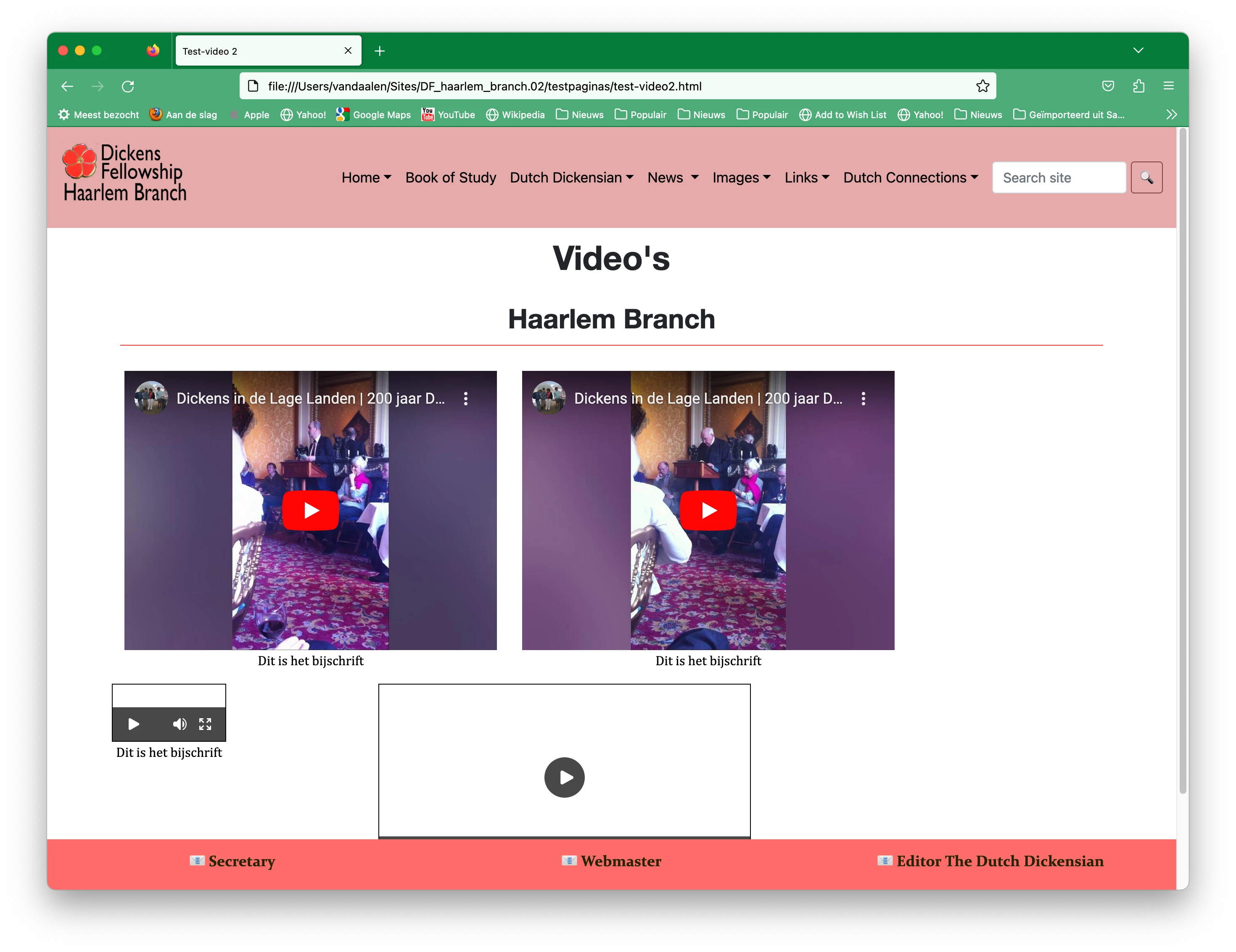
What properties or classes should I use to justify the video's evenly, any one an idea? I tried to find the solution on a search on internet, but none worked.
 AdChoices