Participating Frequently
November 4, 2017
Answered

How do I add padding and borders to pics in DW CC2017?

  • November 4, 2017
  • 2 replies
  • 757 views

When I try - a message says the function is locked due to a template?

    This topic has been closed for replies.
    Correct answer Nancy OShea

    - - - The CSS folder is in the middle of the folders I sent - - right after the "CLASSES" Folder - -

    Here is an image shoing what that folder contains....

    TY -

    Mac
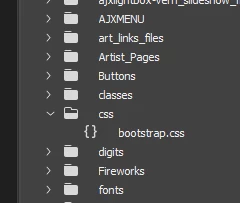

    OK.  So you're using Bootstrap layouts for your website?  Is that correct?

    If yes,  use the built-in Bootstrap img-thumbnail class on all images that require padding and borders.

    <img class="img-thumbnail" src="Your_image.jpg" alt="image described">

    Reference:

    Bootstrap Images

    2 replies

    Nancy OShea
    Community Expert
    Community Expert
    November 4, 2017

    Image padding and borders go in the external stylesheet.  Are you able to open your CSS file?

    /** applies to all site images **/

    img {padding: 2%;  border: 2px solid #333}

    /** applies to all images with this class **/

    .nyImage {padding: 2%; border: 2px solid #333;}

    HTML:

    <img class="myImage" alt="..."

    Nancy O'Shea— Product User & Community Expert
    Participating Frequently
    November 4, 2017

    Thank you Nancy - - are you asking if I can open the Template file related to the pages I am working on..?

    Not sure where to fine the external style sheet..?

    Thanks for your help

    Nancy OShea
    Community Expert
    Community Expert
    November 4, 2017

    An external CSS file should be in your Files Panel assets under Styles or CSS or similar folder. 

    The path to the file is often referenced in the <head> of your Template.dwt file.

    Example:

    <link href="css/YOUR_STYLE_SHEET.css" rel="stylesheet" type="text/css" media="screen" />

    Nancy O'Shea— Product User & Community Expert
    Community Expert
    November 4, 2017

    It sounds like your image is inside a region that is not editable.  Ideally you should go back to the template and update the editable region so that you can edit that image on all pages if you wish to do so.  Or you can detatch that page from the template and make your changes to that page alone, but by detaching, you will no longer get the changes applied to that page when you update the template file. How to apply or remove a template from an existing document in Dreamweaver