Inspiring
June 12, 2019
Question

how do i open dreamweaver?

  • June 12, 2019
  • 1 reply
  • 2356 views

i always get this message.  Clicking either one shuts down the program.
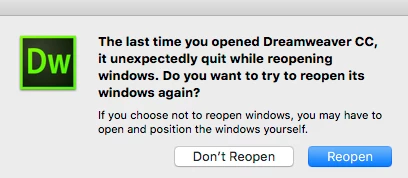
This topic has been closed for replies.

1 reply

Legend
June 13, 2019

Try rstoring Dreamweaver preferences:  Unusual behavior in Dreamweaver? Try restoring preferences.

Paul-M - Community Expert
Inspiring
June 13, 2019

How? Will I lose my .ste site?

Inspiring
June 21, 2019

It's probably an edu or volume license edition.  Keep in mind that CS3 is a relic by modern standards and isn't certified to work on modern OSs.   I think you should contact tech support and ask them to help you with Creative Cloud.   Don't waste time with CS3.

Contact Customer Care


Does the cleaner tool clean OUT? or clean UP?
Does it remove absolutely everything checked,

or just fix some stuff?  Cuz it worked so fast and

all the software is still there.

The first time I uninstalled DW, cleaned, and reloaded DW and

the same problem exists.  The 2d time I just ran the

cleaner without uninstalling and everything still seems to be there.
IN fact I'm looking right at it in the finder.  Yet cloud>open DW said

nothing is there and download again.  Odd?

Either way it blows off the screen.  All my other cloud apps are fine.
