
March 15, 2017
Answered

How do I sync local folder with a specific folder on the remote server?

  • March 15, 2017
  • 1 reply
  • 365 views

I have searched and failed to find an answer

On my remote server I have to load into a folder /public.html  which is one of several folders inside the  / folder

When I upload from my local folder the files go into the / folder not the /public.html  folder

I cannot find the setting to sync with the /public.html folder. Probably obvious but defeats me.Can anyone advise?

Peter
This topic has been closed for replies.
Correct answer Nancy OShea

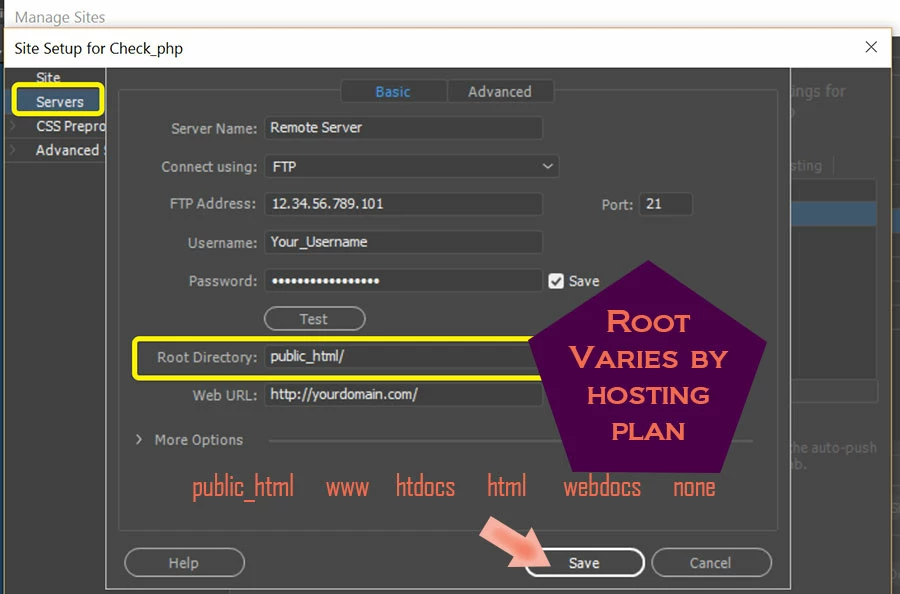
Your site is not defined properly.  See screenshot.  Your public_html folder is your server's Root Directory.  In other words, every public facing file and asset must be uploaded to that folder.   Once it's defined, you should have no trouble with file sync.

1 reply

Nancy OShea
Community Expert
Nancy OSheaCommunity ExpertCorrect answer
Community Expert
March 15, 2017

Your site is not defined properly.  See screenshot.  Your public_html folder is your server's Root Directory.  In other words, every public facing file and asset must be uploaded to that folder.   Once it's defined, you should have no trouble with file sync.

Nancy O'Shea— Product User & Community Expert
March 16, 2017

Nancy

Thank you for such a quick response, indeed I had an incorrect link in the site set-up

Peter