
March 11, 2012
Answered

How to export images with transparent background in illustrator

  • March 11, 2012
  • 2 replies
  • 51402 views

H i

I am trying  to export a png, jpeg button design with curved designs. But the white background keeps appearing when exported.

How do I remove the white background and just have the button image.

Thank you.
This topic has been closed for replies.
Correct answer martcol

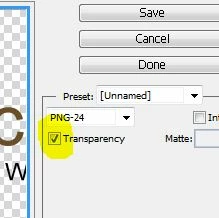
In Illustrator use Save For Web and check transparency

Martin

2 replies

John Waller
Community Expert
Community Expert
March 11, 2012

Tony404 wrote:

I am trying  to export a png, jpeg button design with curved designs. But the white background keeps appearing when exported.

Are you exporting as a PNG or exporting as a JPG?

JPG doesn't support transparency so you'll have to export as a PNG and check the Transparency box.

March 11, 2012

Thank you.

Will export as .png thanks again.

martcol
martcolCorrect answer
Inspiring
March 11, 2012

In Illustrator use Save For Web and check transparency

Martin