


- Home
- Dreamweaver
- Discussions
- How to select an option or type in a value in the ...
- How to select an option or type in a value in the ...
How to select an option or type in a value in the same field

Copy link to clipboard
Copied
I have a PHP page which updates a MySQL table containing volunteer information - one row for each volunteer. Each volunteer has a field called "assignedactivity", the default value is "Unassigned". Administrators can update the volunteer record to assign a volunteer to an activity by selecting a radio button. This works fine and is shown below.
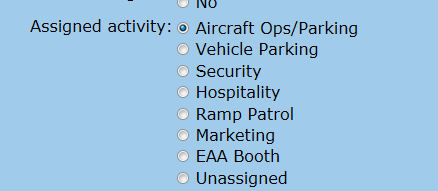
Now, my users would like to be able to also select an additional radio button - labelled "Other" and then type in an Assigned activity. I have no idea how to do this, if someone could point me in the right direction I would really appreciate it.
Below is the current working code for this field
<table>
<tr>
<td><input type="radio" name="assignedactivity" value="Aircraft Ops/Parking" <?php if (!(strcmp(htmlentities($row_rsVolunteer['assignedactivity'], ENT_COMPAT, 'utf-8'),"Aircraft Ops/Parking"))) {echo "checked=\"checked\"";} ?> />
Aircraft Ops/Parking</td>
</tr>
<tr>
<td><input type="radio" name="assignedactivity" value="Vehicle Parking" <?php if (!(strcmp(htmlentities($row_rsVolunteer['assignedactivity'], ENT_COMPAT, 'utf-8'),"Vehicle Parking"))) {echo "checked=\"checked\"";} ?> />
Vehicle Parking</td>
</tr>
<tr>
<td><input type="radio" name="assignedactivity" value="Security" <?php if (!(strcmp(htmlentities($row_rsVolunteer['assignedactivity'], ENT_COMPAT, 'utf-8'),"Security"))) {echo "checked=\"checked\"";} ?> />
Security</td>
</tr>
<tr>
<td><input type="radio" name="assignedactivity" value="Hospitality" <?php if (!(strcmp(htmlentities($row_rsVolunteer['assignedactivity'], ENT_COMPAT, 'utf-8'),"Hospitality"))) {echo "checked=\"checked\"";} ?> />
Hospitality</td>
</tr>
<tr>
<td><input type="radio" name="assignedactivity" value="Ramp Patrol" <?php if (!(strcmp(htmlentities($row_rsVolunteer['assignedactivity'], ENT_COMPAT, 'utf-8'),"Ramp Patrol"))) {echo "checked=\"checked\"";} ?> />
Ramp Patrol</td>
</tr>
<tr>
<td><input type="radio" name="assignedactivity" value="Marketing" <?php if (!(strcmp(htmlentities($row_rsVolunteer['assignedactivity'], ENT_COMPAT, 'utf-8'),"Marketing"))) {echo "checked=\"checked\"";} ?> />
Marketing</td>
</tr>
<tr>
<td><input type="radio" name="assignedactivity" value="EAA Booth" <?php if (!(strcmp(htmlentities($row_rsVolunteer['assignedactivity'], ENT_COMPAT, 'utf-8'),"EAA Booth"))) {echo "checked=\"checked\"";} ?> />
EAA Booth</td>
</tr>
<tr>
<td><input type="radio" name="assignedactivity" value="Unassigned" <?php if (!(strcmp(htmlentities($row_rsVolunteer['assignedactivity'], ENT_COMPAT, 'utf-8'),"Unassigned"))) {echo "checked=\"checked\"";} ?> />
Unassigned</td>
</tr>
</table>
Thanks so much for any advice you may have.
Tony


 3
Replies
3
3
Replies
3


Copy link to clipboard
Copied
http://www.toknowmore.net/e/1/javascript/javascript-disable-enable-text-box.php
Copy link to clipboard
Copied
Thanks so much for pointing me to this page, it was well written and explained the process. I'm having a problem integrating the suggested solution with my
existing code that was generated by DW CS4. I'm a newbie at this stuff and really don't understand how it all fits together.
The referenced page says "..........
We then need to adjust our form we have previously created by adding the call to the function. See the red text.
[note from Tony, when I posted this the color was lost, the code it's referring to is onclick="makeChoice();" on each line below]
<form name="form1" action="#" method="post">
<input type="radio" name="fruit" value="1" onclick="makeChoice();">Apples
<input type="radio" name="fruit" value="2" onclick="makeChoice();">Oranges
<input type="radio" name="fruit" value="3" onclick="makeChoice();">Bananas
<input type="radio" name="fruit" value="4" onclick="makeChoice();">Pears
<input type="radio" name="fruit" value="other" >Other...Please specify
<input type="text" name="otherChoice" >
............"
Below is just a part of the existing code showing the last existing radio button and the newly added button permitting the user to enter a value
<tr>
<td>
<input type="radio" name="assignedactivity" value="Unassigned"
<?php if (!(strcmp(htmlentities($row_rsVolunteer['assignedactivity'], ENT_COMPAT, 'utf-8'),"Unassigned"))) {echo "checked=\"checked\"";} ?> />
Unassigned
</td>
</tr>
<tr>
<td>
<input type="radio" name="assignedactivity" value="other" >Other...Please specify<br />
<input type="text" name="otherActivity" >
</td>
</tr>
Could you tell me where the code in red should be added? I tried putting the red code before the PHP code and although I clicked on the radio button focus didn't shift to the text box and I couldn't enter an activity. Here is a section showing the last existing radio button and the new radio button
<tr>
<td>
<input type="radio" name="assignedactivity" value="Unassigned" onclick="makeChoice();"
<?php if (!(strcmp(htmlentities($row_rsVolunteer['assignedactivity'], ENT_COMPAT, 'utf-8'),"Unassigned"))) {echo "checked=\"checked\"";} ?> />
Unassigned
</td>
</tr>
<tr>
<td>
<input type="radio" name="assignedactivity" value="other" >Other...Please specify<br />
<input type="text" name="otherActivity" >
</td>
</tr>
When I put it after the PHP code DW highlighted the whole section in yellow indicating syntax errors...sigh
Thanks again for getting me this far.
Tony
Message was edited by: tonybabb
Copy link to clipboard
Copied
Thanks for the help. The referenced solution had an error which was confusing me a lot, I'm not quite there yet but close enough that I think I should close this out and raise a much more limited question

Get ready! An upgraded Adobe Community experience is coming in January.
Learn more
 AdChoices