
exhibitorm99666455
Inspiring
December 5, 2016
Answered

How to turn off auto-indent?

  • December 5, 2016
  • 1 reply
  • 5649 views

Adobe says about the new 2017 version:

Code formatting
When you write code, Dreamweaver auto-indents the code to circumvent erroneous manual indentation and improve readability.

I'd like to turn this off. I prefer to do it myself.
    This topic has been closed for replies.
    Correct answer exhibitorm99666455

    I just found out you can, though it doesn't exactly say so.

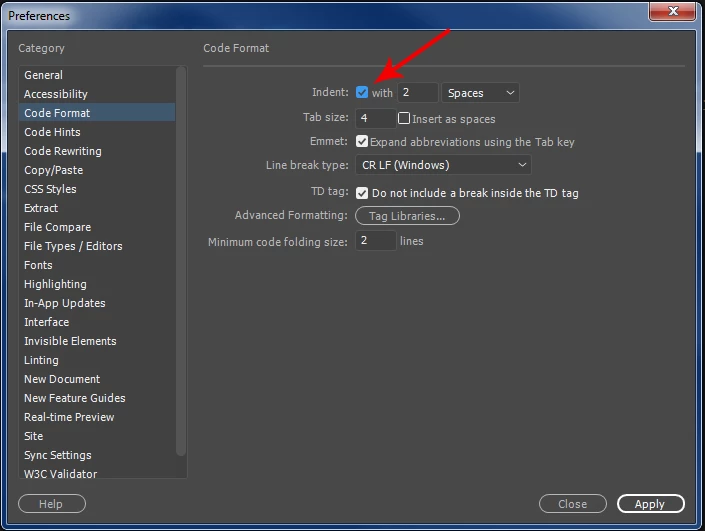
    Edit > Preferences > Code Format:

    If you uncheck the box it won't indent any tags you create at all.

    1 reply

    Nancy OShea
    Community Expert
    Community Expert
    December 5, 2016

    I don't think you can turn it off.

    But you can Edit > Preferences > Code Format > Tag Libraries. 

    After you establish your preferred code format, use Apply Source Formatting.  You'll find that on the Common Toolbar.

    Nancy O'Shea— Product User & Community Expert
    exhibitorm99666455
    exhibitorm99666455AuthorCorrect answer
    Inspiring
    December 5, 2016

    I just found out you can, though it doesn't exactly say so.

    Edit > Preferences > Code Format:

    If you uncheck the box it won't indent any tags you create at all.

    Nancy OShea
    Community Expert
    Community Expert
    July 22, 2017

    i got similar problems, ... and it 's 2017.5 already.

    problem is not only the spacing, but the sensitivity for it, it was better in DW 2015


    There's nothing preventing you from dropping back to the 2015 version if it suits your workflow better.

    Nancy O'Shea— Product User & Community Expert