



Copy link to clipboard
Copied
I want to build the template that allows my team of non-coders to create title and a numbered list without my team having to go into the HTML code. My vision is a form that they can enter a title and then step by step instructions (the numbered list). This could be submitted and the title would populate the <h1> tag and the other inputs the <li> tags of the list. The page could then be saved and where I could remove the <form> and the page could be uploaded to our local server.


 1 Correct answer


JS is client side only. You can make a form that takes input field data and inserts it in another part of the same page. But then what? Refresh your browser and poof, the data is gone.
If you want the data to permanently populate to a page everyone can see, you would need server-side scripts and databases.

 11
Replies
11
11
Replies
11


Copy link to clipboard
Copied
If I were developing the system, I would use CKEditor.com | The best web text editor for everyone and store the info in a database. The results page would be populated by the info contained in the database.
Copy link to clipboard
Copied
Thanks for the link. This isn't to edit articles or documents. It's to create html pages that are pushed to a web app. So, my team (which isn't versed in HTML) needs to be able to add the title and steps for the instruction on the HTML page. I need a method that they can use to do this and also without a third party tool. I have and use Dreamweaver. I may investigate dynamic innerHTML.
Copy link to clipboard
Copied
What you're describing is a custom content management system. The backend admin area contains a secure log-in and data entry form for adding new content (title and lists) to the MySQL database. In turn the database content gets pushed into a details.php page by the web server.
Nancy
Copy link to clipboard
Copied
I am not talking about a custom content management system. I'm talking about users being able to add a title and steps on an html page. Let me use a visual:
Rather than having them sort through this, just to change the area in bold:
<!DOCTYPE html>
<html>
<head>
<meta charset="utf-8">
<meta http-equiv="X-UA-Compatible" content="IE=edge">
<title>Blue Harvest - Job Aid</title>
<meta name="description" content="">
<meta name="viewport" content="width=device-width, initial-scale=1">
<link rel="stylesheet" href="css/pure-drawer.css"/>
<!-- Bootstrap -->
<script>
// Picture element HTML5 shiv
document.createElement( "picture" );
</script>
<script src="js/picturefill.min.js" async></script>
<!-- HTML5 shim and Respond.js for IE8 support of HTML5 elements and media queries -->
<!-- WARNING: Respond.js doesn't work if you view the page via file:// -->
<!--[if lt IE 9]>
<script src="https://oss.maxcdn.com/html5shiv/3.7.2/html5shiv.min.js"></script>
<script src="https://oss.maxcdn.com/respond/1.4.2/respond.min.js"></script>
<![endif]-->
<link rel="apple-touch-icon" href="http://edweb1.kronos.com/education/blueHarvest/apple-touch-icon.png" />
<link rel="apple-touch-icon" sizes="152x152" href="http://edweb1.kronos.com/education/blueHarvest/apple-touch-icon-152x152.png" />
<link rel="apple-touch-icon" sizes="167x167" href="http://edweb1.kronos.com/education/blueHarvest/apple-touch-icon-167x167.png" />
<link rel="apple-touch-icon" sizes="180x180" href="http://edweb1.kronos.com/education/blueHarvest/apple-touch-icon-180x180.png" />
<link rel="icon" sizes="192x192" href="http://edweb1.kronos.com/education/blueHarvest/icon-hires.png" />
<link rel="icon" sizes="128x128" href="http://edweb1.kronos.com/education/blueHarvest/icon-normal.png" />
</head>
<body>
<div class="pure-container" data-effect="pure-effect-push">
<input type="checkbox" id="pure-toggle-left" class="pure-toggle" data-toggle="left"/>
<label class="pure-toggle-label" for="pure-toggle-left" data-toggle-label="left"><span class="pure-toggle-icon"></span></label>
<nav class="pure-drawer" data-position="left">
<p>
<h1><a href="index.html">Home</a></h1>
<h2>Managers</h2>
<ul><a href="capEx.html">Captured Exercise</a></ul></p>
<h2>Employees</h2>
<ul><a href="punches.html">Punching In and Out job aid</a></ul>
</nav>
<div class="pure-pusher-container">
<div class="pure-pusher">
<div class="pure-pusher-container">
<div class="responsive-wrapper-text responsive-wrapper-padding-bottom-90pct" style="-webkit-overflow-scrolling: touch; overflow: auto;">
<h3>Punching In</h3>
<ol>
<li>Access the <strong>Navigator Framework_wfc</strong> logon page.</li>
<li>Log in using your credentials.</li>
<li>Access the <strong>My Timecard</strong> widget.</li>
<li>Double-click an empty In cell.</li>
<li>Enter the time you began working, and then press <strong>Enter</strong>.</li>
<li>Click <strong>Save</strong>.</li>
</ol>
<h4>Punching Out</h4>
<ol>
<li>Accesss the <strong>My Timecard</strong> widget.</li>
<li>Double-click an <strong>Out</strong> cell for a day that has a populated <strong>In</strong> cell.</li>
<li>Enter the time you ended work, and then press <strong>Enter</strong>.</li>
<li>Click <strong>Save</strong>.</li>
</ol>
<div>
<img src="img/sampleImg.png" alt="save" width="100%">
</div>
</div>
</div>
</div>
</div>
</div>
<label class="pure-overlay" for="pure-toggle-left" data-overlay="left"></label>
</div>
<script src="js/jquery-1.11.3.min.js"></script>
<script src="js/embed.js"></script>
</body>
</html>
I want to create something like this to get the input and place it in those tags:
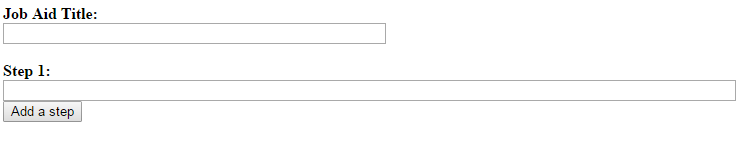
If it can't be done, then I will find a different solution. But it seems like I can use javascript to get the input and populate the tags.
Thanks,
Copy link to clipboard
Copied
JS is client side only. You can make a form that takes input field data and inserts it in another part of the same page. But then what? Refresh your browser and poof, the data is gone.
If you want the data to permanently populate to a page everyone can see, you would need server-side scripts and databases.
Copy link to clipboard
Copied
Thanks.

Copy link to clipboard
Copied
Does your client understand the html in the bold section?
If so, you could use a small include file.
You could give the client access to the include, which would be only the selected bold code. They could change it to whatever they need, save and upload it to the server and the script pulling the include into the page itself would simply update the page with whatever they wrote in.
That could cut out the need for a database or any heavy server-side coding, but without a bare minimum knowledge of html and how to FTP the file, it opens the door to a broken page pretty easily.
Copy link to clipboard
Copied
It's not a client. My work team has access to a shared web server. The problem is they don't understand HTML. I figured I could create a server side tool that would allow them to populate the content of an html template and I could do final review and edit before it gets published. Even dealing with HTML tags is too much for them. They wouldn't be ftping anything.
There are two ideas:
- A tool that they could open, add in the Title and the Steps and then do a Save As... or have it function like a form that would be in the same directory. This form could then be accessed from the HTML file to populate the the DIV section needing changed.
- A dynamic HTML page where the javascript gets the text (see the image above) and uses the entry data to populate the DIV section. The page is saved and I could go in and delete the form section and publish the HTML page.
Thanks for all the help everyone.

Copy link to clipboard
Copied
you also have some premium templates (not free) ... but running from 5 to 20 us$... https://themeforest.net/category/site-templates I agree that some really need to be polished and better developped, but sometimes for the price, and the online support ... it is not a so bad deal...

Copy link to clipboard
Copied
hello,
If you are looking HTML or html5 templates, I have got more free html5 templates. These templates are really helpful for non-coder.
Copy link to clipboard
Copied
The point of this forum, I thought, was to get help and advice...not get sales pitches from people trying to make $$$. Please don't solicit the threads!

Get ready! An upgraded Adobe Community experience is coming in January.
Learn more
 AdChoices


