Participant
February 12, 2017
Answered

I cant seem to center my images on a web page

  • February 12, 2017
  • 1 reply
  • 358 views

Hi All,

Be gentle, this is my first post.

So Im trying to learn about webpages and stuff so i have created a site https://www.tomwelsh.eu from the templates section of Dreamweaver but I cant for the life of me get the image and title to center.

Can some one tell me what Im missing here?

Here is the snippet

      <div class="row">

        <div class="col-lg-4">

          <img class="img-circle" src="images/life.jpg" alt="Life" width="140" height="140" class="img-circle">

          <h2>Life</h2>

          <p>"some blurb that i put here.</p>

          <p><a class="btn btn-default" href="/life.html" role="button">View details &raquo;</a></p>

        </div><!-- /.col-lg-4 -->

        <div class="col-lg-4">

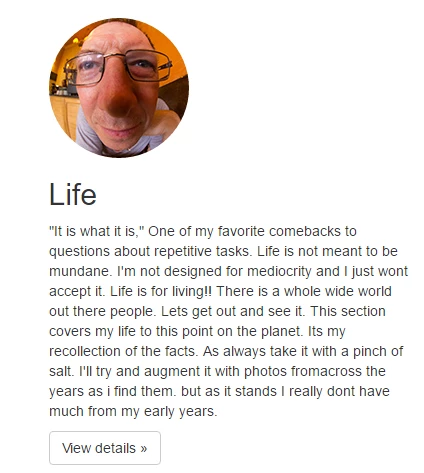
But it looks like this

So how can i get that image and title centered?

All help gratefully received

Chers

Tom

This topic has been closed for replies.
Correct answer twelsh37

OK, So I worked it out.

I needed to use "center-Block" for the image and text-center" for the heading giving me the following..

<div class="row">

        <div class="col-lg-4">

          <img class="center-block img-responsive img-circle" src="images/life.jpg" alt="Life" width="140" height="140" class="img-circle">

  <div class="text-center"><h2>Life</h2></div>

                   <p>bla bla bla.</p>

          <p><a class="btn btn-default" href="#" role="button">View details &raquo;</a></p>

        </div><

1 reply

twelsh37AuthorCorrect answer
Participant
February 12, 2017

OK, So I worked it out.

I needed to use "center-Block" for the image and text-center" for the heading giving me the following..

<div class="row">

        <div class="col-lg-4">

          <img class="center-block img-responsive img-circle" src="images/life.jpg" alt="Life" width="140" height="140" class="img-circle">

  <div class="text-center"><h2>Life</h2></div>

                   <p>bla bla bla.</p>

          <p><a class="btn btn-default" href="#" role="button">View details &raquo;</a></p>

        </div><

Legend
February 12, 2017

You dont need the 'img-circle' class applied twice to your image. Infact I'm surprised DW has not flagged up an error, maybe it has but you have not seen it.

<img class="center-block img-responsive img-circle" src="images/life.jpg" alt="Life" width="140" height="140" class="img-circle">