stephanieo73799811
Participant
April 17, 2017
Answered

Image Map

  • April 17, 2017
  • 2 replies
  • 1119 views

Hi guys I do newsletters in work and I'm having some issues with Dreamweaver Image Maps,

Map’s won’t co-operate for me if the design is similar to Screen Shot 1 “Mapped areas in green" For whatever reason only one link works even though there is 2 or 3 separate links in the code.

I have no issue with Maps when the areas are sectioned horizontally like Screen Shot 2 Mapped areas in blue red & green"

and

Screen Shot 3 Mapped areas in blue & green"

Some tips would be great 🙂

Thanks guys 
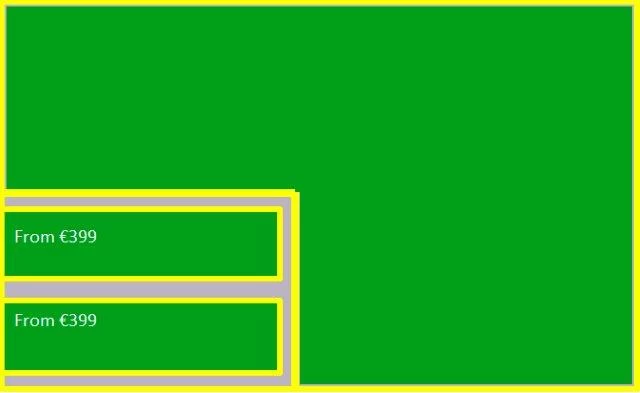
    This topic has been closed for replies.
    Correct answer Jon Fritz

    Standard HTML Image Maps are not responsive by nature. They are created by using fixed coordinates, if the image changes size, the coordinates do not and you get what seems to be image maps that don't work.

    They do work, but only at the browser window size they were designed at.

    If you absolutely must use image maps, you'd have to use javascript to get them to resize as the window/image is resized. Do a search for "responsive javascript image maps" and you should be presented with a fair number of possible solutions.

    2 replies

    Nancy OShea
    Community Expert
    Community Expert
    April 17, 2017

    The thing with HTML emails/newsletters is everyone has different email clients with various limitations.  Some people see HTML emails very well, many do not.  Many have image blocking for security reasons.  The only thing you can be reasonably certain of is that people will see plain text.   HTML image maps & CSS background images in emails are very hit & miss and mostly a miss.  

    HTML E-Mail & Newsletter Blasts - http://alt-web.com/

    Nancy

    Nancy O'Shea— Product User & Community Expert
    Jon Fritz
    Community Expert
    Community Expert
    April 17, 2017

    The answers are in your code.

    Without seeing what you're actually working with, it's all guess work.

    My guess would be you're attempting to use image maps on a responsive image and they're disappearing on you when the image scales down. It would be more noticeable on vertically aligned than when horizontally aligned.

    Could you post all of your code for the page, or better yet, a link to your work in progress at a test location on a server you have access to?

    stephanieo73799811
    Participant
    May 4, 2017

    Thank you so much for your reply and apologies for my delay.

    Yes I'm using image maps on a responsive image and only one link works across all devises please see code,

    Code nefore image maps

    <tr>

    <td align="left" valign="top" style="padding:20px 10px 0 10px;"><p><a href="%%track {[return http://www.falconholidays.ie/?vlid=falc159?$trackingWOcamp&utm_campaign=LH&elink=toppicks]} -group {html:11}%%"><img src="http://cslb.creatormail.co.uk/sites/tui/tui_ie/client/ECRM3-24mar.jpg" alt="" width="620" usemap="#reu" class="mobile-width-100" style="display:block;" border="0"></a></p></td>

    </tr>

    <tr>

    image map code

    <map name="reu">

      <area shape="rect" coords="2,458,618,618" href="http://bit.ly/2nLydr2" target="_blank" alt="costa dorada ">

      <area shape="rect" coords="2,2,615,453" href="http://bit.ly/2mzf1gz" target="_blank" alt="costa dorada">

    </map>

    Jon Fritz
    Community Expert
    Jon FritzCommunity ExpertCorrect answer
    Community Expert
    May 4, 2017

    Standard HTML Image Maps are not responsive by nature. They are created by using fixed coordinates, if the image changes size, the coordinates do not and you get what seems to be image maps that don't work.

    They do work, but only at the browser window size they were designed at.

    If you absolutely must use image maps, you'd have to use javascript to get them to resize as the window/image is resized. Do a search for "responsive javascript image maps" and you should be presented with a fair number of possible solutions.