Exit
  • Global community
    • Language:
      • Deutsch
      • English
      • Español
      • Français
      • Português
  • 日本語コミュニティ
  • 한국 커뮤니티
0

Import > Word Document missing

New Here ,
Apr 25, 2017 Apr 25, 2017

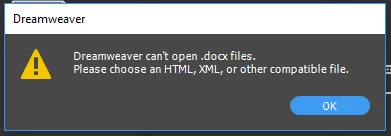
We just got Dreamweaver CC 2017 deployed to us a couple weeks ago.  I've noticed that the File > Import > Word Document option is missing.  If I try to open it directly, open with from Windows, or drag-and-drop I get a message saying it can't open .docx files.  When I search help, I see this article which makes me think it should still be there.  Still works fine in my CS6 installation.  I've been searching and can't find anything about the option missing.  The guy in IT who ran the deployment doesn't know why it would be missing.  Anybody have an idea why this could be missing and how I can restore the option?

Running Windows 10 Ent 64-bit and Office 2014 32-bit.

Capture.PNG

Capture.PNG

1.4K
Translate
Report
Community guidelines
Be kind and respectful, give credit to the original source of content, and search for duplicates before posting. Learn more
community guidelines

correct answers 1 Correct answer

Community Expert , Apr 25, 2017 Apr 25, 2017

Those options were removed recently, pretty much just after the article was written.

You can still bring Word generated code across to DW, but it's done differently.

Copy from the Word .html file and use Edit > Paste Special to get the options they show on that KB article.

Translate
Community Expert ,
Apr 25, 2017 Apr 25, 2017

Those options were removed recently, pretty much just after the article was written.

You can still bring Word generated code across to DW, but it's done differently.

Copy from the Word .html file and use Edit > Paste Special to get the options they show on that KB article.

Translate
Report
Community guidelines
Be kind and respectful, give credit to the original source of content, and search for duplicates before posting. Learn more
community guidelines
New Here ,
Apr 25, 2017 Apr 25, 2017

Removed recently, meaning with CC 2017?  If so, we may just have to stick with a previous version.  This feature is quite literally the only reason we use Dreamweaver.  Without it, we have no need for Dreamweaver.

I understand the issues with Word's horrible formatting and junk code.  We used a set of VBA code to clean up most of that before going over to Dreamweaver.  We then use a custom extension to import word documents in bulk into Dreamweaver.  We literally process hundreds if not thousands of documents a year.  I can't even imagine how manually using Paste Special is supposed to replace that.

Translate
Report
Community guidelines
Be kind and respectful, give credit to the original source of content, and search for duplicates before posting. Learn more
community guidelines
Community Expert ,
Apr 26, 2017 Apr 26, 2017
LATEST

As a paid subscriber, you can have all CC versions of DW installed on the same machines at the same time, under a single license, they just won't run at the same time. That way, you can have CC2015 and CC2017 installed and use the older/easier for your workflow version while still being able to benefit from new features in the more recent version.

The only thing you have to be careful about is when installing newer versions, there's an Advanced Options link to hit during the install process. Clicking that link allows you to turn off the Remove Older Versions checkbox, allowing you to keep any older version already installed, without having to follow the info from the link below to get the older versions back...

How to Find and Install Previous Version of Adobe Apps in CC 2015 | Adobe Customer Care Team

Translate
Report
Community guidelines
Be kind and respectful, give credit to the original source of content, and search for duplicates before posting. Learn more
community guidelines
Community Expert ,
Apr 25, 2017 Apr 25, 2017

Importing a Word file never worked very well.  It invariably injected a bunch of MS junk code into the HTML document.  Paste Special is a good way to filter that junk code out before you introduce it into your HTML file.

Nancy

Nancy O'Shea— Product User, Community Expert & Moderator
Translate
Report
Community guidelines
Be kind and respectful, give credit to the original source of content, and search for duplicates before posting. Learn more
community guidelines