
NicCrockett
Inspiring
March 29, 2017
Answered

Indents Everywhere

  • March 29, 2017
  • 1 reply
  • 1022 views

I installed an update to Dreamweaver CC2017 today and it broke the software to the point that I couldn't even start it. After wasting an hour getting into it, I finally got the file open I needed to look at. Only problem is all the lines are indented in every which way except the correct way. I swear Dreamweaver is the most useless and aggravating software I've used. I don't want to edit the file because I don't want it to save the file with all the lines indented everywhere. Notepad++ can get this correct, why can't Adobe? Is there anything I can do, or am I just screwed, again?
This topic has been closed for replies.
Correct answer Nancy OShea

FYI, before the update I also noticed that when I hit return or typed, it would move the indention to the far right of the screen. Way past where it should have been.


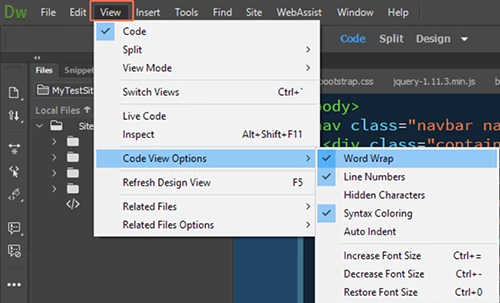
In View > Code View Options, turn on Word Warp and turn off Auto Indent.

Nancy

1 reply

pziecina
Legend
March 29, 2017

I have read a few posts regarding this problem, but i have not read any that actually explains why it is happening or how to apply a simple fix.

It may be worth noting that all the posts I have read, (as far as i remember) were from users producing newsletters, and not working with a defined site.

NicCrockett
Inspiring
March 29, 2017

That's interesting to hear. Unfortunately I switched to Dreamweaver recently so none of my sites are defined. I guess I'll just have to stop using Dreamweaver and Adobe products unless they come up with a fix.

Nancy OShea
Community Expert
Nancy OSheaCommunity ExpertCorrect answer
Community Expert
March 29, 2017

FYI, before the update I also noticed that when I hit return or typed, it would move the indention to the far right of the screen. Way past where it should have been.


In View > Code View Options, turn on Word Warp and turn off Auto Indent.

Nancy

Nancy O'Shea— Product User & Community Expert