
Exit
  • Global community
    • Language:
      • Deutsch
      • English
      • Español
      • Français
      • Português
  • 日本語コミュニティ
  • 한국 커뮤니티
0

Indents Everywhere

Explorer ,
Mar 29, 2017 Mar 29, 2017

I installed an update to Dreamweaver CC2017 today and it broke the software to the point that I couldn't even start it. After wasting an hour getting into it, I finally got the file open I needed to look at. Only problem is all the lines are indented in every which way except the correct way. I swear Dreamweaver is the most useless and aggravating software I've used. I don't want to edit the file because I don't want it to save the file with all the lines indented everywhere. Notepad++ can get this correct, why can't Adobe? Is there anything I can do, or am I just screwed, again?
1.0K
Translate
Report
Community guidelines
Be kind and respectful, give credit to the original source of content, and search for duplicates before posting. Learn more
community guidelines

correct answers 1 Correct answer

Community Expert , Mar 29, 2017 Mar 29, 2017

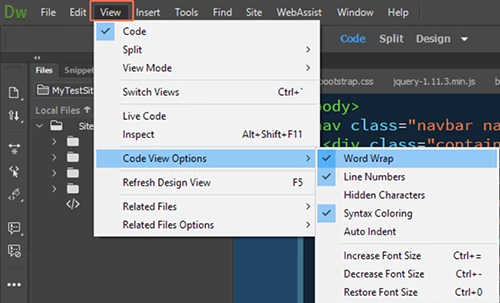
In View > Code View Options, turn on Word Warp and turn off Auto Indent.

Nancy

Translate
LEGEND ,
Mar 29, 2017 Mar 29, 2017

I have read a few posts regarding this problem, but i have not read any that actually explains why it is happening or how to apply a simple fix.

It may be worth noting that all the posts I have read, (as far as i remember) were from users producing newsletters, and not working with a defined site.

Translate
Report
Community guidelines
Be kind and respectful, give credit to the original source of content, and search for duplicates before posting. Learn more
community guidelines
Explorer ,
Mar 29, 2017 Mar 29, 2017

That's interesting to hear. Unfortunately I switched to Dreamweaver recently so none of my sites are defined. I guess I'll just have to stop using Dreamweaver and Adobe products unless they come up with a fix.

Translate
Report
Community guidelines
Be kind and respectful, give credit to the original source of content, and search for duplicates before posting. Learn more
community guidelines
Explorer ,
Mar 29, 2017 Mar 29, 2017

FYI, before the update I also noticed that when I hit return or typed, it would move the indention to the far right of the screen. Way past where it should have been.

Translate
Report
Community guidelines
Be kind and respectful, give credit to the original source of content, and search for duplicates before posting. Learn more
community guidelines
Community Expert ,
Mar 29, 2017 Mar 29, 2017

In View > Code View Options, turn on Word Warp and turn off Auto Indent.

Nancy

Nancy O'Shea— Product User, Community Expert & Moderator
Translate
Report
Community guidelines
Be kind and respectful, give credit to the original source of content, and search for duplicates before posting. Learn more
community guidelines
Community Expert ,
Mar 29, 2017 Mar 29, 2017

It goes without saying that DW is designed to perform best when a site is defined on a primary hard drive folder.  And the site files and assets are stored in that folder.   See screenshot.

If your code is too aggressively indented, you can try reformatting the code from the Common (vertical) toolbar.

CC-applySourceFormatting.jpg

Nancy O'Shea— Product User, Community Expert & Moderator
Translate
Report
Community guidelines
Be kind and respectful, give credit to the original source of content, and search for duplicates before posting. Learn more
community guidelines
Community Expert ,
Mar 29, 2017 Mar 29, 2017

NicCrockett  wrote

That's interesting to hear. Unfortunately I switched to Dreamweaver recently so none of my sites are defined. I guess I'll just have to stop using Dreamweaver and Adobe products unless they come up with a fix.

For someone who has recently upgraded from GoLive to Dreamweaver, I think you are doing well. It has taken me 15 years and I am still discovering bits I never knew about in Dreamweaver.

As long as you stick to the rules, like defining sites etc., you will find Dreamweaver to be the ideal tool, especially for front-end development.

Wappler is the DMXzone-made Dreamweaver replacement and includes the best of their powerful extensions, as well as much more!
Translate
Report
Community guidelines
Be kind and respectful, give credit to the original source of content, and search for duplicates before posting. Learn more
community guidelines
Explorer ,
Jun 12, 2017 Jun 12, 2017
LATEST

BenPleysier​ sorry for the delayed response and thanks for the compliment and suggestions. None of what you said may be wrong and I understand the usefulness of defining a site. However, you shouldn't have to define a site just to open a web page and view the code without it being rearranged. I have sites that were built before Adobe even owned Dreamweaver and I don't have time to convert them into Dreamweaver sites just to make minor edits every once in a blue moon. From my point of view Dreamweaver and the Creative Cloud is a waste of money. I can code in freeware like Notepad++ or Visual Studio. Both of these open a single web page understand the spacing and understand the color coding for multiple languages. Dreamweaver is an inferior program and maybe it's time for it to fade away.

Translate
Report
Community guidelines
Be kind and respectful, give credit to the original source of content, and search for duplicates before posting. Learn more
community guidelines