
Participating Frequently
October 28, 2017
Answered

Insert Favorites Table Row and Column

  • October 28, 2017
  • 1 reply
  • 2504 views

I have hundreds of web pages on my site that contain table rows and columns of actual data. I regularly have to insert new rows and columns as I edit these pages.

I have upgraded from Dreamweaver CS3 to DW CC as part of my overall upgrade to Windows 10. But I have lost my Favorites toolbar where I had Insert Row and Insert Column.

I don't see a comparable command in DW CC. There is an Insert --> Table, and there is a separate Edit --> Table --> [menu], but I don't see a way to add Insert Row and Insert Column as part of "Customize Favorites."

Using keyboard commands works, but I'd really like to have mouse-clickable commands in my Insert Favorites panel.

Can anyone help?

P..S. Under Window --> Toolbars, when I set it to Standard, it blocks out the top menu, and all the various drop-down menus are no longer available. Is there a fix for this bug?
This topic has been closed for replies.
Correct answer John Waller

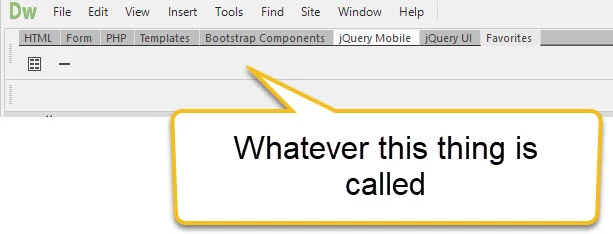
Here is a screen shot of the ""Toolbar" I am trying t work with.

The workaround would be to use the menu suggested by Nancy, but I would prefer a one-click icon in a "Toolbar."


That's the Favorites option in the Insert tab. There's no way of adding Insert New Row/Column in there.

Try using a Snippet. Create a new Snippet for Insert New Row and Insert New Column. You can drag the Snippet panel anywhere you like on the page. Insert your cursor then double click on the Snippet.

1 reply

Nancy OShea
Community Expert
Community Expert
October 28, 2017

Beginning with CC 2017,  DW was rebuilt from the ground up.  It's not quite the same as previous Creative Suite software.

Switch to LIVE view or Split with Live. See screenshot.

Click inside a table cell until you see a blue box around it.  Then right click to bring up the menu you want.

Nancy O'Shea— Product User & Community Expert
platypusman
Participating Frequently
May 18, 2018

This might be slightly off topic, but I can no longer even find how to insert a table row or column...

Whether I select a a cell, or a row, or the table, when I right-click these are the only options I see:

Have these actions been moved or removed? Or am I doing something wrong, or what?...

Using Dreamweaver CC 2018 (v18.1)

(If someone knows the keyboard shortcuts for inserting / removing rows and columns, that would be equally helpful.)

thanks in advance...

Nancy OShea
Community Expert
Community Expert
May 18, 2018

Switch to Design View.

Highlight & right-click inside table cell.

Click on Table to bring up additional context menus.

Nancy O'Shea— Product User & Community Expert