
Participant
November 18, 2016
Answered

Is there a solution that will turn my psd into a clickable file? Please read on for details.

  • November 18, 2016
  • 3 replies
  • 356 views

Hi all,

I'm seriously struggling to find a solution to this. I basically need to make this image have these features:

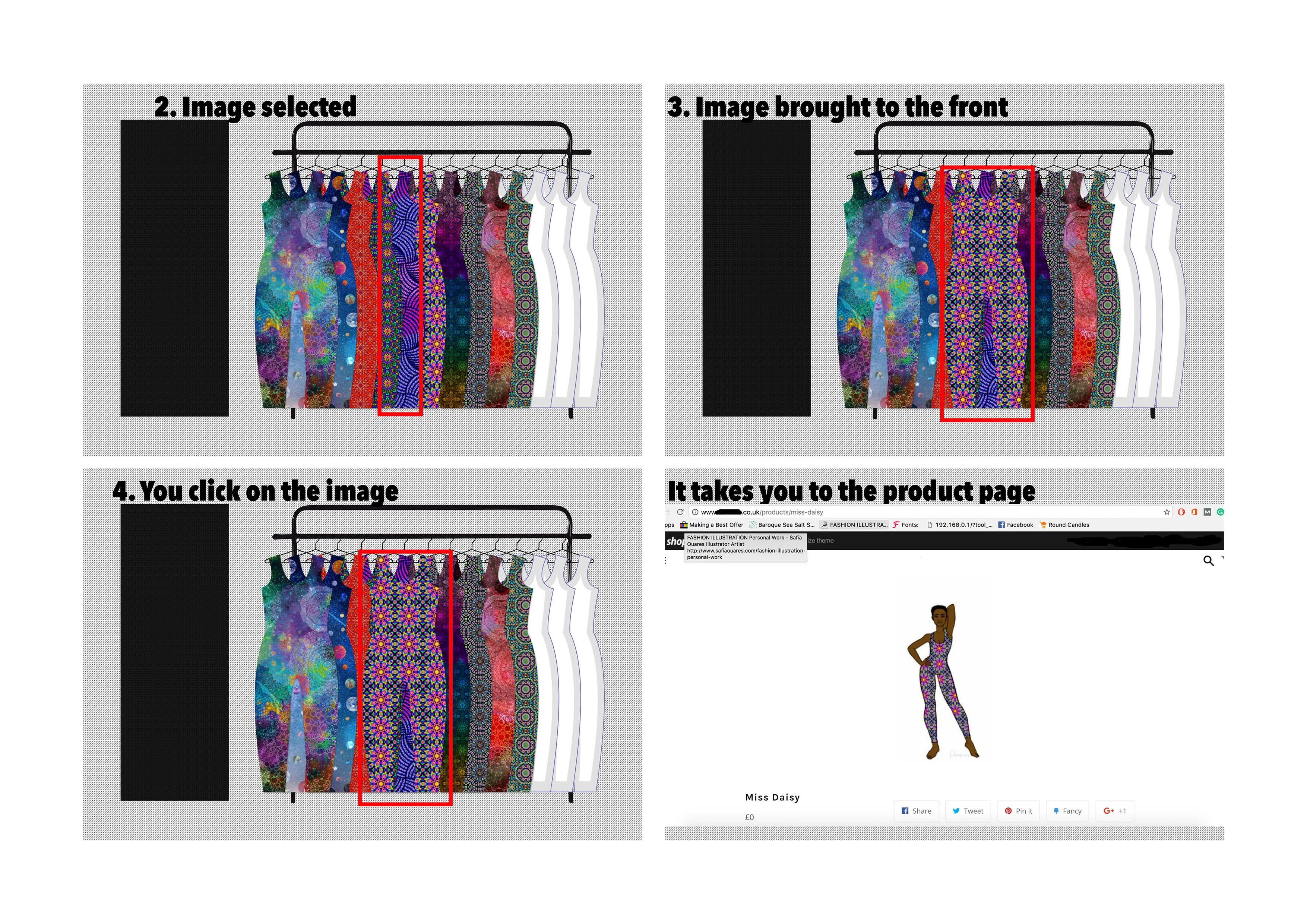
1. There are 13 catsuits and when they are clicked individually they need to be brought to the front.

2. Then when you click the same catsuit a second time it needs to be hyperlinked and take you to the items product page.

I think I have a reasonable understanding of how the second part plays out (using the slice tool etc.) but the first part feels like a mystery to me. I am not a Photoshop expert especially not when it comes to actions and things like that so please assume that I know nothing.

I have not searched the forums as I do not know what to even search for and no one I've come across has been able to provide a solution so any help would be very much appreciated.

I have attached a jpg image of how I would like the process to work - this is only an example and the same steps would need to be applied across each item. Additionally,the solution would need to work on both mobile and desktop devices. I don't mind changing software if needs be.

Many thanks
    This topic has been closed for replies.
    Correct answer Nancy OShea

    There is no magic button for transforming static PSD into an interactive and animated web page.

    For animations, look at Animate CC.  But don't export your project to Flash as flash is not well supported on the web.  Mobile devices can't see Flash.   And most desktops don't have the Flash Player plugins.   Instead, export to SVG or HTML5 canvas.

    As for building your web page, use web authoring software -- Dreamweaver or Muse.  And then embed your Animate CC project into your web page.

    Nancy O.

    3 replies

    Nancy OShea
    Community Expert
    Nancy OSheaCommunity ExpertCorrect answer
    Community Expert
    November 19, 2016

    There is no magic button for transforming static PSD into an interactive and animated web page.

    For animations, look at Animate CC.  But don't export your project to Flash as flash is not well supported on the web.  Mobile devices can't see Flash.   And most desktops don't have the Flash Player plugins.   Instead, export to SVG or HTML5 canvas.

    As for building your web page, use web authoring software -- Dreamweaver or Muse.  And then embed your Animate CC project into your web page.

    Nancy O.

    Nancy O'Shea— Product User & Community Expert
    Rob Hecker2
    Legend
    November 19, 2016

    I think the best approach for this would be to do it in Adobe Illustrator and export the graphic in SVG format. It looks like your image would translate well to the vector format.

    As an SVG, each catsuit could more easily be a selectable object than if it were done with Photoshop slices. With SVG, each catsuit would be on a different layer and clicking on one could move it to the top of the stack, as in your illustration.

    You describe clicking on a catsuit once to bring it forward, and a second time to open the product page. I think that is going to require some javascript on the click event. You logic might be something like: if object is on top, go to product page else move object to top.

    mytaxsite
    Inspiring
    November 18, 2016

    Yes you can do this but you need to create a webspage and link your images on it.  May I suggest thatyou post this on Dreamweaver forum where this can be discussed.  Moderator might move this post but just in case he can't within a reasonable time then you'll need to post there.

    <Dreamweaver support forum >

    ellaroyerAuthor
    Participant
    November 19, 2016

    Thank you, I will move my message over.

    x