
Participant
April 5, 2017
Answered

Just moved from CS6 after hard drive crashed.

  • April 5, 2017
  • 2 replies
  • 648 views

Found one page that was all over the place so tried to return to ap div so I could move everything back into place. Nothing. What is going on? Am I missing something or is cc17 just garbage as many on the forums say it is. Any ideas how I can download another copy of CS6. Dreamweaver.....yea right!!!!
    This topic has been closed for replies.
    Correct answer Jon Fritz

    The APDiv buttons were removed because absolutely positioned elements are not typically flexible enough for modern responsive designs and Adobe wanted to help steer newer developers away from the pitfalls represented by that design method.

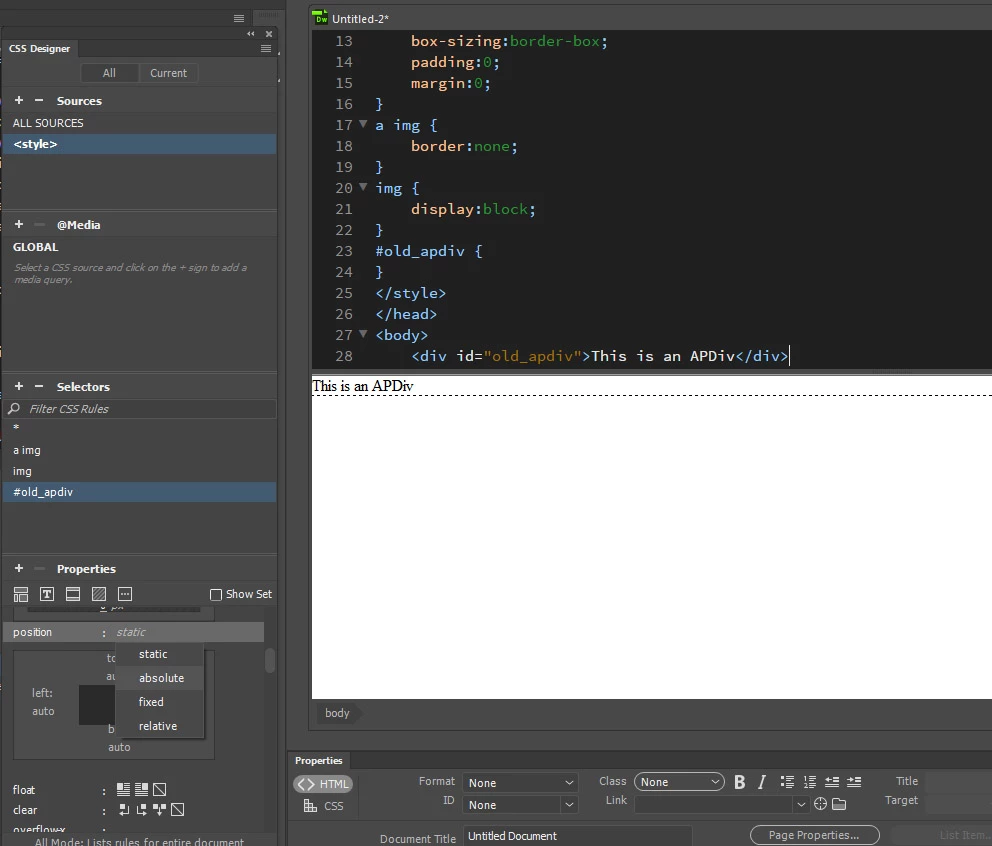
    The functionality is still there in DW, it's just a couple more clicks to get to it. All you should need to do is click the item you want to turn into a draggable element, then in the CSS Designer, give it a position setting of absolute. From there on out, it will act like the old version's APDivs...

    2 replies

    Jon Fritz
    Community Expert
    Community Expert
    April 5, 2017

    Absolutely positioned elements (APDivs) still function as they always have within DWCC2017. If you're trying to modify an older site with the new version, and you're not able to click and drag your APDivs, you may simply be in Live View.

    APDiv handles and drag options aren't available in Live View. Switch over to Design View and you'll see the directional arrows when you mouse over the borders of your AP elements. Click and drag them where you want to from there.

    The Live View Editor is relatively new and still incomplete. There are a lot of editing functions that are only available in Design View. If you are in Design View and the AP elements still won't drag to where you want them, it would usually mean there are some html or css errors in your file that the program can't work out. Run the validator under File > Validate > Current Document (W3C) or go to http://validator.w3.org/nu to get a listing.

    You can get CS6 Cloud (slightly different from the old perpetual license version) under your paid subscription by following the directions here:

    How to Find and Install Previous Version of Adobe Apps in CC 2015 | Adobe Customer Care Team

    pziecina
    Legend
    April 5, 2017

    Dw 2017, is not garbage, it is not very good because it no longer offers ex-users like me anything that i could not get, (and better) with a free open source program.

    As you say you tried to move an ap div, i take it you are trying to layout your page visually which will no longer work reliably for modern rwd layouts, which is why that visual layout tool was removed.

    Providing you are not on a trial of the cc apps, you can still download cs6 by going to the cc app, selecting Dw, then if you select the drop-down 'install' button for Dw it will list installing cs6 as an option.

    glen1parkAuthor
    Participant
    April 5, 2017

    yes I'm trying to layout the page but its in like table mode and wont revert so I can move the various sections about and there no longer arrears to be a convert function.

    Jon Fritz
    Community Expert
    Jon FritzCommunity ExpertCorrect answer
    Community Expert
    April 5, 2017

    The APDiv buttons were removed because absolutely positioned elements are not typically flexible enough for modern responsive designs and Adobe wanted to help steer newer developers away from the pitfalls represented by that design method.

    The functionality is still there in DW, it's just a couple more clicks to get to it. All you should need to do is click the item you want to turn into a draggable element, then in the CSS Designer, give it a position setting of absolute. From there on out, it will act like the old version's APDivs...