
Inspiring
December 10, 2018
Question

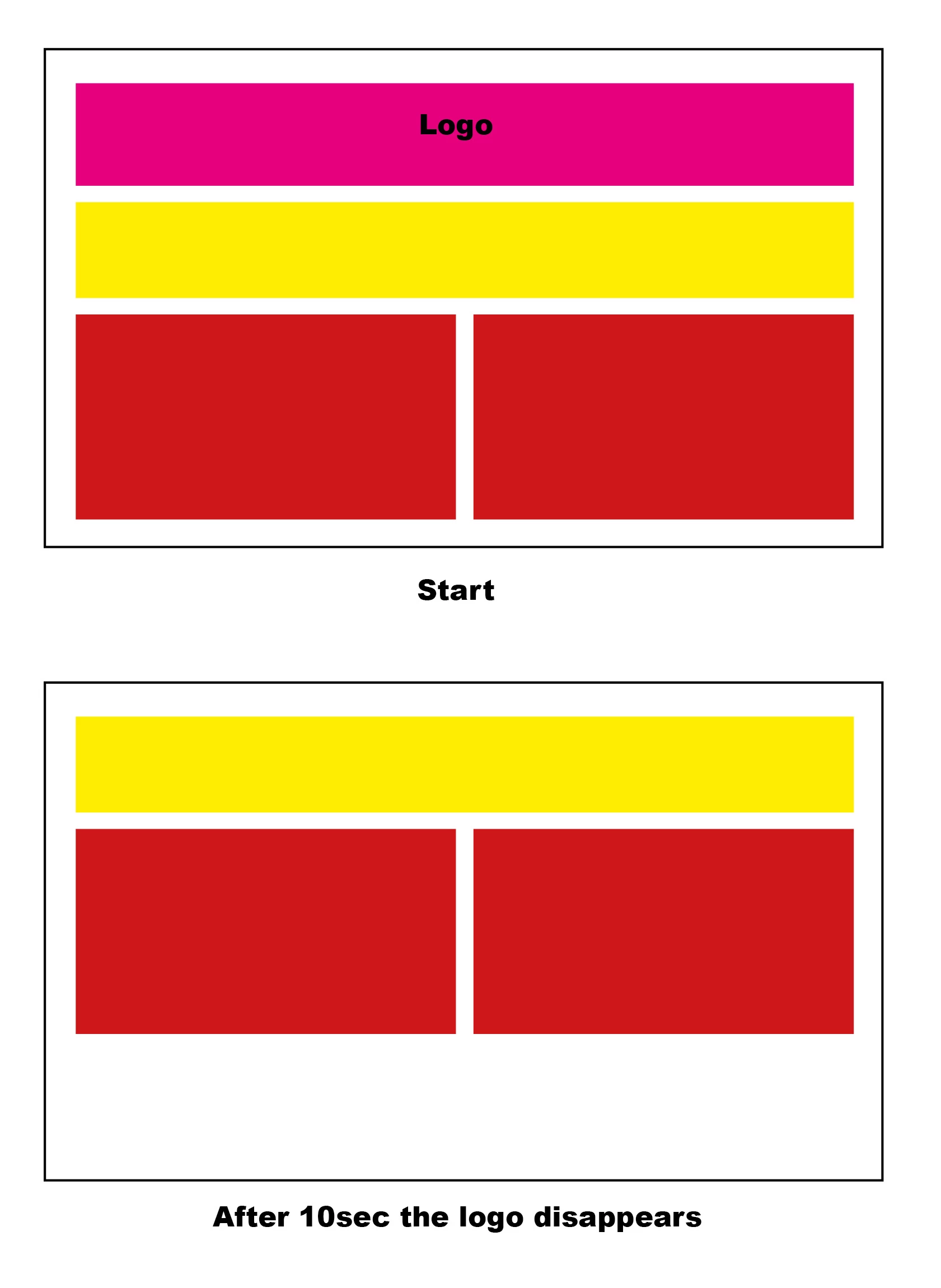
logo in div & height of div disappear after 10sec?

  • December 10, 2018
  • 8 replies
  • 4104 views

Is there a way to hide a div and logo within it?

I have a logo at the top of the screen, but after 10 seconds I want it to disappear, and the text below it move up to replace it.

I have found how to hide the logo, but I can't get the box to go to 0px and disappear!

anyway of doing this please?
    This topic has been closed for replies.

    8 replies

    superc51632781
    Participating Frequently
    December 12, 2018

    you will have to make the background

    of the div transparent so you can not see it.

    create a transparent div.

    Nancy OShea
    Community Expert
    Community Expert
    December 12, 2018

    superc51632781  wrote

    you will have to make the background

    of the div transparent so you can not see it.

    create a transparent div.

    The question is about making a division and its contents  disappear after a delay of 10 seconds.  The background color & transparency are irrelevant.

    Nancy O'Shea— Product User & Community Expert
    pziecina
    Legend
    December 10, 2018

    To the OP.

    The posters of the answers marked as helpfull, are being marked as such by the poster themselves. So have no validity of actually being helpfull.

    Nancy OShea
    Community Expert
    Community Expert
    December 10, 2018

    Helpful and Liked can be marked by anyone at any time today, tomorrow or 5 years from now.  There's nothing invalid about it.

    Nancy O'Shea— Product User & Community Expert
    pziecina
    Legend
    December 10, 2018

    https://forums.adobe.com/people/Nancy+OShea  wrote

    Helpful and Liked can be marked by anyone at any time today, tomorrow or 5 years from now.  There's nothing invalid about it.

    Marking your own as helpfull, does give anyone reading the discussion now or in years to come, a completely false impression. As far as I am concerned the practice of marking something as 'helpfull' that someone posted themselves is unethical.

    Like, that is for the individual to decide.

    ALsp
    Legend
    December 10, 2018

    Hi Tim,

    You can use Bootstrap, jQuery, or both, but here is how I would do it (with pure CSS):

    http://www.projectseven.com/csslab/logo-be-gone/

    ALsp
    Legend
    December 10, 2018

    And for any carpenters who might be lurking...

    If the only tool you have is a hammer (or Bootstrap), you might tend to treat everything as if it were a nail.

    Nancy OShea
    Community Expert
    Community Expert
    December 10, 2018

    jQuery SlideUp.

    <!doctype html>

    <html lang="en">

    <head>

    <meta charset="utf-8">

    <title>jQuery SlideUp Demo</title>

    <meta http-equiv="X-UA-Compatible" content="IE=edge"><meta name="viewport" content="width=device-width, initial-scale=1">

    </head>

    <body>

    <div id="intro">

    <img src="https://dummyimage.com/200x200" alt="logo">

    <em>This will slide up in 10 seconds. </em>

    </div>

    <hr>

    <h3>Heading 3</h3>

    <p>Lorem ipsum dolor sit amet, consectetur adipisicing elit. Aperiam a natus ea error, sunt deserunt est magnam quo, aut voluptatem commodi doloremque dolore, sint nulla culpa dolor eveniet velit. Aliquam!</p>

    <!--latest jQuery 3-->

    <script src="https://code.jquery.com/jquery-3.2.1.min.js" integrity="sha256-hwg4gsxgFZhOsEEamdOYGBf13FyQuiTwlAQgxVSNgt4=" crossorigin="anonymous"></script>

    <script>

    $(window).ready(function(){$("#intro").fadeIn("fast",function()

    //delay 10 seconds

    {$(this).delay(10000).slideUp(1e3)})})

    </script>

    </body>

    </html>

    Nancy O'Shea— Product User & Community Expert
    Legend
    December 10, 2018

    https://forums.adobe.com/people/Nancy+OShea  wrote

    $(this).delay(10000).slideUp(1e3)

    Whats 1e3 do? - never seen that used before.

    Nancy OShea
    Community Expert
    Community Expert
    December 10, 2018

      wrote

    https://forums.adobe.com/people/Nancy+OShea   wrote

    $(this).delay(10000).slideUp(1e3)

    Whats 1e3 do? - never seen that used before.

    1e3 = 1000 = 1 second

    Nancy O'Shea— Product User & Community Expert
    Nancy OShea
    Community Expert
    Community Expert
    December 10, 2018

    Since I use jQuery for most projects anyway...

    Bootstrap with SVG Intro

    <body>

    <div id="intro">

    YOUR LOGO HERE....

    </div>

    <script>

    //show/hide intro
    $(window).ready(function() {
      $('#intro').fadeIn('fast', function() {
      //wait 5 seconds and fade out
    $(this).delay(5000).fadeOut(2000);
      });
    });
    </script>

    Nancy O'Shea— Product User & Community Expert
    Legend
    December 10, 2018

    Assuming your logo is in a <div> with the class of 'logo' or has a class of 'logo' itself use the setTimeout javascript function to set the logo to display none after 10 seconds, example below. You're using jQuery so you can just add it to your exsiting jQuery.

    <!DOCTYPE html>

    <html>

    <head>

    <meta charset="UTF-8" />

    <title>Set Time Out</title>

    <script src="http://code.jquery.com/jquery-3.3.1.min.js"></script>

    <script>

    $(document).ready(function(){

    setTimeout(function(){

    $('.logo').css('display', 'none');

    }, 10000);

    });

    </script>

    <style>

    header {

    width: 70%;

    margin: 0 auto;

    background-color: #f2f2f2;

    }

    </style>

    </head>

    <body>

    <header>

    <div class="logo">Logo goes here</div>

    <div class="text">Text goes here</div>

    </header>

    </body>

    </html>

    WolfShade
    Legend
    December 10, 2018

    I did some looking around.  Use the following instructions, but keep the "transition-timing-function" out of it.

    https://davidwalsh.name/css-slide

    Then use JavaScript to set the timer (setTimeout()) for the transition trigger.

    HTH,

    ^ _ ^

    (Or, keep the transition-timing-function in and alter the numbers to allow a ten second transition and keep it pure CSS with no JS.)

    Ignore that.  I had no idea what the numbers meant.  I do, now.  They are NOT for timing.    Keep the JS in.

    pziecina
    Legend
    December 10, 2018

    WolfShade  wrote

    Ignore that.  I had no idea what the numbers meant.  I do, now.  They are NOT for timing.    Keep the JS in.

    Don't throw out a good idea, try it with the addition of css keyframe animations -

    https://developer.mozilla.org/en-US/docs/Web/CSS/CSS_Animations/Using_CSS_animations

    Legend
    December 10, 2018

    if you follow the link in Wolfshads reply, (or the one below) css animations and keyframes has an animation delay propery -

    https://developer.mozilla.org/en-US/docs/Web/CSS/animation-delay


    pziecina  wrote

    if you follow the link in Wolfshads reply, (or the one below) css animations and keyframes has an animation delay propery -

    https://developer.mozilla.org/en-US/docs/Web/CSS/animation-delay

    I found that out but it still doesnt work as you have to set the height of the animated container (which you might not know) and then it doesnt set the height of the content within to 0, see example below

    I'm sure there is way of doing it but as I havent explored using keyfarmes that much especially for showing and hiding elements I cant get the combo right.

    Its a big fail that css animations cant set a container to display none.

    <!DOCTYPE html>

    <html>

    <head>

    <style>

    .logo {

    background: red;

    animation: hide 3s;

    animation-fill-mode: forwards;

    animation-delay: 3s;

    }

    @keyframes hide {

    0% {

    opacity: 1;

    }

    50% {

    opacity: 0;

    }

    75% {

    height: 100px;

    }

    100% {

    height: 0px;

    }

    }

    </style>

    </head>

    <body>

    <h1 class="logo">Hello World</h1>

    <div class="text">Some text here</div>

    </body>

    </html>

    WolfShade
    Legend
    December 10, 2018

    Are you using jQuery?  Or plain vanilla JavaScript?

    V/r,

    ^ _ ^