Cecil108
Known Participant
June 29, 2017
Answered

new page from a template in CC2017

  • June 29, 2017
  • 1 reply
  • 859 views

I have just started using DW CC2017, and have created a template from my page with editable, repeating areas.

When I try to create a new page from this existing DWT file, it doesn't give me the option to locate the site with it in.

I have 2 sites in my folder when I create a new file, it only shows me the first folder only?

I have gone into preferences, can't see anything that relates to it?

Where am I going wrong?

Thanks

Batch
This topic has been closed for replies.
Correct answer BenPleysier

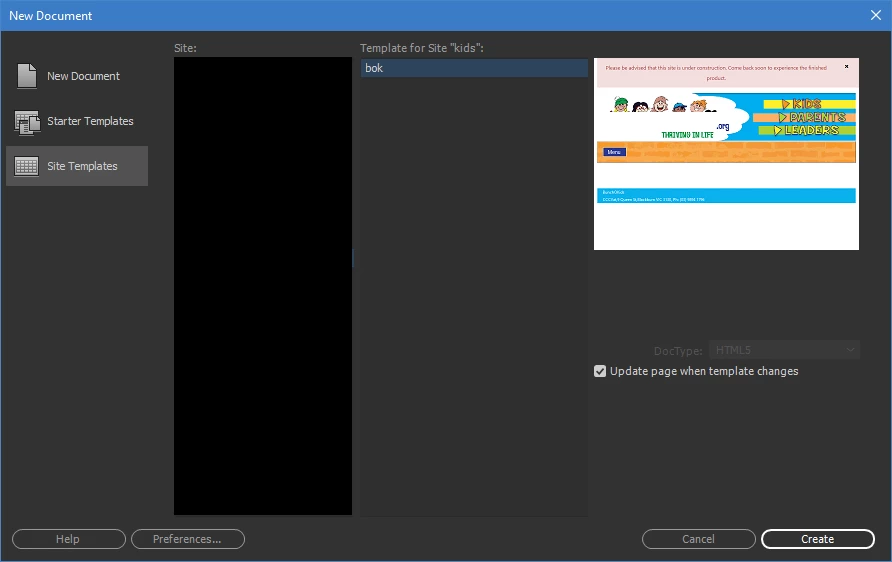
If you have clicked on File > New and, seeing the following dialog, do not see your site's template, then the template is not in the correct location.

The template should always be in the Templates folder in the root directory of your site.

1 reply

BenPleysier
Community Expert
Community Expert
June 29, 2017

Have you defined your sites? See Define a site |

Wappler is the DMXzone-made Dreamweaver replacement and includes the best of their powerful extensions, as well as much more!
Cecil108
Cecil108Author
Known Participant
August 11, 2017

Hi Ben,

I have got the same problem back, I have defined my site, the Create page from Template is no longer there?

Where's it gone?

Thanks

Batch

BenPleysier
Community Expert
BenPleysierCommunity ExpertCorrect answer
Community Expert
August 11, 2017

If you have clicked on File > New and, seeing the following dialog, do not see your site's template, then the template is not in the correct location.

The template should always be in the Templates folder in the root directory of your site.

Wappler is the DMXzone-made Dreamweaver replacement and includes the best of their powerful extensions, as well as much more!