
Exit
  • Global community
    • Language:
      • Deutsch
      • English
      • Español
      • Français
      • Português
  • 日本語コミュニティ
  • 한국 커뮤니티
0

No background color for expanded navbar on small devices

Community Beginner ,
Dec 19, 2022 Dec 19, 2022

I've got a problem with my bootstrap navbar: when I tets it in the development mode in Google chrome, and expand the togge-icon, there is no colored backgrond in the mobile-phone example, but tabelt-formats work fine.

Here are two images showing the difference:
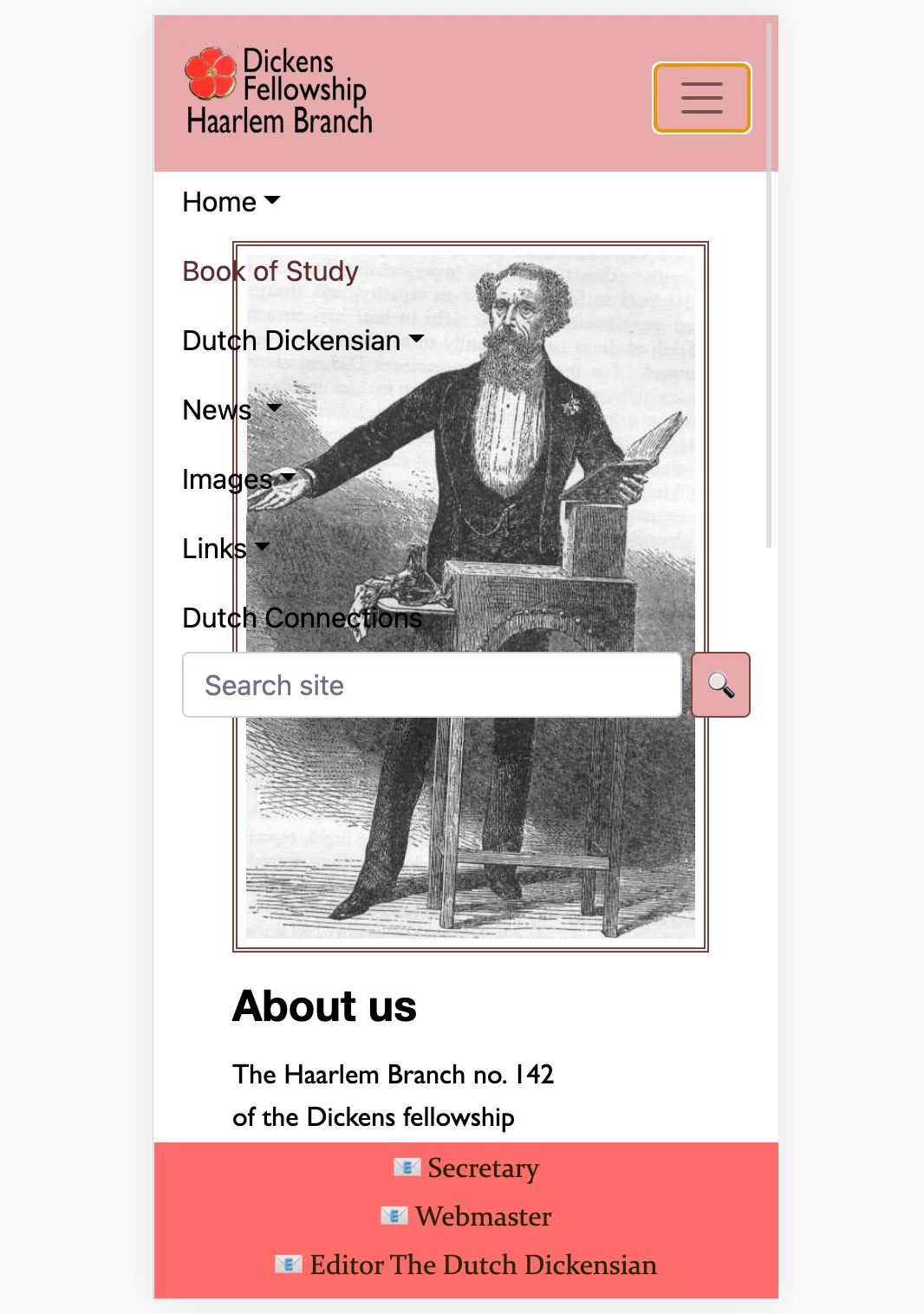
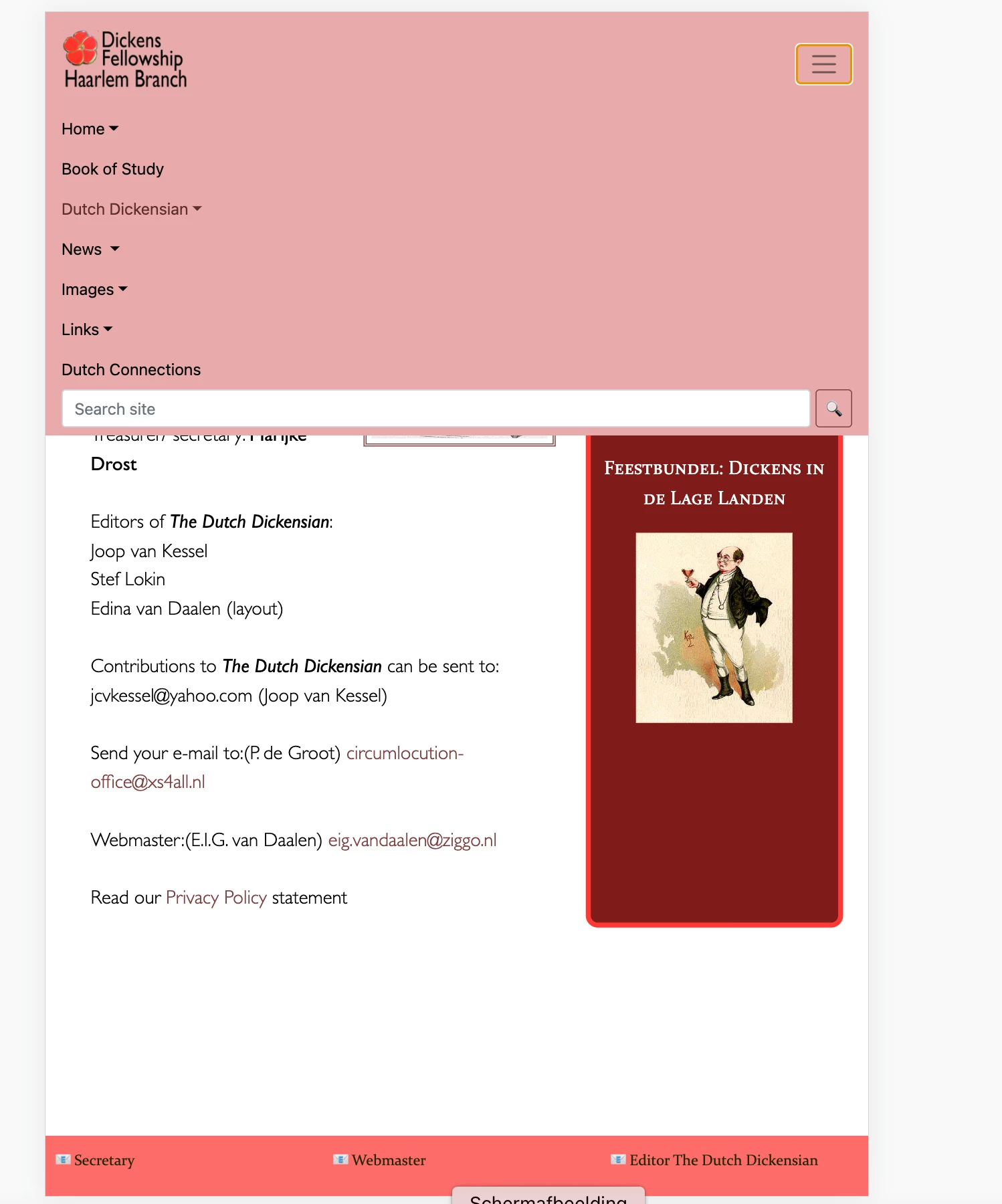
Schermafbeelding 2022-12-19 om 19.30.10.pngSchermafbeelding 2022-12-19 om 19.30.44.png


I don't understand how this can happen, since I didn't have that problem with a previous design. Can anyone take a look at my stylesheet and maby tell me what the solution is? Thanks.


894
Translate
Report
Community guidelines
Be kind and respectful, give credit to the original source of content, and search for duplicates before posting. Learn more
community guidelines
Community Expert ,
Dec 19, 2022 Dec 19, 2022

Without access to the corresponding HTML, it's impossible to say.


Meanwhile, try this.  It works as expected in all devices.


image.png


<!doctype html>
<html lang="en">
<head>
<title>Bootstrap 5.1.3 Example</title>
<meta charset="utf-8">
<meta name="viewport" content="width=device-width, initial-scale=1">
<!--latest minified Bootstrap CSS-->
<link href="https://cdn.jsdelivr.net/npm/bootstrap@5.1.3/dist/css/bootstrap.min.css" rel="stylesheet">

<style>
/**Custom style for pink Navbar**/
.bg-danger { background: deeppink !important }
</style>

</head>
<body>
<!--navbar-->
<nav class="navbar navbar-expand-md navbar-light bg-danger ">
<div class="container-fluid">
<a class="navbar-brand" href="#">Logo</a>
<button class="navbar-toggler" type="button" data-bs-toggle="collapse" data-bs-target="#collapsibleNavbar">
<span class="navbar-toggler-icon"></span>
</button>
<div class="collapse navbar-collapse" id="collapsibleNavbar">
<ul class="navbar-nav">
<li class="nav-item">
<a class="nav-link" href="#">Link</a>
</li>
<li class="nav-item">
<a class="nav-link" href="#">Link</a>
</li>
<li class="nav-item">
<a class="nav-link" href="#">Link</a>
</li>
<li class="nav-item dropdown">
<a class="nav-link dropdown-toggle" href="#" role="button" data-bs-toggle="dropdown">Dropdown</a>
<ul class="dropdown-menu">
<li>
<a class="dropdown-item" href="#">Link</a>
</li>
<li>
<a class="dropdown-item" href="#">Another link</a>
</li>
<li>
<a class="dropdown-item" href="#">A third link</a>
</li>
</ul>
</li>
</ul>
</div>
</div>
</nav>
<!--COMMENT-->
<div class="container mt-3">
<div class="row">
<div class="col-md-10 mx-auto">
<h3 class="mt-3">Bootstrap 5, Collapsible Navbar</h3>
<p>In this example, the navigation bar is hidden on all small screens and replaced by a button in the top right corner.
</p>
<p>When  button is clicked, the  navigation bar will open to reveal vertically stacked links.</p>
</div>
</div>
</div>
<!--latest minified JS bundle-->
<script src="https://cdn.jsdelivr.net/npm/bootstrap@5.1.3/dist/js/bootstrap.bundle.min.js">
</script>
</body>
</html>


Hope that helps.


Nancy O'Shea— Product User, Community Expert & Moderator
Translate
Report
Community guidelines
Be kind and respectful, give credit to the original source of content, and search for duplicates before posting. Learn more
community guidelines
Community Beginner ,
Dec 20, 2022 Dec 20, 2022

Hello Nancy,


Does it have to be 'bg-danger' or can I use the class '.navbar' or '.navbar-expand-lg' instead for the same result?

Translate
Report
Community guidelines
Be kind and respectful, give credit to the original source of content, and search for duplicates before posting. Learn more
community guidelines
Community Expert ,
Dec 20, 2022 Dec 20, 2022

Contextual color classes are baked into Bootstrap. 

https://getbootstrap.com/docs/5.0/utilities/colors/

For convenience I used bg-danger which is normally red and changed it to pink so you understand where the navbar background-color is coming from.  If you wish to change it, that's up to you.


Nancy O'Shea— Product User, Community Expert & Moderator
Translate
Report
Community guidelines
Be kind and respectful, give credit to the original source of content, and search for duplicates before posting. Learn more
community guidelines
Community Expert ,
Dec 20, 2022 Dec 20, 2022

Agreed without seeing the HTML it's tough to say. You can always right click in an affected area and choose Inspect. In your browser's inspector you will see what CSS attributes are impacting the desired area and may be able to see if an attribute is missing or being overwritten by something else. If you can share a link to the page in question we can help take a look for you.

Translate
Report
Community guidelines
Be kind and respectful, give credit to the original source of content, and search for duplicates before posting. Learn more
community guidelines
Community Beginner ,
Dec 20, 2022 Dec 20, 2022

I thought the css stylehseet would be enough as a clue. But hereby I include the html-code of the page.


I'l try out your advice.

Translate
Report
Community guidelines
Be kind and respectful, give credit to the original source of content, and search for duplicates before posting. Learn more
community guidelines
LEGEND ,
Dec 20, 2022 Dec 20, 2022


quote

I've got a problem with my bootstrap navbar: when I tets it in the development mode in Google chrome, and expand the togge-icon, there is no colored backgrond in the mobile-phone example, but tabelt-formats work fine.


By @edinav24550678


That's most likely because you have your navbar css height set to 90px in your media query for mobile phone in your css file. Setting the height won't allow the navbar container div to expand around its contents, so you dont see the full depth of color background behind the navbar content. The content spills out, leaving the navbar at 90px in height and hence the shorter than expected vertical background color.


Translate
Report
Community guidelines
Be kind and respectful, give credit to the original source of content, and search for duplicates before posting. Learn more
community guidelines
Community Beginner ,
Dec 21, 2022 Dec 21, 2022
LATEST

Hello Osgood,


Your simple solution was the answer to my problem! I still got to learn not to mess to much with bootstrap-css, apparently.


Regards,

Edina

Translate
Report
Community guidelines
Be kind and respectful, give credit to the original source of content, and search for duplicates before posting. Learn more
community guidelines