
Known Participant
April 22, 2017
Answered

Padding is moving div o/s fluid grid layout

  • April 22, 2017
  • 1 reply
  • 1711 views

After reading several posts, I am still no wiser to understanding why when I add padding to a text inside a div - it's moving the div outside the fluid grid layout.

I read one post that mentions I should add padding to the actual text using a new css rule, rather than adding the padding to the actual div itself - which I have tried to do, with no joy. The padding applied is still moving the div outside the fluid grid layout...
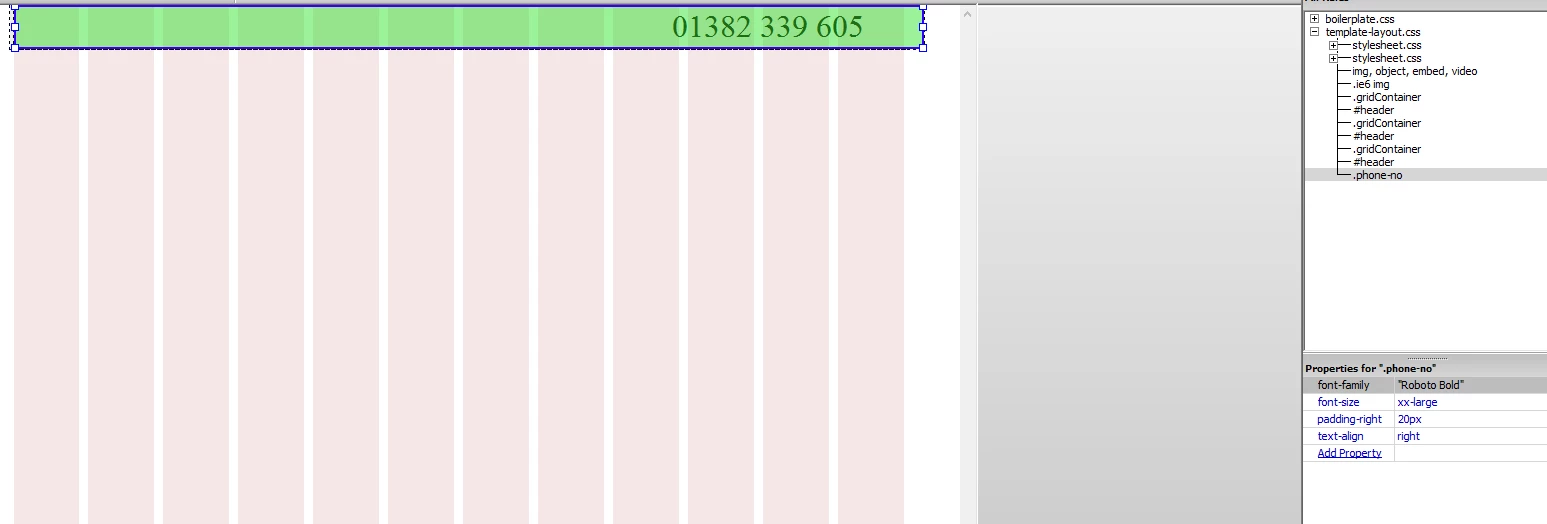
If anyone can point me in the right direction, I would very much appreciate it. Thank you.

/* Desktop Layout: 769px to a max of 1232px.  Inherits styles from: Mobile Layout and Tablet Layout. */

@media only screen and (min-width: 769px) {

.gridContainer {

  width: 89.0217%;

  max-width: 1232px;

  padding-left: 0.4891%;

  padding-right: 0.4891%;

  margin: auto;

}

#header {

  clear: both;

  float: left;

  margin-left: 0;

  width: 100%;

  display: block;

  background-color: #EDEDED;

}

}

.phone-no {

  font-family: "Roboto Bold";

  font-size: xx-large;

  text-align: right;

  padding-right: 20px;

}

This topic has been closed for replies.
Correct answer BenPleysier

This will help you understand Box Sizing | CSS-Tricks In other words, add box-sizing to your CSS rules.

1 reply

BenPleysier
Community Expert
BenPleysierCommunity ExpertCorrect answer
Community Expert
April 22, 2017

This will help you understand Box Sizing | CSS-Tricks In other words, add box-sizing to your CSS rules.

Wappler is the DMXzone-made Dreamweaver replacement and includes the best of their powerful extensions, as well as much more!
Known Participant
April 22, 2017

Thank you Ben.

So, adding the below code to my css layout, allows me to use padding, without moving the div outside the grid?

It appears to have done the trick. Thanks again.

html { box-sizing: border-box; } *, *:before, *:after { box-sizing: inherit; }

Known Participant
April 22, 2017

FYI:  Don't tamper with the Fluid Grid CSS code.  It's very temperamental.

Use a separate stylesheet for your custom styles.

Nancy


Think I spoke too soon.

It worked fine during the test stage, but when I applied it to my actual page... it no longer seems to be working. I keep trying to retrace my steps, but I can't figure out why this worked the first time I tried.

This is the div I am working with:

The style I've applied:

And the box-sizing code that I have attached as a new stylesheet: