Kaberle
Participant
June 10, 2017
Answered

Photo upside down on mobile phones!

  • June 10, 2017
  • 1 reply
  • 1071 views

This is a CS6 question. I added a photo to my home page that looks perfectly fine when viewed via a desktop page- but in a mobile device it's UPSIDE DOWN!!

How in the world does that happen and HOW do I fix it? It was taken with an iPhone 5S.

Thank you in advance,

Jana

    This topic has been closed for replies.
    Correct answer Nancy OShea

    If you use your iPhone or iPad to take video & pictures and you don't hold the device correctly (volume buttons pointing down, round Home button on your right),  you'll end up with upside down or sideways images.

    http://iphonephotographyschool.com/iphone-photos-upside-down/

    http://rotatemailer.com/iphone-horizontal.png

    Apple has auto correction software in its iOS devices to compensate for this.  But other devices do not.

    You seem to have the opposite problem, however.  Looks OK on other devices; upside down on iOS which means your image still contains Apple's orientation metadata.

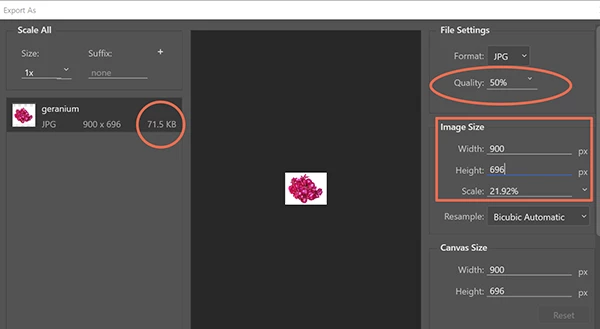
    The best strategy is to open images in Photoshop.  Rotate as needed.   Export As JPG or PNG with a new filename.  Set Metadata to none.   Also don't forget to adjust the quality slider & scale to reduce file size.  Raw images are typically way too big for the web.
    1 reply

    BenPleysier
    Community Expert
    Community Expert
    June 10, 2017

    Please give us a link to the site

    Wappler is the DMXzone-made Dreamweaver replacement and includes the best of their powerful extensions, as well as much more!
    Kaberle
    KaberleAuthor
    Participant
    June 10, 2017

    Indigo Moon Arts ~ Sonora Web Design and Web Developer Services ~ Sonora, Calif. 209 532-4583 ~  that's it but I just changed the image. What would cause it to do that?

    I just want to know to prevent it for future postings.

    Nancy OShea
    Community Expert
    Nancy OSheaCommunity ExpertCorrect answer
    Community Expert
    June 10, 2017

    If you use your iPhone or iPad to take video & pictures and you don't hold the device correctly (volume buttons pointing down, round Home button on your right),  you'll end up with upside down or sideways images.

    http://iphonephotographyschool.com/iphone-photos-upside-down/

    http://rotatemailer.com/iphone-horizontal.png

    Apple has auto correction software in its iOS devices to compensate for this.  But other devices do not.

    You seem to have the opposite problem, however.  Looks OK on other devices; upside down on iOS which means your image still contains Apple's orientation metadata.

    The best strategy is to open images in Photoshop.  Rotate as needed.   Export As JPG or PNG with a new filename.  Set Metadata to none.   Also don't forget to adjust the quality slider & scale to reduce file size.  Raw images are typically way too big for the web.

    Nancy O'Shea— Product User & Community Expert