Inspiring
February 19, 2019
Answered

pop panel script - mucks up the jQuery tab bar

  • February 19, 2019
  • 1 reply
  • 1023 views

I wonder if anyone can help

I am using jQuery tabs bar from dreamweaver plugins I want to add a popup window

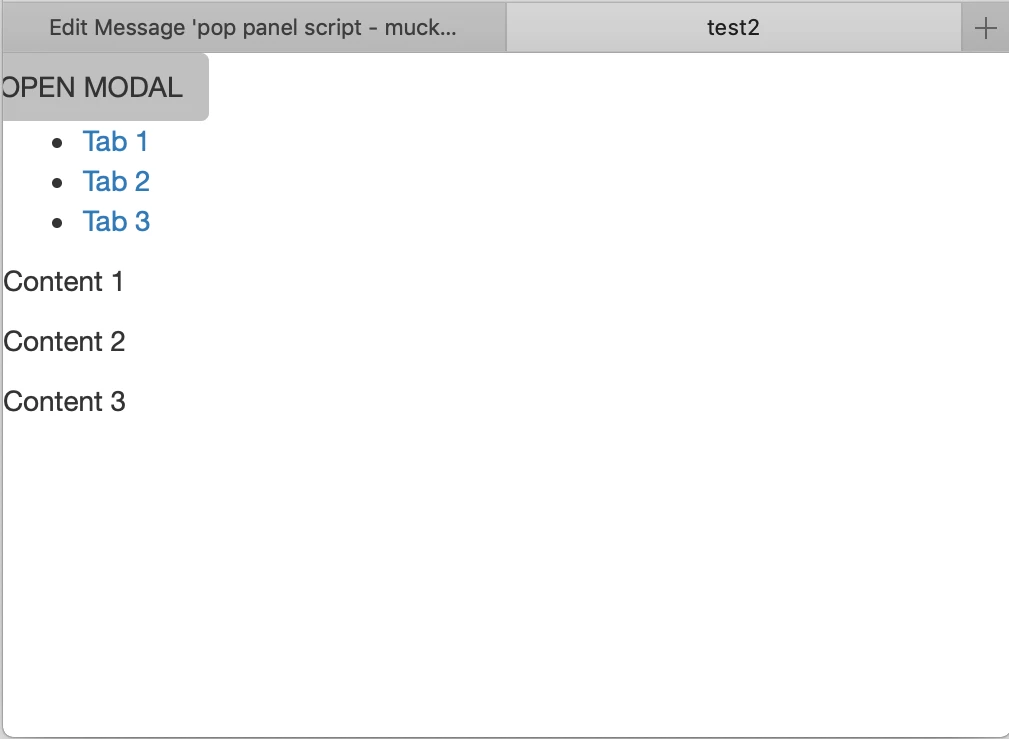
I saw a link that 'Nacy Oo Shea' uploaded which is prefect in the style I want but when I add the code it destroys the tab bar, not sure how to correct this to get the tab bar to work.

Also is there away to get the popup window to open when you click on the button and not auto  load up
Thanks

Tim

------

------

<!doctype html>

<html>

<head>

<meta charset="UTF-8">

<title>test2</title>

<link href="jQueryAssets/jquery.ui.core.min.css" rel="stylesheet" type="text/css">

<link href="jQueryAssets/jquery.ui.theme.min.css" rel="stylesheet" type="text/css">

<link href="jQueryAssets/jquery.ui.tabs.min.css" rel="stylesheet" type="text/css">

<script src="jQueryAssets/jquery-1.11.1.min.js"></script>

<script src="jQueryAssets/jquery.ui-1.10.4.tabs.min.js"></script>

<!--popup start>

<!--[if lt IE 9]>

<script src="http://html5shiv.googlecode.com/svn/trunk/html5.js"></script>

<![endif]-->

<!--Bootstrap-->

<link rel="stylesheet" href="http://maxcdn.bootstrapcdn.com/bootstrap/3.3.5/css/bootstrap.min.css">

<!--popup end>

</head>

  <!--popup panel start -->

<div class="row">

<!-- Button trigger modal -->

<button type="button" class="btn" data-toggle="modal" data-target="#myModal">OPEN MODAL</button>

<!-- Modal window-->

<div class="modal fade left" id="myModal">

<div class="modal-dialog">

<div class="modal-content">

<div class="modal-header">

Modal Header

<button type="button" class="close" data-dismiss="modal" aria-label="Close"><span aria-hidden="true">&times;</span></button>

</div>

<div class="modal-body small" style="text-align:left">

<h3 class="center">Modal Body</h3>

<p>Some text</p>

<p>Some text</p>

<p>Some text</p>

</div>

<div class="modal-footer">

Modal Footer 

<button type="button" class="btn btn-default" data-dismiss="modal">Close</button>

</div>

</div>

</div>

</div>

</div>

</div>

<!--popup panel end -->

<body>

<div id="Tabs1">

  <ul>

    <li><a href="#tabs-1">Tab 1</a></li>

    <li><a href="#tabs-2">Tab 2</a></li>

    <li><a href="#tabs-3">Tab 3</a></li>

  </ul>

  <div id="tabs-1">

    <p>Content 1</p>

  </div>

  <div id="tabs-2">

    <p>Content 2</p>

  </div>

  <div id="tabs-3">

    <p>Content 3</p>

  </div>

</div>

<script type="text/javascript">

$(function() {

  $( "#Tabs1" ).tabs();

});

<!--popup script Latest jQuery Core Library start-->

<script src="http://code.jquery.com/jquery-latest.min.js">

</script>

<!--Bootstrap-->

<script src="http://maxcdn.bootstrapcdn.com/bootstrap/3.3.5/js/bootstrap.min.js"></script>

<!--popup script Latest jQuery Core Library end-->

</script>

</body>

</html>

--------

--------

    This topic has been closed for replies.
    Correct answer Nancy OShea

    Thank you all for your advice. Will redo it using bootstrap.

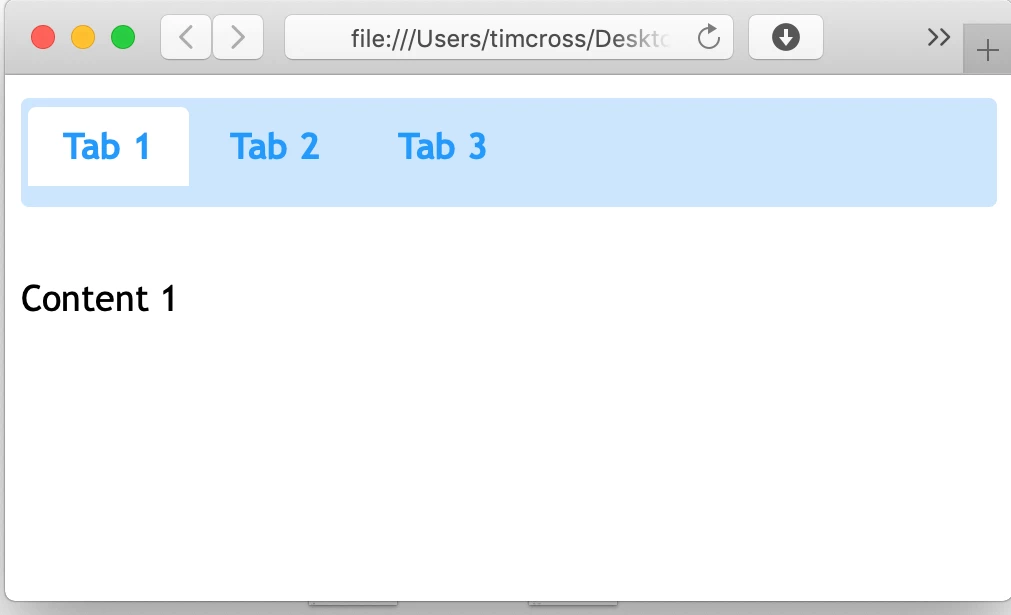
    The jQuery tab was working fine until I tried to add the popup code and then it went all funny.

    Tim


    You don't need jQuery UI if you're using Bootstrap.

    Use Bootstrap's  Dynamic Tabs instead of jQuery Ui tabs.  

    Less code, fewer conflicts.

    <ul class="nav nav-tabs">

      <li class="active"><a data-toggle="tab" href="#home">Home</a></li>

      <li><a data-toggle="tab" href="#menu1">Menu 1</a></li>

      <li><a data-toggle="tab" href="#menu2">Menu 2</a></li>

    </ul>

    <div class="tab-content">

      <div id="home" class="tab-pane fade in active">

        <h3>HOME</h3>

        <p>Some content.</p>

      </div>

      <div id="menu1" class="tab-pane fade">

        <h3>Menu 1</h3>

        <p>Some content in menu 1.</p>

      </div>

      <div id="menu2" class="tab-pane fade">

        <h3>Menu 2</h3>

        <p>Some content in menu 2.</p>

      </div>

    </div>

    In the future when you need to add components,  start with the ones in Bootstrap before going outside the framework.  And stay on top of your code errors.  You'll have way fewer problems that way.

    1 reply

    Legend
    February 19, 2019

    By adding the modal code it looks like you corrupted the existing code. Add the closing </script> tag, shown in red below, to the end of your tabs function. See if that makes a difference.

    <script type="text/javascript">

    $(function() {

      $( "#Tabs1" ).tabs();

    });

    </script>

    You have also got a couple of -- dashes missing from your comment tag:

    <link rel="stylesheet" href="http://maxcdn.bootstrapcdn.com/bootstrap/3.3.5/css/bootstrap.min.css">

    <!--popup end -- >

    Although Im not sure why that comment is there as that is not where the modal code ends, so you might as well delete it.

    tim crossAuthor
    Inspiring
    February 19, 2019

    HI, I corrected that error but sadly that has not correct it :-(

    ----

    ---

    <!doctype html>

    <html>

    <head>

    <meta charset="UTF-8">

    <title>test2</title>

    <link href="jQueryAssets/jquery.ui.core.min.css" rel="stylesheet" type="text/css">

    <link href="jQueryAssets/jquery.ui.theme.min.css" rel="stylesheet" type="text/css">

    <link href="jQueryAssets/jquery.ui.tabs.min.css" rel="stylesheet" type="text/css">

    <script src="jQueryAssets/jquery-1.11.1.min.js"></script>

    <script src="jQueryAssets/jquery.ui-1.10.4.tabs.min.js"></script>

    <!--popup start>

    <!--[if lt IE 9]>

    <script src="http://html5shiv.googlecode.com/svn/trunk/html5.js"></script>

    <![endif]-->

    <!--Bootstrap-->

    <link rel="stylesheet" href="http://maxcdn.bootstrapcdn.com/bootstrap/3.3.5/css/bootstrap.min.css">

    <!--popup end>

    </head>

      <!--popup start -->

    <!-- Button trigger modal -->

    <button type="button" class="btn" data-toggle="modal" data-target="#myModal">OPEN MODAL</button>

    <!-- Modal window-->

    <div class="modal fade left" id="myModal">

    <div class="modal-dialog">

    <div class="modal-content">

    <div class="modal-header">

    Modal Header

    <button type="button" class="close" data-dismiss="modal" aria-label="Close"><span aria-hidden="true">&times;</span></button>

    </div>

    <div class="modal-body small" style="text-align:left">

    <h3 class="center">Modal Body</h3>

    <p>Some text</p>

    <p>Some text</p>

    <p>Some text</p>

    </div>

    <div class="modal-footer">

    Modal Footer  

    <button type="button" class="btn btn-default" data-dismiss="modal">Close</button>

    </div>

    </div>

    </div>

    </div>

    </div>

    </div>

      <!--popup end -->

    <body>

    <div id="Tabs1">

      <ul>

        <li><a href="#tabs-1">Tab 1</a></li>

        <li><a href="#tabs-2">Tab 2</a></li>

        <li><a href="#tabs-3">Tab 3</a></li>

      </ul>

      <div id="tabs-1">

        <p>Content 1</p>

      </div>

      <div id="tabs-2">

        <p>Content 2</p>

      </div>

      <div id="tabs-3">

        <p>Content 3</p>

      </div>

    </div>

    <script type="text/javascript">

    $(function() {

      $( "#Tabs1" ).tabs();

    });

    </script>

    <!--popup script Latest jQuery Core Library start-->

    <script src="http://code.jquery.com/jquery-latest.min.js">

    </script>

    <!--Bootstrap-->

    <script src="http://maxcdn.bootstrapcdn.com/bootstrap/3.3.5/js/bootstrap.min.js"></script>

    <script>

    $('#myModal').modal('show');

    </script>

    </body>

    </html>

    <!--popup script Latest jQuery Core Library end-->

    </body>

    </html>

    -----

    -----

    tim crossAuthor
    Inspiring
    February 19, 2019

    https://forums.adobe.com/people/tim+cross  wrote

    HI, I corrected that error but sadly that has not correct it :-(

    Probably best to take Bens advice on this one. I can see no reason to complicate matters by using the jQuery UI unless you are going to be doing something really fancy, its pointless for tabbed content and from what I remember presents issues if the content in each panel is of different lengths, or maybe that was the jQuery UI accordion....anyway its pretty pointless introducing jQuery UI to reproduce something simple like tabs or an accordion.

    Also the reason why your modal pops open on page-load is because you are instructing it to do so by deploying the below bit of scripting.

    <script>

    $('#myModal').modal('show');

    </script>

    If this is a new project then its best to start with the most up-to-date version of Bootstrap which is 4. If this is something you are wanting to introduce into a Bootstrap 3 project then let us know and we'll try and provide some more guidance.


    Thank you all for your advice. Will redo it using bootstrap.

    The jQuery tab was working fine until I tried to add the popup code and then it went all funny.

    Tim