


Copy link to clipboard
Copied
Hi
I am looking for a simple way to create a pop-up window when the user clicks a hyperlink. When the user clicks the hyperlink, I need a pop-up window to overlay on the screen (smaller size), with the original page still being displayed in the background. Can this be done, relatively simply?
Thanks


 1 Correct answer


As a working example:
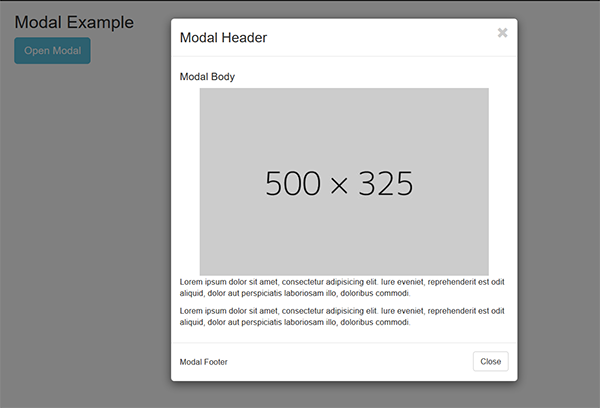
<!doctype html>
<html lang="en">
<head>
<meta charset="utf-8">
<title>Bootstrap 3.3.7 Starter</title>
<meta name="viewport" content="width=device-width, initial-scale=1">
<meta http-equiv="X-UA-Compatible" content="IE=edge">
<!-- Latest compiled and minified Bootstrap CSS-->
<link rel="stylesheet" href="https://maxcdn.bootstrapcdn.com/bootstrap/3.3.7/css/bootstrap.min.css" integrity="sha384-BVYiiSIFeK1dGmJRAkycuHAHRg32OmUcww7on3RYdg4Va+PmSTsz/K68vbdEjh4u" crossorigin="anonymous">
</h
...
 8
Replies
8
8
Replies
8

Copy link to clipboard
Copied
It's called a model window or lightbox.
If you're using Bootstrap, modal windows are built-in to the framework. See example below.
If you're not using Bootstrap, do a Google search for jQuery Lightbox or Fancybox plugins.
Nancy
Copy link to clipboard
Copied
Hey,
Thanks for the info. If I am already using a bootstrap, named "bootstap.cc", should I create a new bootstrap named "modal.js"?
Copy link to clipboard
Copied
I meant to say "bootstrap.css". Sticky keyboard
Copy link to clipboard
Copied
If you're using a complete Bootstrap document, you don't need anything more than the requisite classes in your HTML code.
Nancy
Copy link to clipboard
Copied
As a working example:

<!doctype html>
<html lang="en">
<head>
<meta charset="utf-8">
<title>Bootstrap 3.3.7 Starter</title>
<meta name="viewport" content="width=device-width, initial-scale=1">
<meta http-equiv="X-UA-Compatible" content="IE=edge">
<!-- Latest compiled and minified Bootstrap CSS-->
<link rel="stylesheet" href="https://maxcdn.bootstrapcdn.com/bootstrap/3.3.7/css/bootstrap.min.css" integrity="sha384-BVYiiSIFeK1dGmJRAkycuHAHRg32OmUcww7on3RYdg4Va+PmSTsz/K68vbdEjh4u" crossorigin="anonymous">
</head>
<body>
<div class="container">
<h2>Modal Example</h2>
<!-- Trigger the modal with a button -->
<button type="button" class="btn btn-info btn-lg" data-toggle="modal" data-target="#myModal">Open Modal</button>
<!-- Modal -->
<div class="modal fade" id="myModal" role="dialog">
<div class="modal-dialog">
<!-- Modal content-->
<div class="modal-content">
<div class="modal-header">
<h3 class="modal-title pull-left">Modal Header</h3>
<button type="button" class="close" data-dismiss="modal"><span class="glyphicon glyphicon-remove"></span></button>
</div>
<div class="modal-body">
<h4>Modal Body</h4>
<img class="center-block" src="http://dummyimage.com/500x325.jpg" alt="placholder">
<p>Lorem ipsum dolor sit amet, consectetur adipisicing elit. Iure eveniet, reprehenderit est odit aliquid, dolor aut perspiciatis laboriosam illo, doloribus commodi.</p>
<p>Lorem ipsum dolor sit amet, consectetur adipisicing elit. Iure eveniet, reprehenderit est odit aliquid, dolor aut perspiciatis laboriosam illo, doloribus commodi.</p>
</div>
<div class="modal-footer">
<h5 class="pull-left">Modal Footer</h5>
<button type="button" class="btn btn-default" data-dismiss="modal">Close</button>
</div>
</div>
</div>
<!--/modal--></div>
<!--/container--></div>
<!--latest jQuery-->
<script src="https://code.jquery.com/jquery-1.12.2.min.js" integrity="sha256-lZFHibXzMHo3GGeehn1hudTAP3Sc0uKXBXAzHX1sjtk=" crossorigin="anonymous">
</script>
<!--Bootstrap-->
<script src="https://maxcdn.bootstrapcdn.com/bootstrap/3.3.7/js/bootstrap.min.js" integrity="sha384-Tc5IQib027qvyjSMfHjOMaLkfuWVxZxUPnCJA7l2mCWNIpG9mGCD8wGNIcPD7Txa" crossorigin="anonymous"></script>
</body>
</html>
Nancy
Copy link to clipboard
Copied
Thanks Nancy for your help. Your information is working out for me. 

Copy link to clipboard
Copied
Look into "css modal windows" in Google (there are many tutorials).
Javascript solutions aren't the best option for this anymore given the ubiquity of pop-up blockers in browsers these days.
Copy link to clipboard
Copied
I am looking for an HTML code

Get ready! An upgraded Adobe Community experience is coming in January.
Learn more
 AdChoices
