


jhaber3
Known Participant
August 29, 2023
Answered

Popup hides menu

  • August 29, 2023
  • 2 replies
  • 1422 views

When Dreamweaver opens, it displays a pop-up at upper left with common actions as its default plus other options. However, it covers the menu bar there, so I can't get to Edit actions (apart from alt-E). The popup won't move if I try to drag it. What can I do?

This topic has been closed for replies.
Correct answer Nancy OShea

@jhaber3 when you click your name or go to your profile you can see a list of your previous topics that you can click through. I merged your comment to what I beleive is the thread you were referring to. If not, let me know and I can resolve.


21 days later & we're still discussing the futility of a 23 year old product on modern equipment.


@jhaber3,

It will never work as expected because it's too old.


Either get new web software or find an old computer that still runs Windows 98 or 2000.

That's the best & only answer I have.


2 replies

Community Expert
August 30, 2023

As @Nancy OShea  asked, could you please provide a screenshot ?

Nancy OShea
Community Expert
Community Expert
August 29, 2023

Can you provide a screenshot?

Which operating system are you using?

What is your display's screen resolution and magnification setting?

Are you using a single or dual display?


Nancy O'Shea— Product User & Community Expert
jhaber3
jhaber3Author
Known Participant
August 29, 2023

You really think the screen resolution could be inadequate? I've been running Dreamweaver on other laptops for years, and this is a brand new Windows 11 laptop. I don't know the terms, but I'm sure it's a single display.

Nancy OShea
Community Expert
Community Expert
August 30, 2023

I just took a screen shot. With luck, you'll find that my description already covers it, but here goes! Any help appreciated.


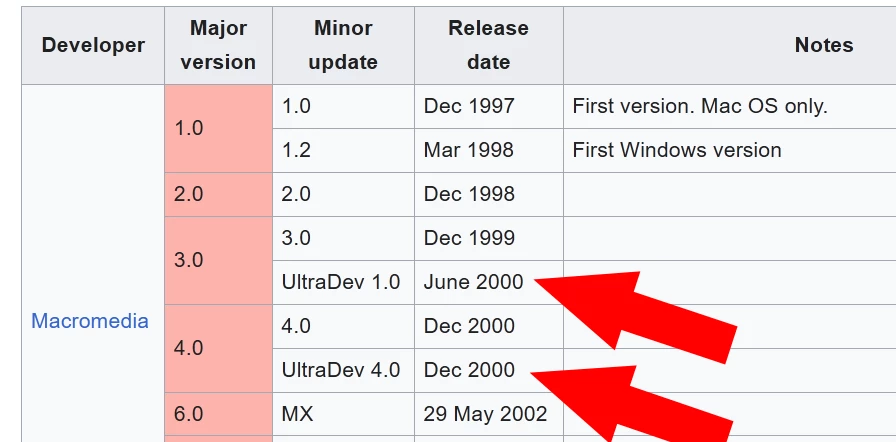
Given the advanced age of UltraDev — and on Windows 11 no less, I'm not even going to suggest a solution.  This is a waste of everyone's time.


Nobody should be using 20 year old web software in 2023. 

  • The Internet has changed too much. 
  • Coding technology has changed too much.
  • Computers, browsers and the web devices that people use have changed too much.  


Please do everyone a favor and get a modern code editor that's compatible with Windows 11. 

If not Dreamweaver CC, then something else...


CODE TUTORIALS:
- https://www.w3schools.com/html/
- https://www.w3schools.com/css/
- https://www.w3schools.com/js/

- https://www.w3schools.com/bootstrap/
================
CODE EDITORS:
-- Adobe Dreamweaver CC - https://www.adobe.com/products/dreamweaver.html
-- Codespaces (free, browser-based) - https://github.com/features/codespaces
-- Nova (Mac only, formerly called Coda) - https://nova.app/
-- Pinegrow - https://pinegrow.com/
-- Sublime Text - http://www.sublimetext.com/
-- Visual Studio Code (free) - https://code.visualstudio.com/
-- Wappler ~ Visual Web App Builder - https://wappler.io/

Hope that helps.


Nancy O'Shea— Product User & Community Expert