Inspiring
January 23, 2017
Answered

Question on Icons

  • January 23, 2017
  • 2 replies
  • 420 views

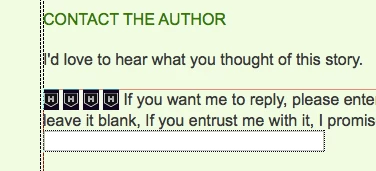
I'm new to DW so could someone please tell me what these strange icons are for (see screenshot - H inside a shield)?

Thanks

Alan
    This topic has been closed for replies.
    Correct answer Jon Fritz

    Those are Design View's icon for Hidden Form Fields.

    You can change which Invisible Element icons you see under Edit > Preferences > Invisible Elements

    2 replies

    Nancy OShea
    Community Expert
    Community Expert
    January 23, 2017

    Shields denote the type of code.  In your case, it looks like HTML5.

    In my example, it's PHP code.

    Nancy

    Nancy O'Shea— Product User & Community Expert
    Jon Fritz
    Community Expert
    Community Expert
    January 23, 2017

    While the small shield icons can denote the type of code being used (it's 1 of the 13 icons in Invisible Elements, specifically "visual server markup tags"), in the OP's case, they are denoting hidden form fields.

    That particular H icon appears when a form <input> has type="hidden"...

    Inspiring
    January 24, 2017

    Thanks everyone.

    Alan

    Jon Fritz
    Community Expert
    Jon FritzCommunity ExpertCorrect answer
    Community Expert
    January 23, 2017

    Those are Design View's icon for Hidden Form Fields.

    You can change which Invisible Element icons you see under Edit > Preferences > Invisible Elements
