Answered
Question on Icons
I'm new to DW so could someone please tell me what these strange icons are for (see screenshot - H inside a shield)?
Thanks
Alan
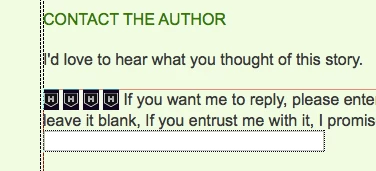

I'm new to DW so could someone please tell me what these strange icons are for (see screenshot - H inside a shield)?
Thanks
Alan
Those are Design View's icon for Hidden Form Fields.
You can change which Invisible Element icons you see under Edit > Preferences > Invisible Elements
Already have an account? Login
Enter your E-mail address. We'll send you an e-mail with instructions to reset your password.
 AdChoices