Copy link to clipboard
Copied
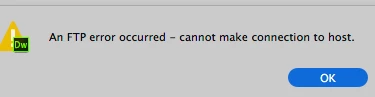
I have never had to do this and cannot even upload to my site now
cuz nothing happens in response except error. Now what?
Thanks anyone !
DW 18.1 b 10155

Hi,
Thanks for reporting. We are aware of this issue and looking into it.
Will update you on this thread once the bug is fixed. Thanks for your patience.
Thanks
Copy link to clipboard
Copied
It's a Mac problem. Contact Apple support.
Copy link to clipboard
Copied
ok thanks.
How do you know that?
Copy link to clipboard
Copied
See Preran's reply #14 below for the latest on this.
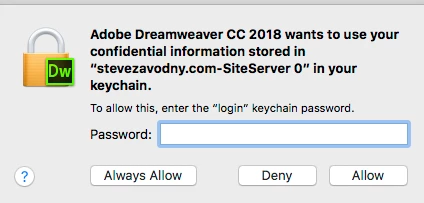
Re: Adobe Dreamweaver CC 2018 wants to use your confidential stored in " " in your keychain
Copy link to clipboard
Copied
Since this seems to have cropped up with 2018.1, it may be worth trying an older version of DW.
You can have all major releases of cloud versions installed on the same machines at the same time under a single subscription, they just won't run concurrently. To download and install an older version...
1. Open the CC Desktop App
2. Click the Apps Tab
3. Click the small arrow next to DW's button
4. Choose Other Versions
5. Click and install a more stable version, like CC2015
If it works from there, at least you'll be able to update your site without the Mac constantly popping up the Allow/Deny prompt. hopefully Adobe and/or Apple can get to the bottom of it.
Copy link to clipboard
Copied
To add to what Jon suggested (reverting to an older version), you could try connecting to server with Filezilla FTP client. It's free.
https://filezilla-project.org/download.php?show_all=1
Copy link to clipboard
Copied
What am I supposed to do with that?
Went to 18.0 b10136 NO success.
Copy link to clipboard
Copied
That sounds logical because it is a keychain problem. Google the issue or go to How to Resolve Mac OS X Keychain Problems – Queens University of Charlotte
Copy link to clipboard
Copied
Hi,
Thanks for reporting. We are aware of this issue and looking into it.
Will update you on this thread once the bug is fixed. Thanks for your patience.
Thanks
Copy link to clipboard
Copied
It has been an entire week now and I have no access to my own site.
I dont even know what to try. Cannot upload files for clients.
DW 18.1 b 10155


Copy link to clipboard
Copied
Download the Filezilla FTP Client.
It's a free dedicated FTP program. You can make your changes in DW, then open FZ to do the upload while troubleshooting continues in DW.
If you still can't upload from FZ, it would point to an issue outside of Dreamweaver, possibly a loss of your FTP credentials on the server. If that happens, you will need to contact your hosting company.
Copy link to clipboard
Copied
So adobe still has some problems with this?
Copy link to clipboard
Copied
My guess is there won't be a fix until the next version is released in the next couple months.
They very likely won't tell us either way. Adobe's policy has been not to give release dates or discuss included fixes until the product is released.
Copy link to clipboard
Copied
Gosh this is fundamental. Cant imagine leaving us adrift like that?
Copy link to clipboard
Copied
Hi,
Dreamweaver 18.2 is live. It can be downloaded from creative cloud Desktop application.
This issue is fixed in 18.2 for Dreamweaver update from versions other than 18.0 to latest Dreamweaver version 18.2.
However, the issue still exist if we update Dreamweaver 18.0 to Dreamweaver 18.2.
Please refer to known issues document: Known issues in the 18.0 and 18.1 releases of Dreamweaver CC
Thanks
Copy link to clipboard
Copied
It sounds like updating from 18.1 should solve the problem, then?
NO IT DOES NOT WORK

Copy link to clipboard
Copied
According to the release notes from Adobe, CC 18.2 only fixes some SFTP upload issues. Apparently, using a .pem file versus a .ppk file for your private key file in the Identity File field for your server info should now work.
The specific issue you started this thread about, the Keychain access pop-up, was not fixed in the CC 18.2 update, per Kratika's post and link.
Copy link to clipboard
Copied
DW has "remote" and "Testing" for ftp service.
I am able to get remote service in the "testing" mode.
As long as it stays this way, I am ok, but this is not normal?
or expected, right? does this mean anything?
Copy link to clipboard
Copied
As far as I've ever seen, the only thing checking the radio button for Testing and Remote should really do, is assign the associated FTP information from your server set-up to the corresponding buttons in the Expanded Files window.
Copy link to clipboard
Copied
AND the info in both is the same, but only "testing" works for me.
Copy link to clipboard
Copied
Under Servers > Advanced, what is your Testing Server's model?
Copy link to clipboard
Copied
nothing is selected for both models
Copy link to clipboard
Copied
Hi Steve,
Thanks for reporting the issue.
Can you please elaborate on the hosting server, list of ciphers, mac, kex algos being used in the connection.
Also, can you please tell if you are using username/password authentication for the connection
OR identity file for the connection.
If identity file, i hope you are using .pem file as Dreamweaver doesn't support .ppk file (which other clients like file zilla and putty does).
And just to confirm, are you using the latest CC 2018.2 DW build.
Thanks,
Mahak Kudyar
Adobe Dreamweaver
Copy link to clipboard
Copied
mahakk20912952 wrote
Hi Steve,
Thanks for reporting the issue.
Can you please elaborate on the hosting server, list of ciphers, mac, kex algos being used in the connection.
Also, can you please tell if you are using username/password authentication for the connection
OR identity file for the connection.
If identity file, i hope you are using .pem file as Dreamweaver doesn't support .ppk file (which other clients like file zilla and putty does).
And just to confirm, are you using the latest CC 2018.2 DW build.
Thanks,
Mahak Kudyar
Adobe Dreamweaver
I'd be glad to report but I dont know those terms:
"hosting server, list of ciphers, mac, kex algos being used in the connection."
"If identity file, i hope you are using .pem file as Dreamweaver doesn't support .ppk file"
but yes, username/password, yes 18.2
Everything worked seamlessly for years.


Copy link to clipboard
Copied
Have you contacted Blue Host to see if anything has changed on your server recently?
It's not unusual for hosting companies to goof up user credentials when upgrading servers.
Have you tried adding your domain name, rather than the IP address in the FTP Address field?
Also, the "Web URL" field will usually be your actual www web address, not the ftp location.
Find more inspiration, events, and resources on the new Adobe Community
Explore Now