


Copy link to clipboard
Copied
Hello, everyone! I have set up a testing server for my Dreamweaver website using WAMP. When I try the Live view or try to see the website in a browser, the pages seem to have a problem loading the .css files which are inserted in a php include.
Does someone know how to solve this or what may be the cause of this error?
Thanks!


 1 Correct answer


Hi,
We have seen such issues happening with the browser cache. Please try clearing your browser cache and see if it works.You can do it automatically if you use Ctrl+F5 in your browser.
For future reference-
Most probably the file is just being cached by the server. You could either disable cache (but remember to enable it when the site goes live), or modify href of your link tag, so the server will not load it from cache.
If your page is created dynamically by some language like php, you could add
...
 17
Replies
17
17
Replies
17


Copy link to clipboard
Copied
What happens if you right-click the open tab and select View in Browser -- without F12 Real-Time Preview?

If you still can't see your CSS styles, it's likely because the testing server is not set up correctly or the path to your CSS file is not relative to the parent document.

Copy link to clipboard
Copied
In addition to Nancy's suggestion, another possibility is that you may not be including the CSS rules from the include correctly.
What I do is build up one large PHP variable with the css rules in the include, then, in the HTML (PHP) file, include it as follows:
<style>
<?php echo $my_css_variable ?>
</style>
Copy link to clipboard
Copied
Thanks, Nancy and Rob! I tried both Live view and "Open in Browser" and none of them seem to be picking up the css. I think my server is correctly setup as I see the page but without all the includes! BTW, I'm working with DW CS6 which I didn't mention before.
This is the code I use for them
<head>
<meta http-equiv="Content-Type" content="text/html; charset=utf-8">
<meta charset="UTF-8"/>
<title>Liceo Espigas</title>
<meta name="keywords" value=""/>
<meta name="viewport" content="width=device-width, initial-scale=1">
<?
include 'phpincludes/imports/links.php';
include 'phpincludes/imports/scripts.php';
?>
</head>
<body id="home" style="background: #fcf3db;">
<div class="wrapper">
<div class="inner">
<!-- site header -->
<div class="site-header group">
<?
include 'phpincludes/header.php';
include 'phpincludes/menu.php';
?>
</div>
They work online, that is when I upload the files via FTP, so I don't underestand why they don't work from the testing server.
Any help is highly appreciated as I'm new at working with php. Tks!
Copy link to clipboard
Copied
Are you using site root relative links? When working locally, site root relative links will drill all the way down to your computer's hard drive which causes a failed response. However, it works just fine on a remote server.
I prefer to use document relative links when working locally. See screenshot.

Copy link to clipboard
Copied
I'm using document too. It's really frustrating that viewing php files is so complicated!

Copy link to clipboard
Copied
Show us the code inside your include file that holds CSS links.
I'm guessing it's a path problem.
Nancy
Copy link to clipboard
Copied
This is the code for the links (links.php). For example, the page I'm trying to view in the browser is directly under the root folder.
<link rel="icon" type="image/png" sizes="32x32" href="favicon-32x32.png">
<link href="https://maxcdn.bootstrapcdn.com/bootstrap/3.3.7/css/bootstrap.min.css" rel="stylesheet"
integrity="sha384-BVYiiSIFeK1dGmJRAkycuHAHRg32OmUcww7on3RYdg4Va+PmSTsz/K68vbdEjh4u" crossorigin="anonymous">
<link rel="stylesheet" href="css/style.css" type="text/css"/>
<link rel="stylesheet" href="css/newstyles.css" type="text/css"/>
<link rel="stylesheet" href="css/magnific-popup.css" type="text/css"/>
<link rel="stylesheet" href="css/flexslider.css" type="text/css"/>
<link rel="stylesheet" href="https://cdnjs.cloudflare.com/ajax/libs/ekko-lightbox/5.1.1/ekko-lightbox.css"/>
<link href="https://fonts.googleapis.com/css?family=Gilda+Display|Indie+Flower" rel="stylesheet">
<link href="https://maxcdn.bootstrapcdn.com/font-awesome/4.7.0/css/font-awesome.min.css" rel="stylesheet"
integrity="sha384-wvfXpqpZZVQGK6TAh5PVlGOfQNHSoD2xbE+QkPxCAFlNEevoEH3Sl0sibVcOQVnN" crossorigin="anonymous">
Copy link to clipboard
Copied
Everything there looks fine.
Is your testing server running and displaying a green (good to go) icon in your Taskbar? See screenshots.
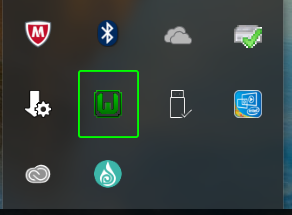
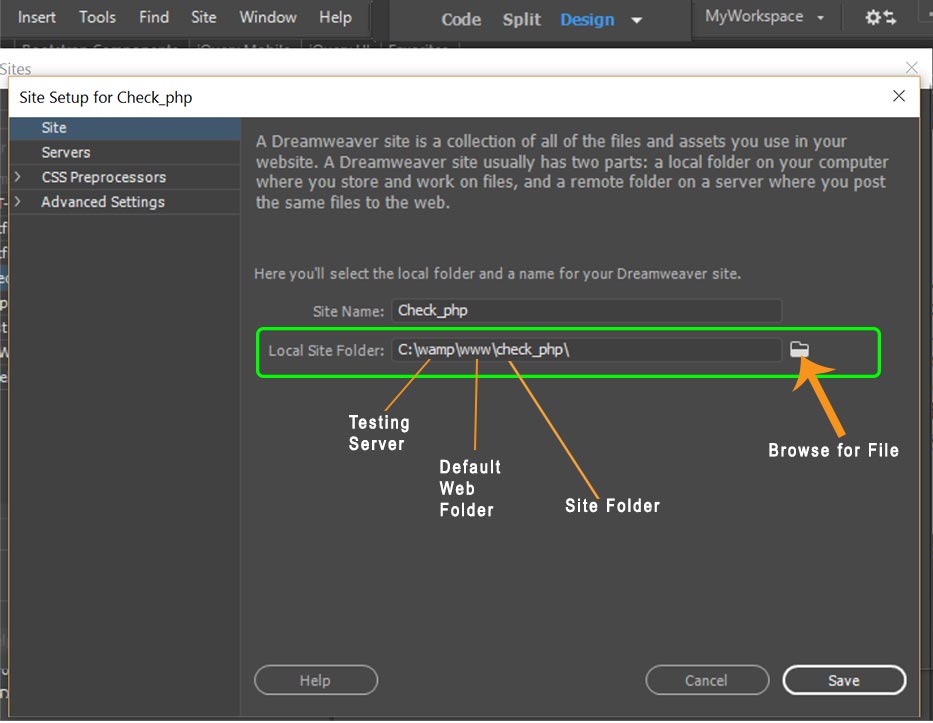

Advanced Tab: Server Model PHP & MySQL.
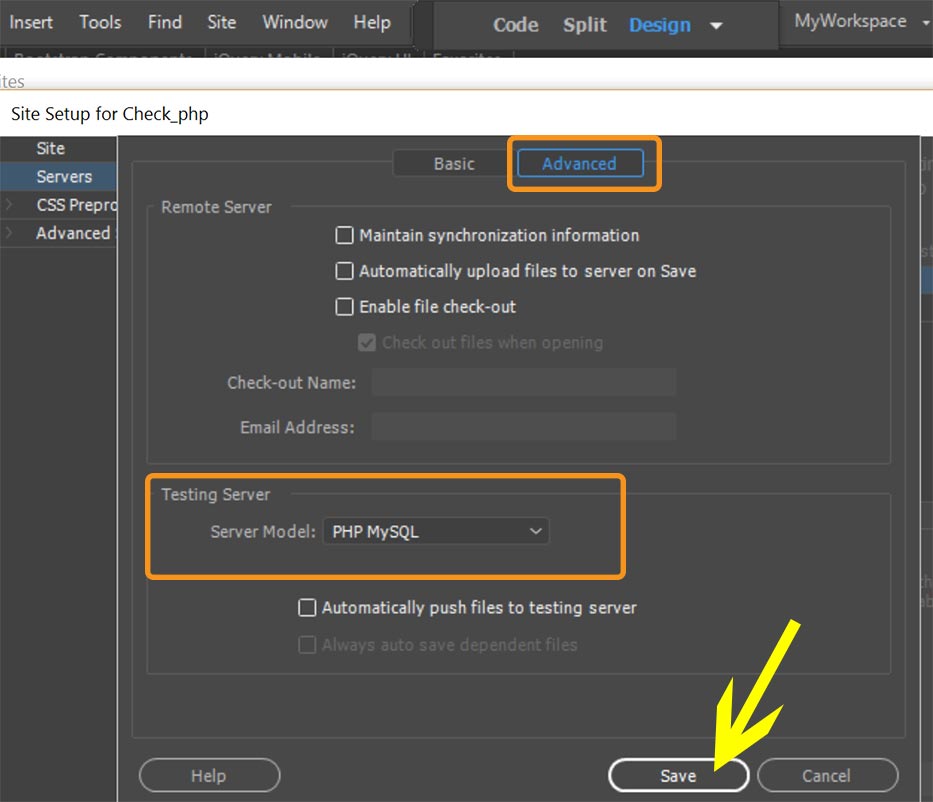

Nancy

Copy link to clipboard
Copied
Instead of
<?
include 'phpincludes/imports/links.php';
include 'phpincludes/imports/scripts.php';
?>
try
<?php
include ('phpincludes/imports/links.php');
include ('phpincludes/imports/scripts.php');
?>
Copy link to clipboard
Copied
Thanks guys! Nancy, the Wamp icon is green in my taskbar and it says "all services running" 
I'll check all the things you and Ben suggested tomorrow.
Thanks again for all your help and effort 
Copy link to clipboard
Copied
Hi,
We have seen such issues happening with the browser cache. Please try clearing your browser cache and see if it works.You can do it automatically if you use Ctrl+F5 in your browser.
For future reference-
Most probably the file is just being cached by the server. You could either disable cache (but remember to enable it when the site goes live), or modify href of your link tag, so the server will not load it from cache.
If your page is created dynamically by some language like php, you could add some variable at the end of the href value, like:
<link rel="stylesheet" type="text/css" href="css/yourStyles.css?<?php echo time(); ?>" />
That will add the current timestamp on the end of a file path, so it will always be unique and never loaded from cache.
If your page is static, you have to manage those variables yourself, so use something like:
<link rel="stylesheet" type="text/css" href="css/yourStyles.css?version=1" />
after doing some changes in the file content, change version=1 to version=2 and so on.
Hope this helps.
Regards,
Niharika Gupta
Adobe Dreamweaver
Copy link to clipboard
Copied
I really don't know what's wrong. I check everything that all of you have suggested and both the configuration in DW as well as Wamp are correct.
One question though, must the name of the folder in DW be the same as the folder in Wamp/www? Or any name there will act as a testing server if it is assigned as such to any folder you've already been working on in DW and synchronized with it?
For example, I've been working on a folder in DW called Liceo-tester and I have set up a folder called Liceo-server in Wamp/www. Will that work?
Thanks all again!
Copy link to clipboard
Copied
The site definition name you use in DW can be anything. It's merely a way to identify the site.
For example SiteName1 -- Testing Server, Remote Server.

I always define my local site in the testing server's default web folder. When I save files, they are automatically saved in the testing server. If you don't do it that way, you have to remember to PUT files to the testing server which is an additional step that I prefer to avoid.
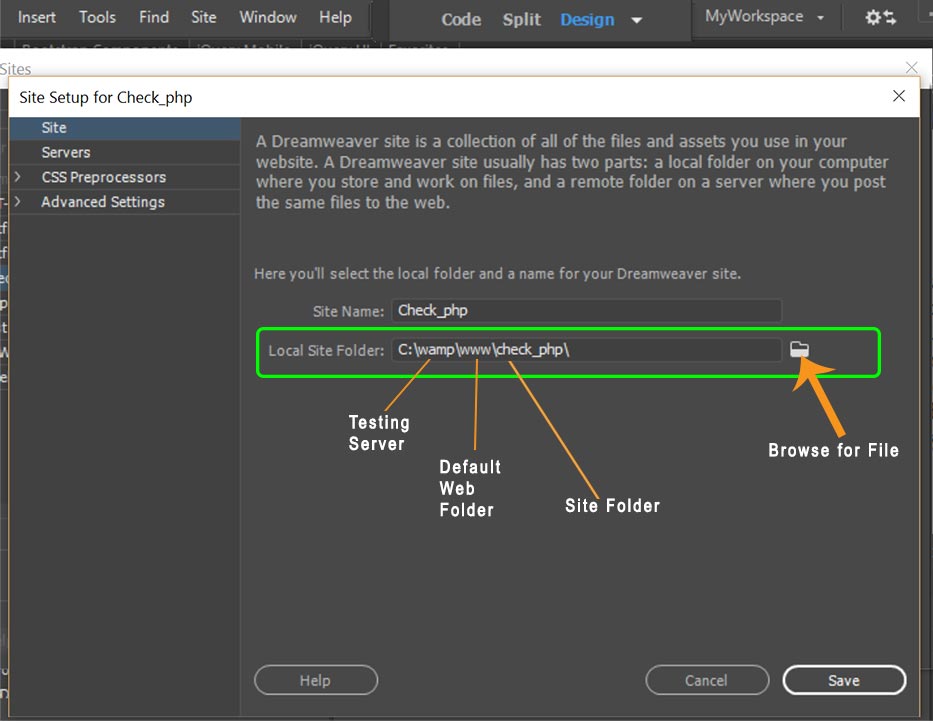
Is your local site folder in your testing server?
Copy link to clipboard
Copied
The site folder I've been working on in called Liceo-tester and it' located in My Web Sites. My testing folder is located in Wamp/www and it's called Liceo-server.
When I try to assign Liceo-server to be the testing server for Liceo-tester, it still doesn't work...
In your example, your local folder and your testing server are the same, if I'm correct. I tried that too, that is making my site folder and testing folder the same wamp/www/Licep-server and it still doesn't work.
I'm sure I followed all of the instructions you gave me to configure the server. Thanks all of you for helping!!!
If I were to use a remote server, let's say a folder in my hosting server, how would I do that? I'm getting pretty frustrated here!
P.S.: My hosting provider just told me their servers cannot be used as testing servers. The only way is to upload the files via FTP. So I'm going to try with XAMPP instead of WAMP and see what happens. I'll keep you posted *crossing fingers*
Thanks again for all your help!
Copy link to clipboard
Copied
Well, folks. XAMPP worked beautifully! It only took me like 10 minutes to download, install and configure it
I was starting to think I was really dumb LOL
Copy link to clipboard
Copied
Do you have Skype? Skype is a known conflict with WAMP because they both use port 80.
WAMP and Skype Conflict | BeFused
Nancy
Copy link to clipboard
Copied
Thanks, Nancy. That must have been the problem with Wamp then! I do have Skype installed. But well, XAMPP is working fine so far.

Get ready! An upgraded Adobe Community experience is coming in January.
Learn more
 AdChoices