


- Home
- Dreamweaver
- Discussions
- Re: want allman code formatting on php code in dre...
- Re: want allman code formatting on php code in dre...

Copy link to clipboard
Copied
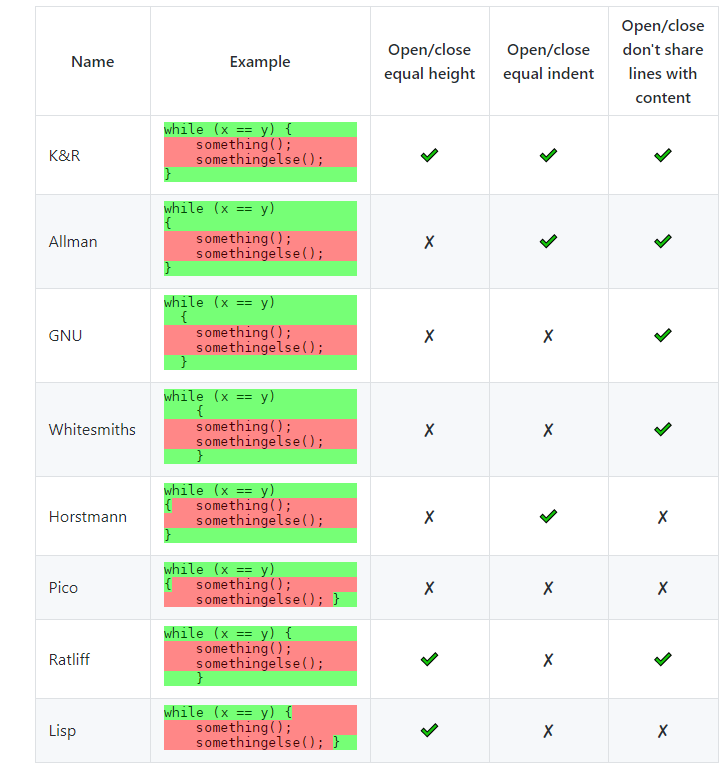
I want allman source formating in php code, but here have only retliff formate


 1 Correct answer

the Bracket preference setting interface has not been integrated in DW... so you have to write hard in the code...
as Ben indicates, open the file beautify-php.js (in admin mode)
if you replaced online 295 the string "collapse" by "expand" it should do the job, but in some cases I noticed that it was not taken into account
so place a comment on line 295....
and add a hard line containing
opt.brace_style = "expand";

 7
Replies
7
7
Replies
7



Copy link to clipboard
Copied
To see the script that formats the PHP code, go to C:\Program Files\Adobe\Adobe Dreamweaver CC 2018\www\extensions\default\BracketsDWBeautify\thirdparty\beautify-php.js
I have not found the section that is relevant to your problem, but it should not be too hard if you have the time.
Copy link to clipboard
Copied
please help me how to change the beautify-php.js file for allman coding , thanks
Copy link to clipboard
Copied
Line #34 of the script says:
brace_style (default "collapse") - "collapse-preserve-inline" | "collapse" | "expand" | "end-expand" | "none"
put braces on the same line as control statements (default), or put braces on own line (Allman / ANSI style), or just put end braces on own line, or attempt to keep them where they are.
Then, when you do a find on 'brace_style' you will see all of the occurrences.
When I have more time, I will go through the file and where it is used on the preferences side. In the meantime, maybe someone else can help you out.
Copy link to clipboard
Copied
the Bracket preference setting interface has not been integrated in DW... so you have to write hard in the code...
as Ben indicates, open the file beautify-php.js (in admin mode)
if you replaced online 295 the string "collapse" by "expand" it should do the job, but in some cases I noticed that it was not taken into account
so place a comment on line 295....
and add a hard line containing
opt.brace_style = "expand";
Copy link to clipboard
Copied
thanks sir , i done this job succefully

Copy link to clipboard
Copied
I'm not real fussy about code formatting since it has zero effect on site performance. But if you feel strongly about code format styles, go to your Dreamweaver Help menu > Submit Bug/Feature Request.
Copy link to clipboard
Copied
I'm not arguing, but it's not question of performance there, but readability...
when we work on dozens of projects simultaneously and in addition with teams that have different requirements (isolated closures or not, tab vs spaces, extended verticality distance...) the formatting of the code quickly becomes an unavoidable necessity...
on the beta forum itself we have 4 different topics just on formatting

Get ready! An upgraded Adobe Community experience is coming in January.
Learn more
 AdChoices