

martinv44029552
Inspiring
October 27, 2018
Question

Website erratic on iPhones

  • October 27, 2018
  • 3 replies
  • 1732 views

Hello

I've posted a couple of times before but perhaps never properly introduced myself. By the way it's not a current pic of me, I'm sadly way older than that, still missing my youth;)

I'm trying to learn HTML and CSS but finding it a slow process. I've completed a very basic course and have been plowing through the W3Schools and adobe tutorials and while I'm getting a better understanding of the theory, practise is very much a different matter. I'm currently using the latest version of Dreamweaver. I only wish to attain skills for my own personal use, I have no intention of trying to set myself up in any shape or form as a web designer.

I've currently copied and pasted a w3schools template (am I allowed to say that, there weren't any appropriate free adobe ones) into my Dreamweaver application to get some practise and adapted it to suit my needs.

I've uploaded it to a remote server and it appears to work fine on Desktop and iPad but is erratic on iPhones, I have an iPhone 6s but I've tried it on other models and it's the same issue on them all.

It loads and resizes perfectly to fit the screen and initially it'll work for a bit but if I open and close the images repeatedly they eventually start to overlap, this happens on all the pages.

The only errors that appear on my HTML sheet are below
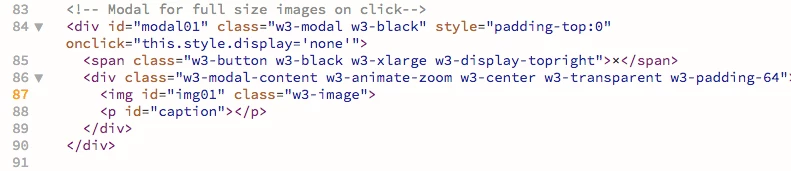
and the only errors on my CSS sheet are below
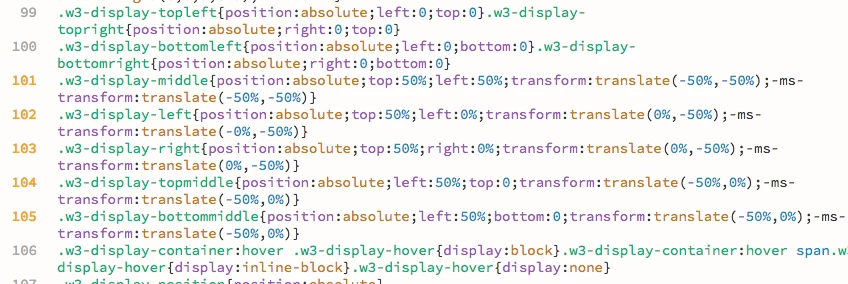
Would these errors be likely to cause the overlapping of images, see below, on mobile devices?


My web address: martinvallis.com

Any thoughts and feedback would be much appreciated.

Thanks in anticipation.

Martin

    This topic has been closed for replies.

    3 replies

    ALsp
    Legend
    October 28, 2018

    Absolute positioning can be a little sometimes with phones and small screens. So can  transforms and transitions. Also problematic are fixed background images and the background size property. I would say that relying on free templates is usually a very bad idea. But, as Ben said, the only real way to get some help here is going to require that you post a link to your actual page.

    And a word to the wise - there is no such thing as a free lunch. You get what you pay for, either in tools or in the investment of your time in learning.

    martinv44029552
    Inspiring
    October 28, 2018

    Thanks for getting back to me ALsp​ I appreciate your time.

    I totally agree with you 'you get what you pay for' but as I said in my original post, I'm basically a beginner, though I have done a course and have been reading tutorials, however I think it's fairly understandable that I choose to experiment with a free template to improve my understanding of the process.

    When I feel in a better position to make an informed judgement on the best way for me to proceed based on my skill level, then I have no problem with paying for a responsive template if I feel that may be my best option, while I try to build something from scratch which will obviously take me a lot longer.

    martinv44029552
    Inspiring
    November 1, 2018

    Absolutely no offense intended. Whether you realize it or not, I am actually trying to help you. I'm sure Nancy is trying to help you, and I certainly don't expect you to know much about me, but masonry grids are nothing more than a JavaScript parlor trick. and the code-weight is totally unnecessary if the page link you posted is any indication of the images you are actually using. My advice, if you can read between the lines, is simple and always consistent... learn to write CSS. Use extensions to augment your skills, if necessary, or if you've gotten to the point where saving time is worth money. Rely on Bootstrap at your own peril, because the effort required to understand it will leave you in a position where you will never need it.

    Amen and good luck


    Nancy certainly has been helpful Nancy OShea and apologies @ALsp if I misread your comments but you did appear to be emphasising the ‘free’ comment.

    Neither of us know each other and to make assumptions is a bit premature, my decision making is based on the current circumstances I find myself in.

    My plan was that perhaps I could have a short term solution, maybe I’m wrong in thinking that, while in the long term learning html and css, which I am, in amongst the other stuff that life throws up.

    I hope that clears up any misunderstanding.

    BenPleysier
    Community Expert
    Community Expert
    October 28, 2018

    None of the code include errors, only warnings. The HTML code shows a warning for <img> not containing an 'alt' attribute (see An img element must have an alt attribute · cfjedimaster/brackets-w3cvalidation Wiki · GitHub ), the CSS shows non--compliant prefixes when using '-ms-transform'.

    None of these warnings will cause the problem that you are having. The best way for us to help you, is to upload the site and supply the URL to the site.

    Wappler is the DMXzone-made Dreamweaver replacement and includes the best of their powerful extensions, as well as much more!
    martinv44029552
    Inspiring
    October 28, 2018

    Thanks for your reply BenPleysier​ I appreciate your time. Link below.

    http://martinvallis.com/

    Nancy OShea
    Community Expert
    Community Expert
    October 27, 2018

    98% of browser rendering problems are code related.  An orphaned or missing curly brace will kill all CSS styles below it. 

    Check CSS

    The W3C CSS Validation Service

    Check HTML

    The W3C Markup Validation Service

    Nancy O'Shea— Product User & Community Expert
    martinv44029552
    Inspiring
    October 28, 2018

    Many thanks for your response and for the validation links Nancy OShea

    A number of issues occur in HTML all relate to images, see below. While I comprehend the message, as hard as I look I cannot see where the space it refers to is located within the code?

    Also in the CSS validation this appears but seems to be a warning rather than an error?

    The trouble of course that I'm having along with the website performance on mobiles is my lack of experience in interpreting the process.