Inspiring
January 10, 2017
質問

Weird Font Issues

  • January 10, 2017
  • 返信数 2.
  • 336 ビュー

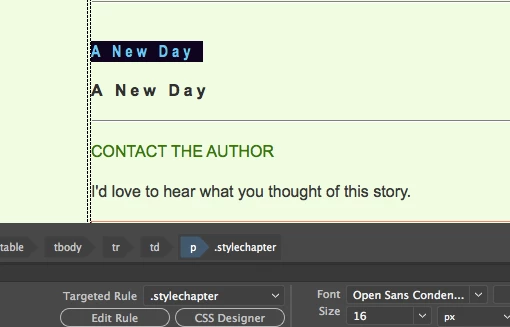
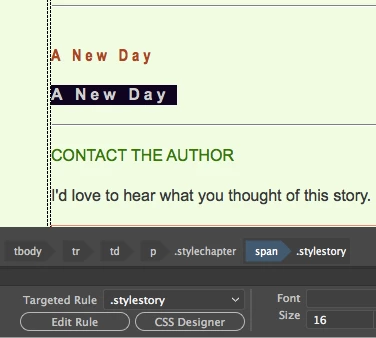
I'm having issues with custom fonts. If you look at the screenshots you will see that the two lines of text should be different. The top one is my .stylechapter font which is Open Sans Condensed/bold/with 5px spacing and the bottom one is .stylestory which uses regular Arial/normal/no letter spacing.

First question.

When I change the font for the selected text, I notice that it just adds the new font to the old font (the table body tbody tr td p .stylechapter span style story) Is that normal?

Second question.

In this case the font is not my story font but the chapter font but a black color and with wider letter spacing, I also notice that the Font box is blank, it should show the font for that style - which in this case should be Arial.

Any idea what's going on?
Thanks
Alan
    このトピックへの返信は締め切られました。

    返信数 2

    Nancy OShea
    Community Expert
    Community Expert
    January 10, 2017

    Are you using Google Web Fonts?  Did you embed the Google Font link in your <head> tag and add the font-family  to your CSS code?  See screenshot.

    Nancy O'Shea— Product User & Community Expert
    English100作成者
    Inspiring
    January 11, 2017

    Nancy

    I looked at the page in my browser and the correct font is displayed. Not sure what's going on with my display driver on my MacBook Air but I had a similar issue when I underlined a string of text. In DW it shows only the individual letters underline yet in my browser the whole string was underlined.

    Alan

    Nancy

    Yes it was a cursive Google font and the code as added in the <head> section.

    Alan

    Jon Fritz
    Community Expert
    Community Expert
    January 10, 2017

    The first part sounds like it's adding the font to the font stack in your font-family css. It's a little hard to tell what's going on looking at screenshots though. The code would be much better for debugging purposes.

    If that's what's happening, just delete the font you don't want, or move it after the font you do. The font stack is there for browsers that don't have a given font installed. They'll use the next font in the stack until they find one they have and display using that.

    The second part could be something as simple as a code error in your css confusing DW (it's not all that difficult a task). Run the validator and take care of any structural errors you come across...

    CSS Validation - http://jigsaw.w3.org/css-validator/