
Participating Frequently
November 29, 2016
Answered

When using split view in CC 2017, code is very slow to respond

  • November 29, 2016
  • 1 reply
  • 1270 views

I use Dreamweaver CC 2017 in split view code-design.  When I open a file, the design section is immediately active, but the code section is frozen and takes a long time before it is responsive.  I can make changes in the design section, but they do not appear in the code.  I cannot make changes directly to the code until the file has been open for about a minute.  Any suggestions?
    This topic has been closed for replies.
    Correct answer Nancy OShea

    The local site folder on the primary hard drive the same as DW.

    The sleep mode is disabled.

    I am running Windows 10 Professional (x64) Version 1607, Core i5 processor, 8GB ram.

    Intel(R) HD Graphics 4600

    Charles


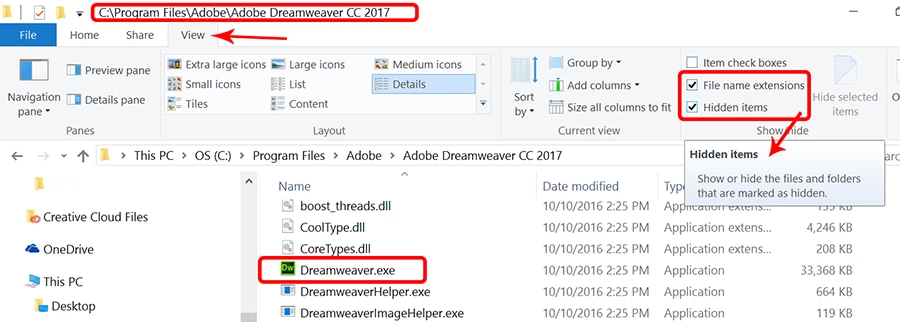
    In your File Manager, show Hidden Items (see screenshot).

    1 reply

    Preran
    Community Manager
    Community Manager
    November 29, 2016

    Can you try the solutions in DIY troubleshooting kit for Dreamweaver  and let us know if they helped?

    Thanks,

    Preran

    chk3273Author
    Participating Frequently
    November 29, 2016

    I don't know which issues I am supposed to try.

    Charles

    Nancy OShea
    Community Expert
    Community Expert
    November 29, 2016

    Start with Crashes & Freezes .

    Also it might be prudent to check your code for validation errors just in case that's causing code view to choke.

    Go to Window > Results > Validation.

    Click the large triangle to check current document.

    Fix any reported errors and save your file.

    Nancy

    Nancy O'Shea— Product User & Community Expert