
Participating Frequently
November 29, 2016
Answered

When using split view in CC 2017, code is very slow to respond

  • November 29, 2016
  • 1 reply
  • 1270 views

I use Dreamweaver CC 2017 in split view code-design.  When I open a file, the design section is immediately active, but the code section is frozen and takes a long time before it is responsive.  I can make changes in the design section, but they do not appear in the code.  I cannot make changes directly to the code until the file has been open for about a minute.  Any suggestions?
    This topic has been closed for replies.
    Correct answer Nancy OShea

    The local site folder on the primary hard drive the same as DW.

    The sleep mode is disabled.

    I am running Windows 10 Professional (x64) Version 1607, Core i5 processor, 8GB ram.

    Intel(R) HD Graphics 4600

    Charles


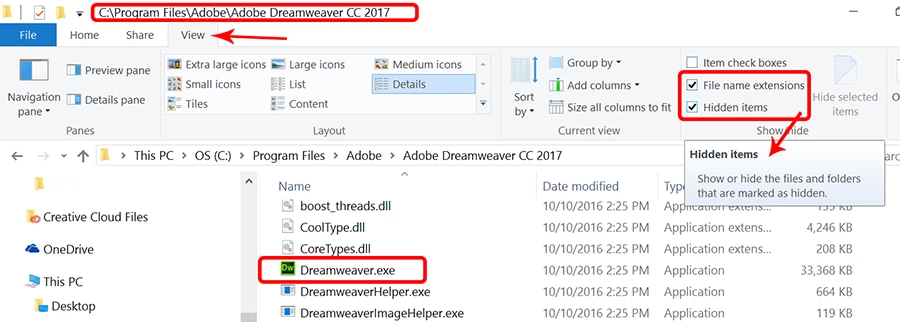
    In your File Manager, show Hidden Items (see screenshot).

    1 reply

    Preran
    Community Manager
    Community Manager
    November 29, 2016

    Can you try the solutions in DIY troubleshooting kit for Dreamweaver  and let us know if they helped?

    Thanks,

    Preran

    chk3273Author
    Participating Frequently
    November 29, 2016

    I don't know which issues I am supposed to try.

    Charles

    BenPleysier
    Community Expert
    Community Expert
    November 30, 2016

    I didn't find anything in the Crashes & Freezes section that helped the situation.

    Since I am not expert in writing code, I am sure that my code has errors.  However, I did not have this particular problem in version CC 2016.  I am including a link to one of my documents.  After opening the document, it took about 1' 20" before I could work directly in the code section.  Star Light, Star Bright - Children's Sermons from Sermons4Kids.com If you don't mind, could you look at the source code and see if there are any major errors that could cause the problem?

    Thanks,

    Charles


    The only error that I can find is a stray </p> at the end of line 107.

    I have tried to replicate the problem without success. I think that the problem lies not with Dreamweaver or the file that you have given us, I believe that there is something within your local system that is the problem.

    Try Unusual behavior in Dreamweaver? Try restoring preferences.

    Wappler is the DMXzone-made Dreamweaver replacement and includes the best of their powerful extensions, as well as much more!