
Known Participant
December 8, 2016
Answered

where are sort categories on local and remote files?

  • December 8, 2016
  • 1 reply
  • 444 views

On previous versions of Dreamweaver the local files and remote files had sort categories at the top of the site file windows for size, type and modified.  I used these all the time. I can't find them on Dreamweaver cc 2017.  Is there a preference I can use to get them back or are they in some other place ? I can't imagine something so useful being deliberately removed or hidden.
    This topic has been closed for replies.
    Correct answer Nancy OShea

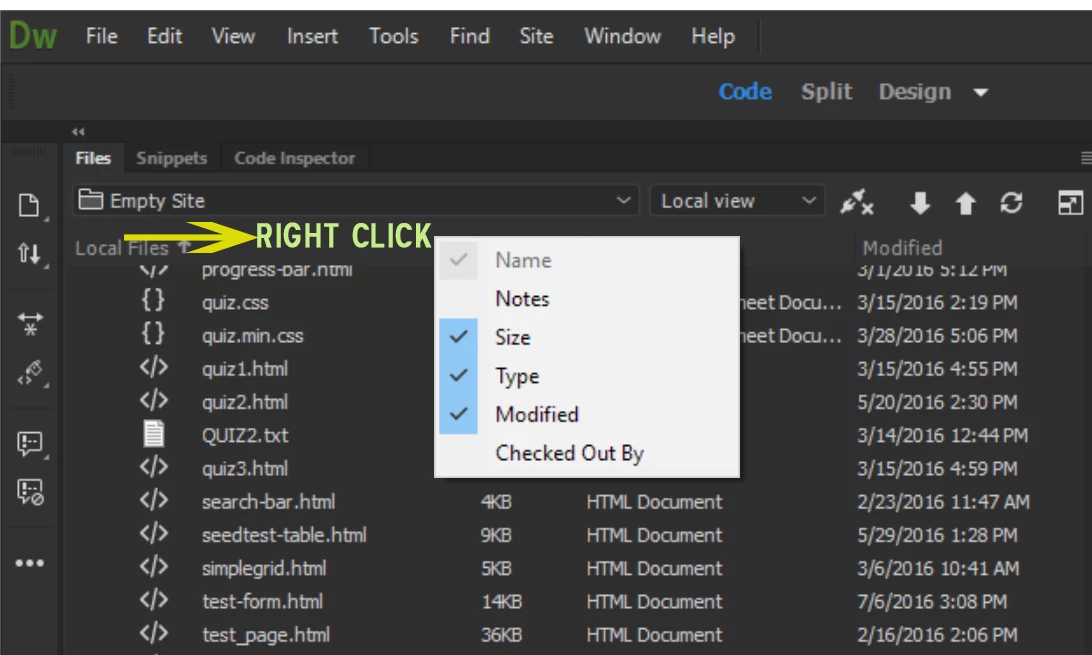
    I assume you mean the column headings in the Files Panel.   See screenshot.

    1 reply

    Nancy OShea
    Community Expert
    Nancy OSheaCommunity ExpertCorrect answer
    Community Expert
    December 8, 2016

    I assume you mean the column headings in the Files Panel.   See screenshot.

    Nancy O'Shea— Product User & Community Expert
    elhzAuthor
    Known Participant
    December 8, 2016

    Thanks.  They do come up when I right click. I was getting ready to ditch this and reinstall an earlier version. I work on many, many sites. It seems that I'll have to go through right clicking for every column header on every single site since doing it for one does not automatically show them on other sites. Is there away to set this as a preference? It's not in the preference menu, I looked. How annoying for Dreamweaver to hide what I consider the most time saving feature that I use every time I work on a site.

    Nancy OShea
    Community Expert
    Community Expert
    December 9, 2016

    For what it's worth, I agree with you.  I feel it should be turned on by default.

    Currently, there is no Preference setting.  

    Go to Help > Submit Bug/Feature Request.

    Nancy

    Nancy O'Shea— Product User & Community Expert