


Apache port 80 in use error

Copy link to clipboard
Copied
Win 32 XP Pro SP3
Followed David Powers article and installede Xampp and at the end got an error "port 80 or 443(ssl) already in use. Installing Apache 2.2 service failed"
Looked in Xampp .apache/logs but there is no error file


 20
Replies
20
20
Replies
20


Copy link to clipboard
Copied
Just a wild guess, but do you have IIS running?
Copy link to clipboard
Copied
No
Copy link to clipboard
Copied
Uninstalled then re-installed.
Didn't get the port 80 error but when I open the Xammp control panel I see that the MYSQL service is running but the Apache service is not. I click on "Start" Apache svc" and in the lower panel it states "Apache service started"
However when I go to http://localhost or localhost80 or localhost8080 I get "IE cannot display the web page"

Copy link to clipboard
Copied
gbotour wrote:
I click on "Start" Apache svc" and in the lower panel it states "Apache service started"
Yes, it might have started, but the question is whether it's still running. Unless you see the "Running" label, as shown in the following screenshot, it ain't running:
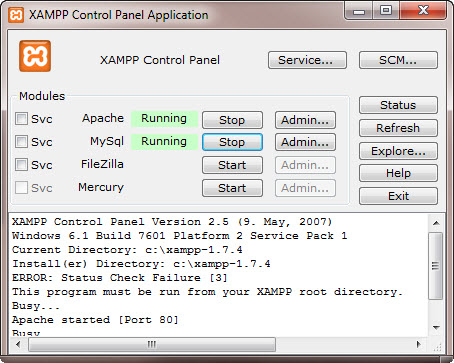
If it fails to start, read the Apache error log.If you installed in the default location, it's at C:\xampp\apache\logs\error.log.
Copy link to clipboard
Copied
As I said David.
function(){return A.apply(null,[this].concat($A(arguments)))} I see that the MYSQL service is running but the Apache service is not.
function(){return A.apply(null,[this].concat($A(arguments)))} Looked in Xampp .apache/logs but there is no error file
Dunno why these function statements appear. I copied and pasted from my previous posts.
Copy link to clipboard
Copied
Yes, I saw that in your original post. If you uninstalled and reinstalled, it should have created a error log.
The most common conflict with port 80 comes from Skype. If you have Skype installed, go to Tools > Options and select Advanced > Connection. Deselect the checkbox labelled "Use port 80 and 443 as alternatives for incoming connections".
Copy link to clipboard
Copied
I don't use Skype !
Don't know if it's relevant but during the Xampp set up I don't get a dos window as you describe in your online article "Setting up a PHP development environment for Dreamweaver" so I didn't get the opportunity to change or confirm anything.
Also, in your book "CS5with PHP" (just recieved) you say that in the case of a conflict with port 80 it is easy to change ports, although I have not yet seen in the boook how this is done.
Copy link to clipboard
Copied
gbotour wrote:
Don't know if it's relevant but during the Xampp set up I don't get a dos window as you describe in your online article "Setting up a PHP development environment for Dreamweaver" so I didn't get the opportunity to change or confirm anything.
I think that XAMPP has recently made some changes in its installation setup. I installed XAMPP 1.7.4 to help someone troubleshoot a problem the other day, and I seem to remember that there were no command prompts at the end, but I wasn't sure if that was because I was upgrading from a previous version. The latest version of XAMPP seems to have some bugs. For example, on a 64-bit system, it displays an error message every time you start the XAMPP control panel. Also, if you turn off short open tags, as recommended in my book, the XAMPP setup screen won't display. It might be worth uninstalling and trying XAMPP 1.7.3 instead.
However, before doing so, try this:
- Open a command prompt window.
- Type netstat -o -n -a | findstr 0.0:80 and press Enter.
- If you get a result that looks like this: TCP 0.0.0.0:80 0.0.0.0:0 LISTENING 8704, it means that process 8704 is using port 80.
- Press Ctrl-Alt-Del and open the Task Manager.
- Check the name of the program that has PID 8704 (or whatever the number happens to be).
- That's the culprit.
To change the port used by Apache, you need to edit the Apache configuration file, httpd.conf, which should be in xampp\apache\conf. Open the file in Notepad, and search for the line that reads: Listen 80. Change it to Listen 8888.
A few lines further down, you'll find a line that begins with ServerName and ends with :80. Change :80 to :8888.
Save httpd.conf and start Apache. After changing the port number, you need to add :8888 to localhost in your URLs: http://localhost:8888/.
Copy link to clipboard
Copied
The culprit is Kservice.exe
Copy link to clipboard
Copied
I don't know what Kservice.exe does, but see if you can change its configuration to use a different port. Otherwise, you need to change the Apache port as described earlier.
Copy link to clipboard
Copied
It's integral to the way programmes are served from Skyplayer, BBC
Iplayer and 4OD.
Having read a number of forum postings it seems to be extremely persistent despite many efforts to get rid of it. There doesn't seem to be one good answer available. In addition a lot of people are saying it drastically reduces data transfer speeds.
So, I'll try re-allocating the port in Apache.
Copy link to clipboard
Copied
Now have Apache running as a sevice so thanks for that.
Went to a site where the local address is c:\sites\firs4 and opened the index page. Went to preview in a browser and got this error message.
The page "http://localhost8888/firs4/index.php" was not loaded because Dreamweaver could not find the server "localhost8888". Please make sure you are connected to the internet and the server name is correct.
The testing server details are :-
Apache adress : c:/Xampp/htdocs
Connection local/net
Server folder C:\xampp\htdocs\
Web URL http://localhost8888/
Copy link to clipboard
Copied
gbotour wrote:
Web URL http://localhost8888/
There should be a colon between localhost and the port number: localhost:8888.
Copy link to clipboard
Copied
Bingo ! That's it.  I feel like I'm flying. You can get back to the bar now David.
Many thanks for your time.
Now, it would be great if these posts could be consolidated into a resource somewhere for the benefit of the next one to hit the same problem(s). The normal search option doesn't always get to where you want to be.
Copy link to clipboard
Copied
A follow up issue is trying to connect to MySQL Admin.
I entered http://localhost:8888/MySQL in IE8 and got "object not found"
Copy link to clipboard
Copied
gbotour wrote:
I entered http://localhost:8888/MySQL in IE8 and got "object not found"
I'm not surprised. It should be http://localhost:8888/phpmyadmin/.
By the way, I see that you're using C:\xampp\htdocs as your Web URL. It's more normal to create the testing server for different sites in subfolders of htdocs.

Copy link to clipboard
Copied
I am using Mr. Power's book to learn PHP for Dreamweaver CS5. I'm on a Windows 7 pro system. I followed the directions to install XAMPP but couldn't install b/c port 80 is being used by "NT Kernel & System". I changed the port from 80 to 88 both places in C:\xampp\apache\conf\httpd.conf (using the Apache Friends forums) which then worked.
When trying to finish up the exercise at http://www.adobe.com/devnet/dreamweaver/articles/setup_php.html#articlecontentAdobe_numberedheader_2, everything works great using http://localhost:88/php_test/ until the end. I can't get the MySQL to work.
I set everything according to the directions on http://localhost:88/phpmyadmin . I've set up a user account called 'testUser'@'localhost:88' with the password 'xyz'. I put in the information as:
Connection Name: connTest
MySQL Server: localhost:88
User Name: testUser
Password: xyz
Database: php_test
When I either click on "select" (for the database) or click "test", the "File Activity - localhost" box comes up and goes to "(Not Responding)" status within a few seconds. The box is white the entire time, the text I'm coping comes from the header bar. After a minute or two, a box comes up saying "a server timeout has occured. Possible reasons: 1. Make sure web server is up and running 2.verify ODBC DSN exists on test server". Not sure what to do from there. (If I've clicked on the "select" button by database, Dreamweaver will lock up so I have to shut down and restart b/c it keeps going back to the "File Activity" box.)
I've also tried having MySQL Server: "localhost". Then I get a MySQL error #1045 Access denied for user 'testUser' @ 'localhost' (using password:YES) - but I know the user name & password are correct. I've tried retyping both 10+ times! This is very frustrating for me, any help is much appreciated.
Copy link to clipboard
Copied
I forgot to add the XAMPP is running in the background and shows Apache and MySQL running.
Also, when I set up the user name 'testUser' for php_test, on the "host", I selected "local" then defined the name as 'localhost:88'
Copy link to clipboard
Copied
In my case the use of localhost:8888 wqas the answer

Copy link to clipboard
Copied
Hello Sir,
I had installed wamp server on one window with port 8080......and it worked fine on that window......but now i'm having a great problem in installing the php on my another window in E drive.....I hav tried both Wamp as well as Xampp ...... and changed their ports to 8888 and 8080 respectively.......but of no use....
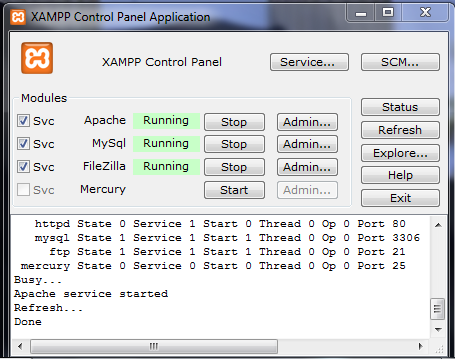
The moment I write "http://localhost:8080/phpmyadmin" or "htt://localhost:8888/" ...... it takes a long time to load the page...and at the end it says Unable to open the page......as the server isn't responding................................please help me .....Here's my XAMPP panel.....

Get ready! An upgraded Adobe Community experience is coming in January.
Learn more
 AdChoices