jamien16988115
Participant
November 15, 2016
Answered

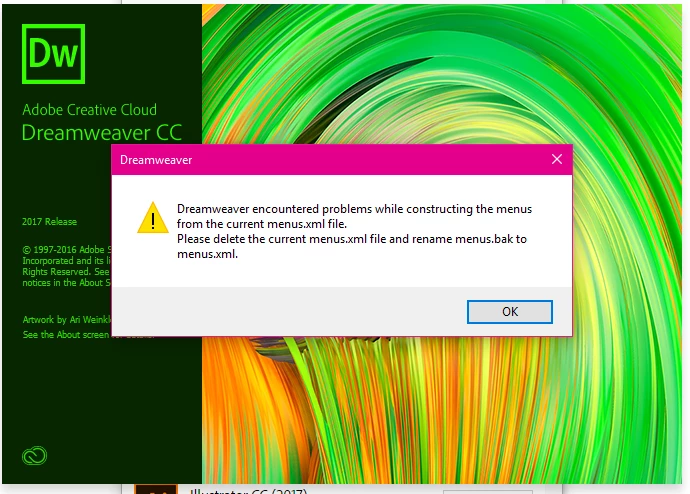
Dreamweaver CC 2017 won't open due to error how do I fix this?

  • November 15, 2016
  • 2 replies
  • 3493 views

This just started happening yesterday. I tried the "fix" suggested here but it doesn't work, unless I have done it incorrectly, which is possible. 

I have uninstalled and reinstalled several times and nothing is working.

When I click on OK it just closes down.
This topic has been closed for replies.
Correct answer Yalpi

Hello,

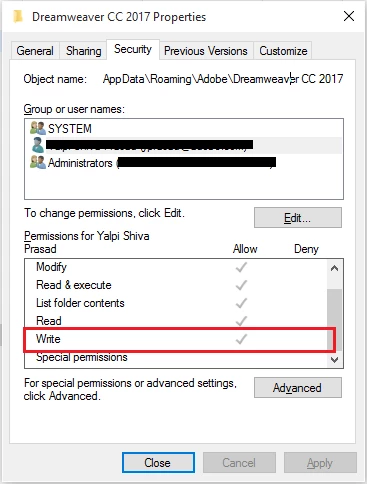
The error occurs when Dreamweaver does not have write access to %appdata%\Adobe\Dreamweaver CC 2017

Can you please check if the current logged in user has Write access to the folder. If not, kindly add the permission and then try launching Dreamweaver.

2 replies

Preran
Community Manager
Community Manager
November 15, 2016

Can you also have a look at this doc The menus.xml file in Dreamweaver  and let me know if it helped?

Participant
December 20, 2016

Not exactly how this link helps anyone with this issue.  For me the issue arose with a recent update.  Dreamweaver worked fine before hand, now it doesn't.  The menus.xml was never changed, appears to be in the right place and the backup version is the same as the original.  So error continues after deletion of menus.xml and renaming menus.bacst

Also the error will leave an instance of Dreamweaver 2017 running in the Windows Task manager.  Each attempt to start Dreamweaver with this error results in multiple instances of Dreamweaver being listed in memory.  Have tried shutting down with each error and correction, however, still no solution.

Is there just a default menus.xml file somewhere that can be downloaded from Adobe that would just be a 'stock' file that can be installed to overcome this issue?  I had been using the default menus.xml can't an original default copy be made available?

Also some threads have suggested deleting the Configuration files in the Win10 User's Roaming section, however, upon inspection the Dreamweaver CC 2017 folder in this area is empty.

Am awaiting call back from Adobe tech staff as I write.......

YalpiCorrect answer
Inspiring
December 21, 2016

Hello,

The error occurs when Dreamweaver does not have write access to %appdata%\Adobe\Dreamweaver CC 2017

Can you please check if the current logged in user has Write access to the folder. If not, kindly add the permission and then try launching Dreamweaver.

John Waller
Community Expert
Community Expert
November 15, 2016

Have you tried?

Dreamweaver menus.xml

What else have you already tried exactly? Got links?