


- Home
- Dreamweaver
- Discussions
- F12 displays code and not design for .php pages
- F12 displays code and not design for .php pages

Copy link to clipboard
Copied
Hello,
when I press F12 to see how the pages look like, .php pages diplay the lines of code and not the design of the page. It used to work fine before and I know I can display in Dmweaver the design but I prefer F12 (when it works)
thanks


 1 Correct answer


Chrome without a testing server cannot render anything beyond ordinary HTML, CSS and JS code. Either you had a testing server installed and didn't know it or your page didn't contain any server side scripts.
When working with PHP code, DW always asks me to set-up a testing server if one is not already defined.
Screenshot without a testing server.
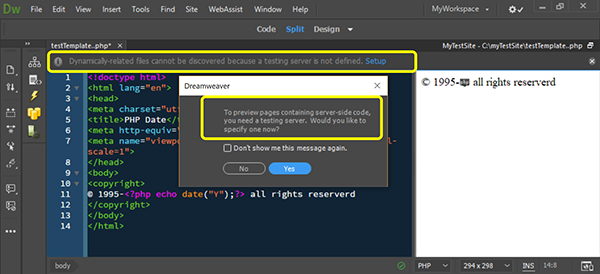

With local testing server.


 5
Replies
5
5
Replies
5


Copy link to clipboard
Copied
I am probably stating the obvious, but I'll suggest it, are you using a PHP server to view your work? Has the Dreamweaver site been properly configured?
Please see How to set up a testing server in Dreamweaver
If that wasn't the problem, please come back here with more info.
Copy link to clipboard
Copied
thanks for your answer, but I've installed over 1000 thousands websites in my Dreamweaver interface, withouth configuring any php server for almost all of them. It would take too much time to add them
Copy link to clipboard
Copied
To give you a bit of basic knowledge, a web browser can only interpret HTML, CSS and JS. Anything else will not be processed by a browser. PHP is a server side language which dynamically interprets PHP code into HTML so that the browser can in turn interpret the code. If you do not have an active server, the browser will receive the PHP code which it cannot interpret.
The websites that did not have any problems, would not have included PHP documents, most likely they were HTM or HTML documents.
Copy link to clipboard
Copied
Many thanks BenPleyser,
Until now, Chrome was able to display php pages without having any web servers installed, simply by pressing F12 in DW or even opening a document in any folder.
Or at least, it's what I think I was doing. Maybe that somebody has an explaination.
Copy link to clipboard
Copied
Chrome without a testing server cannot render anything beyond ordinary HTML, CSS and JS code. Either you had a testing server installed and didn't know it or your page didn't contain any server side scripts.
When working with PHP code, DW always asks me to set-up a testing server if one is not already defined.
Screenshot without a testing server.


With local testing server.


Get ready! An upgraded Adobe Community experience is coming in January.
Learn more
 AdChoices