
Participant
February 28, 2019
Answered

How do I make an image full width and remove space around it?

  • February 28, 2019
  • 3 replies
  • 3560 views

Well I have been trying to make this image a landing page all day. I wanted to add a hotspot on the click here part so they can click it and it lead them to my other website. But this part is very confusing. I've watched videos, videos, and blogs online and none has helped get this image to fit the browser so the edges fill the browser. They rather have white edges that you can see that do not look good. Can you tell me what my code suppose to be? What do it need to be because this is so difficult....way difficult. I use to could just insert the image and it put the code in and add a hotspot and the link would work, but this version is way to complicated for beginners.

what is the code suppose to be to make the image fit the browser to the edge. Nothing works! After I put in these codes the image still does not meet the browser.
    This topic has been closed for replies.
    Correct answer Nancy OShea

    Use a background image with an active link in the foreground.  Style the link to look like a button if you wish.

    CSS Buttons

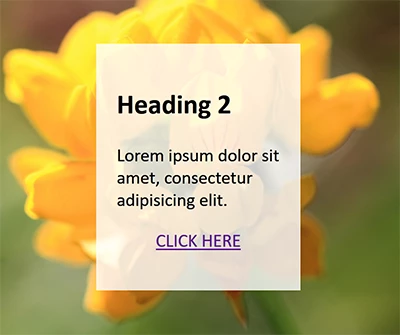
    Below is the basic HTML and CSS code, also a screenshot.

    <!doctype html>

    <html lang="en">

    <head>

    <meta charset="utf-8">

    <title>Background-Size Cover Demo</title>

    <meta name="viewport" content="width=device-width, initial-scale=1">

    <meta http-equiv="X-UA-Compatible" content="IE=edge">

    <style>

    body, html {

    margin: 0;

    padding: 0;

    height: 100%;

    display: flex;

    align-items: center;

    justify-content: center;

    }

    body {

    background: url(https://placeimg.com/900/900/nature) center center fixed;

    background-size: cover

    }

    .container {

    width: 40%;

    margin: 0 auto;

    padding: 5%;

    background: rgba(255,255,255,0.8);

    }

    .center { text-align: center }

    </style>

    </head>

    <body>

    <div class="container">

    <h2>Heading 2</h2>

    <p>Lorem ipsum dolor sit amet, consectetur adipisicing elit.</p>

    <p class="center"><a href="https://example.com" class="button">CLICK HERE</a></p>

    </div>

    </body>

    </html>

    3 replies

    Nancy OShea
    Community Expert
    Nancy OSheaCommunity ExpertCorrect answer
    Community Expert
    February 28, 2019

    Use a background image with an active link in the foreground.  Style the link to look like a button if you wish.

    CSS Buttons

    Below is the basic HTML and CSS code, also a screenshot.

    <!doctype html>

    <html lang="en">

    <head>

    <meta charset="utf-8">

    <title>Background-Size Cover Demo</title>

    <meta name="viewport" content="width=device-width, initial-scale=1">

    <meta http-equiv="X-UA-Compatible" content="IE=edge">

    <style>

    body, html {

    margin: 0;

    padding: 0;

    height: 100%;

    display: flex;

    align-items: center;

    justify-content: center;

    }

    body {

    background: url(https://placeimg.com/900/900/nature) center center fixed;

    background-size: cover

    }

    .container {

    width: 40%;

    margin: 0 auto;

    padding: 5%;

    background: rgba(255,255,255,0.8);

    }

    .center { text-align: center }

    </style>

    </head>

    <body>

    <div class="container">

    <h2>Heading 2</h2>

    <p>Lorem ipsum dolor sit amet, consectetur adipisicing elit.</p>

    <p class="center"><a href="https://example.com" class="button">CLICK HERE</a></p>

    </div>

    </body>

    </html>

    Nancy O'Shea— Product User & Community Expert
    Participant
    March 2, 2019

    I used your code and input my information and the site disappeared. I am using dreamweaver cc and it has never been this difficult. I'm a beginner and old school version way better. I could just insert my picture, code the image so it fill browser, and hotspot it and publish and my site would be launched and fit the screen correctly.

    This version WOW! can't do nothing. I been working on this site now for 3 days and nothing accomplished. I am using hp windows 10. Both internet explorer and windows edge, google chrome. I just want to insert the picture so it fill the screen, put a hot spot on where it says click here, and publish the site so it visible. I can't even find a hotspot on here to make the click here linkable. I like html way better, but this css stuff very difficult. I tried using the css and it did not work in my design. All the edges were still visible and can't see image. I attached it along with my code im using.

    For some reason after I used this code, it made my screen unvisible in internet explorer, and chrome, and edge. I don't know...??? someone help?

    <!doctype html> 

    <html lang="en"> 

    <head> 

    <meta charset="utf-8"> 

    <title>Organic Cleanse | Natural Fruit Juice</title>

    <meta name="viewport" content="width=device-width, initial-scale=1"> 

    <meta http-equiv="X-UA-Compatible" content="IE=edge"> 

    <meta name="author" content="Resa Mitchell">

    <meta name="description" content="Get rid of intestinal parasites with our natural kidney and liver cleanse. Start a new journey today with Organic Cleanse acne and leaky gut detox therapy.">

    <meta name="keywords" content="juice, cleanse, juice cleanse, colon cleanse, cold press juicer, pressed juicery, liver cleanse, jamba juice, juice plus, acne, hormonal acne, gas, cystic acne, digestive system, cancer, leukemia, lymphoma, melanoma, breast cancer, pancreatic cancer, skin cancer, colon cancer, prostate cancer, multiple myeloma, colon, oncology, cervix, cervical cancer, ovarian cancer, lung cancer, mesothelioma, leaky gut, organic cleanse, organic, acne bust">

    <style> 

    body, html { 

    margin: 0; 

    padding: 0; 

    height: 100%; 

    display: flex; 

    align-items: center; 

    justify-content: center; 

    body { 

    <img src="../Organic Cleanse/WEBSITE LAYOUT/Acne Bust/index.png" alt="" width="1348" height="844" id="acne" align="middle"/> center center fixed; 

    background-size: cover 

    }

    </body>

    </html>

    BenPleysier
    Community Expert
    Community Expert
    March 2, 2019

    body {

    <img src="../Organic Cleanse/WEBSITE LAYOUT/Acne Bust/index.png" alt="" width="1348" height="844" id="acne" align="middle"/> center center fixed;

    background-size: cover

    }

    The highlighted line is not a style rule, it is HTML inside a style rule. This is not acceptable.

    You are much better off to copy Nancy's code and paste it into a new document, changing the source of the image to your image.

    I'll try to explain Nancy's style rules:

    body, html { 

    /* This targets the body and html elements, setting padding and margins to zero, setting full height, setting display to flexbox and aligning contents to center both  horizontall and veryically */

    margin: 0;                          

    padding: 0; 

    height: 100%; 

    display: flex; 

    align-items: center; 

    justify-content: center; 

    body {

    /*  This sets a background image to the body element. The image is centred both horizontally and vertically, is fixed (meaning it will not move) and will cover the full screen */

    background: url(https://placeimg.com/900/900/nature) center center fixed; 

    background-size: cover 

    .container { 

    /* The container element is 40% of the screen width wide, sets an auto margin to center it horizontally, has a padding and a background colour */

    width: 40%; 

    margin: 0 auto; 

    padding: 5%; 

    background: rgba(255,255,255,0.8); 

    /* this declares the center class to centre the text horizontally */

    .center { text-align: center } 

    As for the HTML

    <body>  <!-- This picks up the body element style rules. In other words, it contains the background image -->

    <div class="container"> <!-- This will show the box in the middle of the screen with the following content -->

    <h2>Heading 2</h2> 

    <p>Lorem ipsum dolor sit amet, consectetur adipisicing elit.</p> 

    <p class="center"><a href="https://example.com" class="button">CLICK HERE</a></p>  <!-- The center class will center the text -->

    </div> 

    </body>

    Also notice the (abreviated) document structure as

    html

         head

              style rules

         body

              markup (HTML)

    Wappler is the DMXzone-made Dreamweaver replacement and includes the best of their powerful extensions, as well as much more!
    WolfShade
    Legend
    February 28, 2019

    What you are attempting to do is way old school, and will most likely make the page "heavy".  Using an image as the content of a page just plain looks bad.

    But to answer your question, you give the image and the element that contains it (div, span, etc.) a margin and padding of 0px.  If the image is contained within a div, divs are block elements and will take up 100% of the width of the element containing it (ie, if the div is within the body, it will take up 100% of the body; if it is within another div, it will take up 100% of the width of that div.)

    Again, this isn't a very good design path to take.

    V/r,

    ^ _ ^

    Jon Fritz
    Community Expert
    Community Expert
    February 28, 2019

    I've branched this from the old, unrelated post.