


Participant
November 24, 2020
解決済み

.htaccess File not "visible" in DW 2021

  • November 24, 2020
  • 返信数 3.
  • 3225 ビュー

Since years I edit my .htaccess in DW (on a Mac). Now with DW2021 i'm able to edit the .htaccess only by going the way over "finder" > "Edit in" > Dreamweaver becaus in the File-List inside DW the .htaccess file is not showen!? Please fix it! I still have macOS (Catalina) for investigating...

    このトピックへの返信は締め切られました。
    解決に役立った回答 Jon Fritz

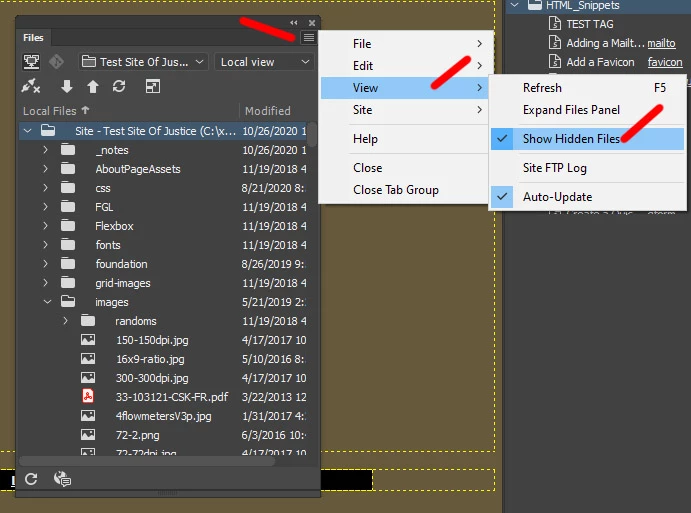
    Have you enabled Hidden Files from the Files Window Menu as I describe above? A check mark will  appear next to it, if it is enabled...


    ...also, on a Mac, any file name starting with a dot is hidden by the OS by default. You may also need to turn on hidden files at the OS level. I'm not sure if DW's setting would be enough to do it by itself.

    返信数 3

    anissa_thompson
    Community Expert
    Community Expert
    November 25, 2020

    Double-check that your preferences are set for Dreamweaver to recognize .htaccess files:


    Hope this helps! Make sure to press "✔ Correct Answer" on this post if this answers your question. Happy Creating!Anissa • @anissat
    Participant
    November 25, 2020

    Having the same problem: after updating to DW 2021 I don't see the .htaccess file anymore in the file window. I have checked the preferences and they are set as in the example from annisa_thompson. I am working on a Mac, OS X 10.15. Is there anything else that I can do to make .htaccess files appearing again (it worked fine in DW 2020)?


    Jon Fritz
    Community Expert
    Jon FritzCommunity Expert解決!
    Community Expert
    November 25, 2020

    Have you enabled Hidden Files from the Files Window Menu as I describe above? A check mark will  appear next to it, if it is enabled...


    ...also, on a Mac, any file name starting with a dot is hidden by the OS by default. You may also need to turn on hidden files at the OS level. I'm not sure if DW's setting would be enough to do it by itself.

    Nancy OShea
    Community Expert
    Community Expert
    November 24, 2020

    This must be a Mac thing.  I have no trouble viewing .htaccess files on Windows.


    Nancy O'Shea— Product User & Community Expert
    Jon Fritz
    Community Expert
    Community Expert
    November 24, 2020


    1. Open DW
    2. Open the Files Window under Window > Files or hit F8
    3. Click the small menu icon in the upper right of the Files Window
    4. Choose View > Show Hidden Files from the pop up menu that appears