


- Home
- Dreamweaver
- Discussions
- Re: Problem with sub-menu positioning within my dr...
- Re: Problem with sub-menu positioning within my dr...

Copy link to clipboard
Copied
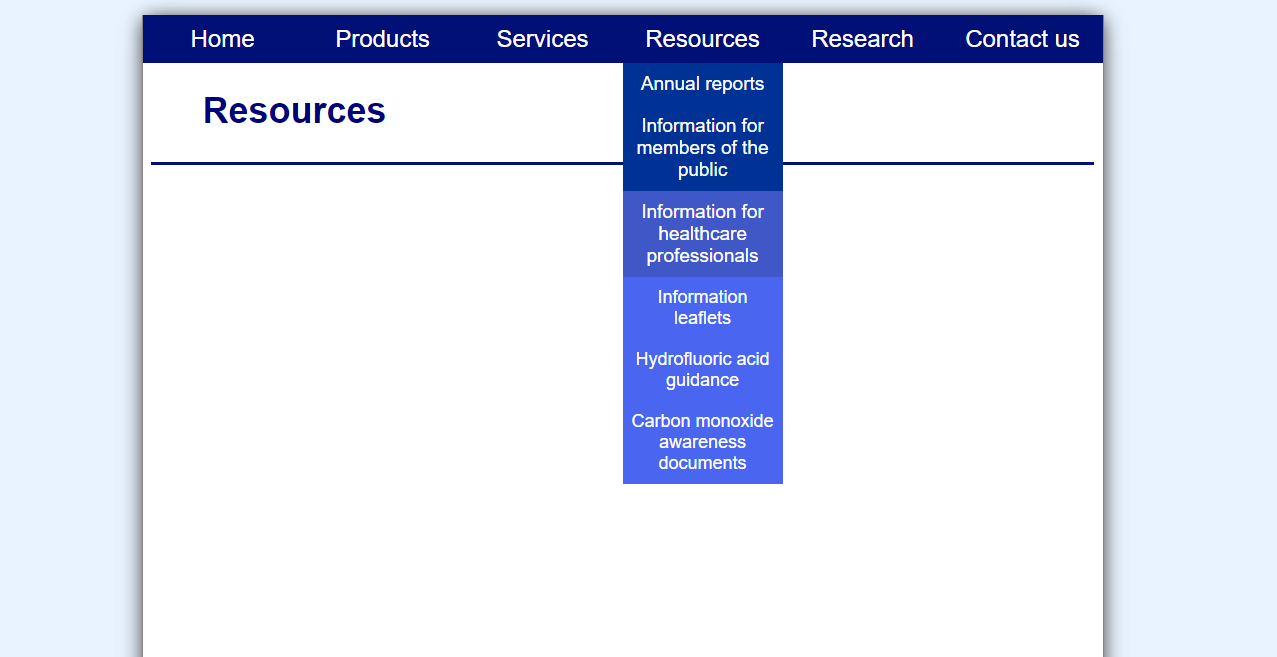
I have created a horizontal navigation bar along the top of my webpage, with some items containing drop down menus. Within one of my drop down menu links, I would like to add another submenu, which expands to the right hand side when the mouse hovers over the item. However, with the submenu I have created, the submenu expands directly below the drop down menu item, instead of expanding to the right hand side.
For clarification ( I don't think I explained it very well), I've got a drop down menu under 'Resources'. Within that drop down menu is the item 'Information for healthcare professionals'. This item is what I would like to contain the submenu, which is made up of 'Information leaflets', 'hydrofluoric acid guidance' and 'carbon monoxide awareness documents' (all in a slightly lighter shade of blue).
Can anyone help me display this submenu to the right hand side of the drop down menu, instead of directly beneath it? Any assistance would be much appreciated!
Mike


 1 Correct answer


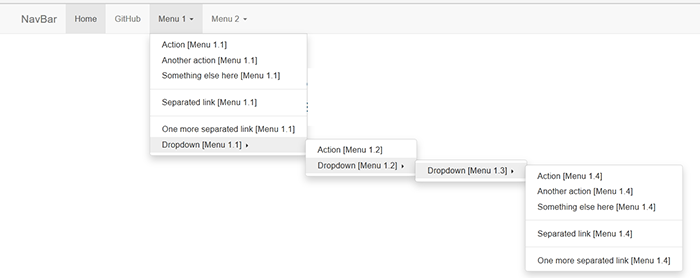
So you want a drop-menu that's capable of doing this (see screenshot) even though you may not use all of them.
Bootstrap Snippet Bootstrap NavBar using HTML CSS jQuery | Bootsnipp.com

 6
Replies
6
6
Replies
6


Copy link to clipboard
Copied
Have a look at https://codepen.io/emredenx/pen/ojcxl
Copy link to clipboard
Copied
Thanks Ben. My HTML matches the code you have displayed ( I think), so I don't think that is the problem. Here is my HTML code:
<div id="navbar">
<ul>
<li id="navbar"><a href="#">Home</a></li>
<li id="navbar"><a href="#">Products</a></li>
<li id="navbar"><a href="#">Services</a></li>
<li id="navbar"><a href="#">Resources</a>
<ul id="sub-navbar">
<li><a href="#">Annual reports</a></li>
<li><a href="#">Information for members of the public</a></li>
<li><a href="#">Information for healthcare professionals</a>
<ul id="sub-sub-navbar">
<li><a href="#">Information leaflets</a></li>
<li><a href="#">Hydrofluoric acid guidance</a></li>
<li><a href="#">Carbon monoxide awareness documents</a></li>
</ul>
</li>
</ul>
</li>
<li id="navbar"><a href="#">Research</a></li>
<li id="navbar"><a href="#">Contact us</a></li>
</ul>
</div>
I'm still quite new to Dreamweaver and am struggling to find which part of the CSS code applies to the submenus. Could you point me in the right direction??
Many thanks.
Copy link to clipboard
Copied
Just so you understand, complex multi-level menus are horrid to work with on mobile devices. That's why web developers avoid them nowadays. The prevailing wisdom is to keep top level navigation as simple as possible (1 level if possible) for easy finger tapping.
Or, if you require it, look at Mega Menus. See screenshot for example.

Mega Menus for Bootstrap:
6 Ways To Turn a Bootstrap Menu Into a Mega Menu | BootBites.com
Yamm!3 Megamenu for Bootstrap3
http://codepen.io/redfrost/pen/CvFpD
Nancy
Copy link to clipboard
Copied
Hi Nancy
I completely agree about keeping the drop down menu simple; almost all of the drop down menu items on my website are only 1 level 'deep'. However, I do still need to input the submenu in this one specific example that I'm trying to fix. But as I am only trying to insert this 1 isolated submenu (and the rest of my drop down menu is very simple as I have just said), I do not feel like the Mega Menu option would be necessary...
What do you think? And any tips on the CSS code that Ben kindly provided?? Many thanks for your help!
Copy link to clipboard
Copied
So you want a drop-menu that's capable of doing this (see screenshot) even though you may not use all of them.

Bootstrap Snippet Bootstrap NavBar using HTML CSS jQuery | Bootsnipp.com
Copy link to clipboard
Copied
Yes exactly! That would be perfect.

Get ready! An upgraded Adobe Community experience is coming in January.
Learn more
 AdChoices