
Known Participant
February 3, 2017
Answered

SVG Logo image code

  • February 3, 2017
  • 4 replies
  • 6881 views

I have a design in Dreamweaver that uses SVG for the logo along with <g> and <path d=...> tags containing lengthy code. I wish to replace this with my client's logo, which I created in Illustrator and Photoshop and exported to SVG. How do I now get this logo into the code? The design doesn't appear to reference an image filename for the logo on the page or in style.css. Alternatively, I nixed the whole SVG attempt and referenced the logo as a jpg, then as a .png using <img src=..> but the quality was so poor, I'd like to see if I can successfully add the logo using SVG with your help if you think it will improve rendering of the logo on retinal displays. Adobe support pointed me to the forum for help with this.

Link to site in test directory: testdev.digitalinkllc.com

New logo in PNG:

Note, the logo moves to the center when the window is resized. It also becomes gray when resized to the mobil layout.

Here is a bit of the current code for the logo section which I am trying to duplicate for my new logo. (There are several more <path d=..> tags not copied here)

<!-- RD Navbar Brand-->

                <div class="rd-navbar-brand"><a href="index.html" class="brand-name">

                    <svg width="230px" height="51px" viewbox="0 0 230 51">

                      <g>

                        <path d="M83.389,33.077c0,0.46,0.368,0.736,0.828,0.736c0.828,0,1.334-0.506,4.049-2.53l0.828,1.196                c-2.208,2.208-6.119,5.935-9.385,5.935c-1.656,0-2.346-1.288-2.346-2.761c0-0.367-0.69-0.321,3.358-7.774l-10.029,0.322                l-9.431,9.385c-1.104,1.104-2.852,3.036-4.508,3.036c-0.69,0-1.61-0.138-1.61-1.012c0-1.519,3.542-5.935,7.867-7.453l3.588-3.956                c-2.944,0.092-4.462,0.275-4.462-0.92c0-0.875,3.358-4.739,5.797-5.521c1.794-0.598,4.278-0.966,4.278-0.322                c0,0.828-3.358,0.414-3.358,1.242c0,0.322,0.414,0.414,0.644,0.414c0.736-0.046,2.623-0.138,2.807-0.138l10.305-8.557                c4.508-3.727,10.029-7.913,12.099-7.913c0.966,0,1.61,1.15,1.61,1.979c0,0.966-0.966,2.53-1.426,3.358l-5.705,9.983                c3.404,0,1.334-0.46,4.232,0.184c-1.334,1.564-2.438,3.404-3.45,5.244l-3.681,0.185L83.389,33.077z M90.382,11.501l-0.092-0.092                L76.994,22.404l0.092,0.092l7.039-0.506L90.382,11.501z"></path>

                        <path d="M110.297,18.816c-2.162,4.371-2.53,6.073-7.59,5.75c-1.564,2.024-4.187,5.797-4.187,8.557                c0,1.013,0.322,1.61,1.38,1.61c1.472,0,3.128-1.38,7.913-4.784l0.23,2.024c-2.714,2.484-7.683,7.406-11.593,7.406                c-1.794,0-2.898-1.242-2.898-3.082c0-1.519,0.598-3.267,1.196-4.601l-0.092-0.092l-2.347,1.886l-0.506-1.748                c2.76-2.116,5.291-4.462,6.993-7.361c-2.806,0-1.932-0.184-4.371,0.184l0.506-0.828c2.484-4.048,2.852-4.785,7.775-4.968                c1.38-1.886,2.392-4.049,5.061-4.049c0.598,0,1.472,0.138,1.472,0.874c0,0.828-1.334,2.347-1.794,2.991L110.297,18.816z"></path>
This topic has been closed for replies.
Correct answer Nancy OShea

Personally, I would not use Photoshop for SVGs.  I think Illustrator is a much better tool for this.

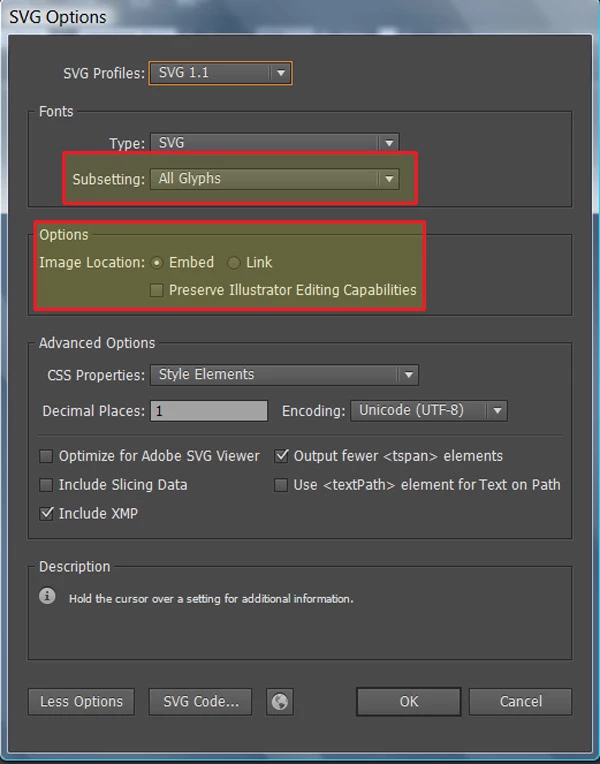
If it's still a vector graphic -- an .ai file (and let's hope so because jpg is no good for SVG), you want to open your image in Illustrator and Export to SVG.   See screenshot below for the setting I use.

This will produce an SVG image suitable for inserting into your DW document with the SRC tag.

As an example of the code I use in a Bootstrap layout with the img-responsive class (adjust the inline style height & width to suit.

<img class="img-responsive center-block" src="img/my-logo.svg" alt="my logo" style="height:50%; width:50%">

Nancy

4 replies

Known Participant
February 6, 2017

I'm back on task and REALLY appreciate the efforts of each of you in this thread. I've learned a LOT here. For the sake of my workflow and timeline, however, I need to ditch incorporating the SVG code for this logo and use an IMG tag instead. However, I'm wondering if you have a suggestion as to a file format that will render a crisp clear logo image. Encouraged by Nancy's post, I recreated the logo using a single tool - Illustrator which I should have been doing in the first place.  So now, in Illustrator I can save this logo in a variety of formats - my question now is this - Considering I will be using an IMG tag which file format from Illustrator will render the cleanest, crispest, result for my site? Thanks all!

Known Participant
February 6, 2017

And what resolution? 300? 72? It's got to load quickly, too, obviously.

Known Participant
February 6, 2017

Everyone in this thread deserve$ credit for being helpful.

Known Participant
February 4, 2017

I have recreated the logo using Illustrator, saved it as svg and got the following code. Not sure what to do with this, though.

From Illustrator:

<?xml version="1.0" encoding="utf-8"?>

<!-- Generator: Adobe Illustrator 21.0.2, SVG Export Plug-In . SVG Version: 6.00 Build 0)  -->

<svg version="1.1" id="Layer_1" xmlns="http://www.w3.org/2000/svg" xmlns:xlink="http://www.w3.org/1999/xlink" x="0px" y="0px"

  viewBox="0 0 1081.4 207.3" style="enable-background:new 0 0 1081.4 207.3;" xml:space="preserve">

<style type="text/css">

  .st0{fill-rule:evenodd;clip-rule:evenodd;fill:#21205F;}

  .st1{fill-rule:evenodd;clip-rule:evenodd;fill:#808080;}

  .st2{fill:#21205F;}

  .st3{font-family:'Copperplate';}

  .st4{font-size:70px;}

  .st5{font-size:105px;}

  .st6{fill:#666766;}

  .st7{font-family:'Copperplate-Bold';}

  .st8{font-size:30px;}

</style>

<path class="st0" d="M161.7,19.7H93.6H25.5v7.8c0,4.3,3.5,7.8,7.8,7.8h60.3H154c4.3,0,7.8-3.5,7.8-7.8V19.7z"/>

<path class="st1" d="M151.9,40.2H93.6H35.4c-2.8,0-5.1,2.3-5.1,5.1v0c0,2.8,2.3,5.1,5.1,5.1h58.3h58.3c2.8,0,5.1-2.3,5.1-5.1v0

  C157,42.5,154.7,40.2,151.9,40.2"/>

<polygon class="st1" points="10.9,6 93.6,6 176.3,6 176.3,14.5 93.6,14.5 10.9,14.5 "/>

<path class="st0" d="M40.7,56.4h106v70.2c-2.1,0.6-4.2,1.3-6.3,1.9c-3.4,1.1-6.8,2.1-10.3,3.3V79.1c0-4.2-3.4-7.6-7.6-7.6

  c-4.2,0-7.6,3.4-7.6,7.6V137c-4.6,1.7-9.2,3.4-13.7,5.2v-63c0-4.2-3.4-7.6-7.6-7.6s-7.6,3.4-7.6,7.6v69.2c-4.6,2-9.2,4-13.7,6.1

  V79.1c0-4.2-3.4-7.6-7.6-7.6c-4.2,0-7.6,3.4-7.6,7.6v82.7c-5.6,2.8-11.1,5.8-16.5,8.8V56.4z"/>

<path class="st1" d="M213.4,121.5C185.1,121.5,74,148.8,0,207.3c53.2-27,132.8-64.5,213.4-64.5C213.4,121.5,213.4,121.5,213.4,121.5

  "/>

<text transform="matrix(1 0 0 1 420.6504 54.2497)" class="st2 st3 st4">Law Office of</text>

<text transform="matrix(1 0 0 1 232.6504 142.6509)" class="st2 st3 st5">Jack W. Bolling</text>

<text transform="matrix(1 0 0 1 452.6504 194.6509)" class="st6 st7 st8">a professional corporation</text>

</svg>

Known Participant
February 4, 2017

That turned out to be too large, I resized and exported new code. Still working on it.

pziecina
Legend
February 3, 2017

To use an image with svg you would use, (no pun intender here) the <use> element with an xpath -

https://developer.mozilla.org/en/docs/Web/SVG/Element/use

You could also insert the image using the image tag, but this is best done once the image is converted to a base64 encoding format, though just using  a link inside the svg will work -

https://developer.mozilla.org/en-US/docs/Web/SVG/Element/image

Known Participant
February 3, 2017

neither of these solutions worked

Nancy OShea
Community Expert
Community Expert
February 3, 2017

What does "didn't work" mean exactly?   You couldn't export an SVG file directly from Illustrator? 

Nancy O'Shea— Product User & Community Expert
Nancy OShea
Community Expert
Nancy OSheaCommunity ExpertCorrect answer
Community Expert
February 3, 2017

Personally, I would not use Photoshop for SVGs.  I think Illustrator is a much better tool for this.

If it's still a vector graphic -- an .ai file (and let's hope so because jpg is no good for SVG), you want to open your image in Illustrator and Export to SVG.   See screenshot below for the setting I use.

This will produce an SVG image suitable for inserting into your DW document with the SRC tag.

As an example of the code I use in a Bootstrap layout with the img-responsive class (adjust the inline style height & width to suit.

<img class="img-responsive center-block" src="img/my-logo.svg" alt="my logo" style="height:50%; width:50%">

Nancy

Nancy O'Shea— Product User & Community Expert