creativedigitalnz
Known Participant
February 23, 2018
解決済み

Tag completion not working for new file extension (.twig)

  • February 23, 2018
  • 返信数 2.
  • 2258 ビュー

Hey folk,

I have recently added .twig to my list of file extensions Dreamweaver will open. Colour coding (kinda) and source format are working in code view, however tag completion is not. This is a bit of a pain as a lot of my .twig files are html heavy.

Anyone know a step I may have missed to activate tag completion? Tag completion is working for all other file extensions.

Thanks heaps!

Mike

このトピックへの返信は締め切られました。
解決に役立った回答 BenPleysier

I think that you will find that it is not only code colouring, the end result will be a total inclusion of TWIG files.

In the meantime, do the following:

  1. Launch Dw
  2. Open brackets.json from below path:
    Mac: located in ~username/Library/Application Support/Adobe/Dreamweaver CC 2017/en_us/Configuration/Brackets
    Win: located in ~username/AppData/Roaming/Adobe/Dreamweaver CC 2017/en_us/Configuration/Brackets
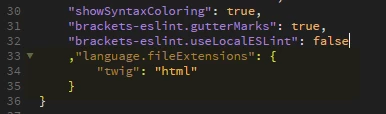
  3. Add below code at the end:
    ,"language.fileExtensions": {
         "twig": "html"
    }
  4. Save brackets.json and relaunch Dw

返信数 2

creativedigitalnz
Known Participant
February 23, 2018

Ok I've discovered a workaround. Changing TWIG to PHP in the bottom right menu allows me to use code completion. Would need to do everytime I open a template however.

Would still be interested in a fulltime fix.

BenPleysier
Community Expert
Community Expert
February 23, 2018

This feature request is already posted on dreamweaver user Voice.

Twig Code Coloring – Adobe Dreamweaver CC: Feature Ideas

Wappler is the DMXzone-made Dreamweaver replacement and includes the best of their powerful extensions, as well as much more!
creativedigitalnz
Known Participant
February 23, 2018

Code colouring... I'm after tag completion

BenPleysier
Community Expert
BenPleysierCommunity Expert解決!
Community Expert
February 23, 2018

I think that you will find that it is not only code colouring, the end result will be a total inclusion of TWIG files.

In the meantime, do the following:

  1. Launch Dw
  2. Open brackets.json from below path:
    Mac: located in ~username/Library/Application Support/Adobe/Dreamweaver CC 2017/en_us/Configuration/Brackets
    Win: located in ~username/AppData/Roaming/Adobe/Dreamweaver CC 2017/en_us/Configuration/Brackets
  3. Add below code at the end:
    ,"language.fileExtensions": {
         "twig": "html"
    }
  4. Save brackets.json and relaunch Dw

Wappler is the DMXzone-made Dreamweaver replacement and includes the best of their powerful extensions, as well as much more!