


- Home
- Exchange
- Discussions
- Re: Marketplace: Couldn't install plugin. Error co...
- Re: Marketplace: Couldn't install plugin. Error co...
Marketplace: Couldn't install plugin. Error code -9

Copy link to clipboard
Copied
Windows 10
Account: Creative Cloud All apps
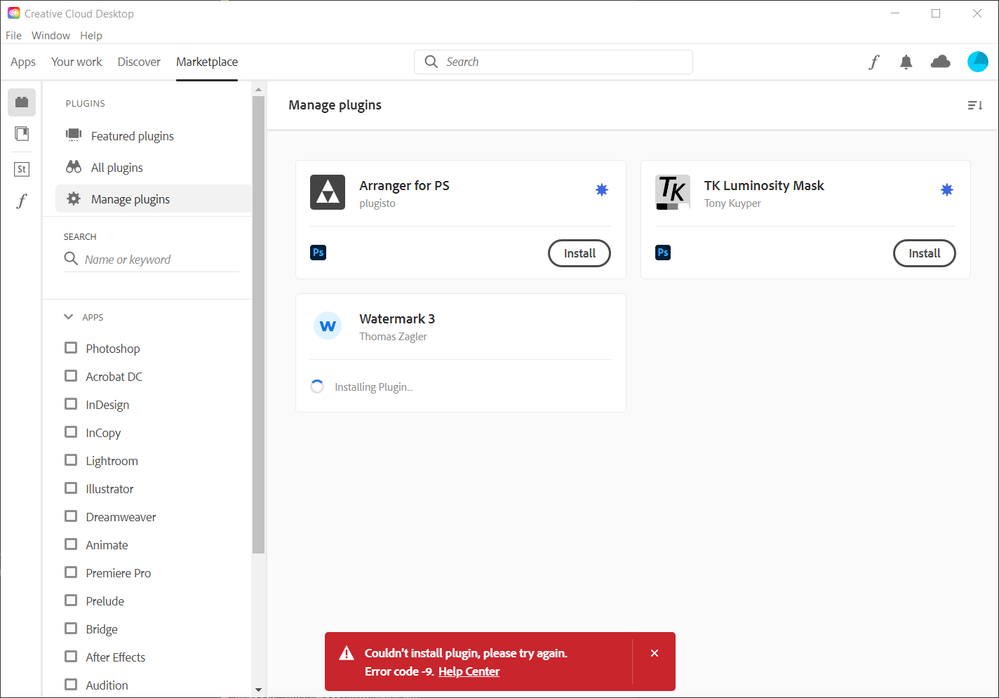
When using Creative Cloud Desktop > Marketplace > Manage plugins I try to install "Watermark 3" (as an example). I click on install and then have to agree with some things and click "ok". The install butoon turns to "Installing plugin" but nothing seems to happen. After a while I get an error and I have no idea how to fix it (I checked the help center for error -9). My internet is fine.


 7
Replies
7
7
Replies
7


Copy link to clipboard
Copied
there's a win 10 update bug (or incorrect setting) causing a lot of "no internet connection" errors while there is an active internet connection. see if it applies to you.
https://lifehacker.com/how-to-fix-windows-10s-latest-no-internet-connection-bu-1844458254 https://answers.microsoft.com/en-us/windows/forum/windows_10-networking/windows-10-says-i-have-no-in...
Copy link to clipboard
Copied
HKEY_LOCAL_MACHINE\SYSTEM\CurrentControlSet\Services\NlaSvc\Parameters\Internet
EnableActiveProbing was already set to 1
Copy link to clipboard
Copied
what ps version is installed?
Copy link to clipboard
Copied
Photoshop v 22.0.1
Copy link to clipboard
Copied
see if anything here helps, Troubleshoot Adobe Exchange for Creative Cloud
Copy link to clipboard
Copied
I can (sometimes) sideload the ZXP files but that's hardly a solution for a product I pay 60 euro's per month for.
Copy link to clipboard
Copied
So this is as far as support goes?


Get ready! An upgraded Adobe Community experience is coming in January.
Learn more
 AdChoices