


ActiveX in Windows 10

Copy link to clipboard
Copied
How can I turn off activeX in Windows 10?


 6
Replies
6
6
Replies
6


Copy link to clipboard
Copied
Hi tomm79013134
If you're using the Edge browser and want to turn off Flash Player, just do the following steps:
- Click the “…” button to access the Edge menu
- Select the “Settings” menu item
- Scroll down to the “Advanced Settings” section and click the “View Advanced settings button”
- Locate the “Use Adobe Flash Player” section and toggle the switch off to disable Adobe Flash Player
- Refresh your web page or open a new browser tab
Chris
Copy link to clipboard
Copied
Chris, thanks for your reply. I tried your fix but it doesn't work. I get
these results after pressing the test button.
Flash Player is integrated with Microsoft Edge in Windows 10.
You do not need to install Flash Player.
You aren’t running Microsoft Edge in Windows 10.
For other troubleshooting tips, see Flash Player Help
<http://helpx.adobe.com/flash-player.html>.
Either Flash Player is disabled or ActiveX Filter is ON.
Please follow trouble shooting steps to play Flash content.
On Mon, Aug 10, 2015 at 2:02 PM, chris.campbell <forums_noreply@adobe.com>
Copy link to clipboard
Copied
When you went to the page http://helpx.adobe.com/flash-player.html , did you click the "check now" button? What browser did this page tell you that you were running? Here's what I'm seeing:
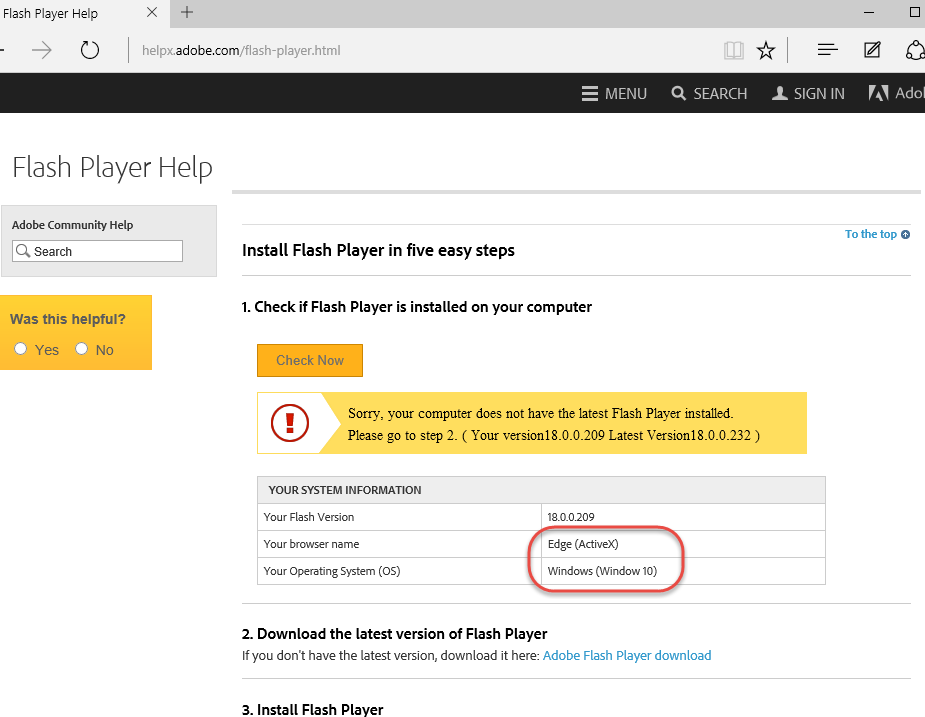
Copy link to clipboard
Copied
Chris, I clicked the "check now" button and got the same thing shown on
your link. The Microsoft tech tried for quite awhile to get it to work
then asked me to call Adobe. Besides this problem, I lost my ability to
log into my computer with the finger print scanner which Microsoft could
not fix either. I therefore decided to revert back to Windows 7 and got
both features back. I will wait a year or two before trying Windows 10
again on the assumption that both problems will eventually be corrected.
Thank you again for your help. You may see this problem come up again from
others. Have a nice day.
PS, the link I was trying unsuccessfully to reach was:
https://cogstatebriefbattery.cogstate.com/test/test.cfm?002&trialid=400291&ses=Follow%20Up%205&gender=female&hand=right&dob=1947&sub
On Tue, Aug 11, 2015 at 11:39 AM, chris.campbell <forums_noreply@adobe.com>
Copy link to clipboard
Copied
Do you recall if you tried to use Internet Explorer to see if Flash worked there before you reverted back to Win 7?
Thanks
Chris
Copy link to clipboard
Copied
Chris, I don't believe that I tried IE before reverting. Microsoft tech couldn't get it to work and asked me to call Adobe.

Get ready! An upgraded Adobe Community experience is coming in January.
Learn more
 AdChoices